InterBase Backup and Restore Software
InterBase backup is similar to Firebird backup, as InterBase and Firebird are derivatives of one product line by CodeGear. A rich history of development made it very popular all over the world, and that is why Handy Backup supports InterBase backup and restore.
 Download for Free
Version 8.5.3 , built on March 5, 2024. 116 MB
30-day full-featured trial period
InterBase Backup Highlights
Along with other powerful backup features, Handy Backup can perform InterBase backup and thereby protect it from accidental corruption or erasure. By using Handy Backup, you will gain the following features regarding InterBase database backup:
- Automated InterBase backups. The flexible scheduler lets you automate all backup operations including compression, encryption and saving Interbase backup files on a desired media.
- Full or partial database backup. Handy Backup allows backing up all InterBase tables, or any specific tables you need.
- Run as Windows service. With this feature enabled, you trigger the program on to launch on computer startup and run invisibly in the background, requiring no any action to start.
- Multi-threaded transfer engine. The programs advanced architecture allows executing InterBase backup tasks without affecting your systems performance.

Recommended Solution
$249 per license

Handy Backup Small Business
The complete solution for one server or top-level workstation, the Small Business edition can make perfect Interbase database backup and recovery!
How to Use Handy Backup as Interbase Backup Scheduler
To make an Interbase backup task, please follow the next simple instruction.
- Tune up an Interbase ODBC driver for working with Windows. This step is independent from Handy Backup itself. Please read the database, Windows and ODBC driver instructions to learn how to set up a driver properly.
- Open Handy Backup, create a new task and select a backup task on Step 1.
Note: You can turn on the advanced task wizard mode here, to access such additional functions as differential and mixed backup, versioned backup, time stamps and running other software utilities along with a task.
- Go to next step. On Step 2, select the Database plug-in from the Database group.
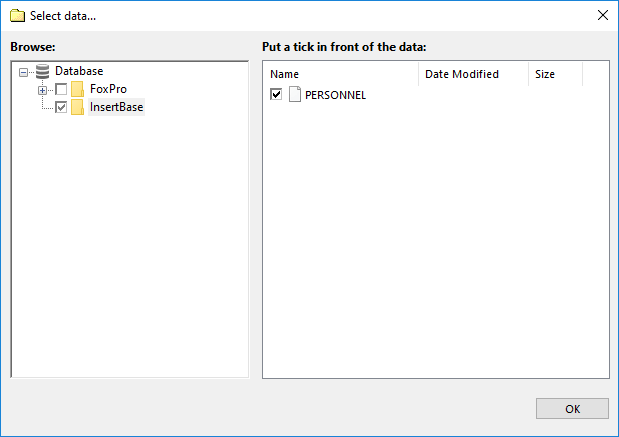
- Select Interbase, and mark the databases that you want to backup.
- Click OK, and then continue creating a backup task as described in the User Manual.
InterBase Recovery
To make an Interbase backup restore task, you can simple choose a corresponding backup task on the main window, right-click on its name and select “Restore” in a context menu. Nevertheless, for more complex activities (e.g., cloning Interbase backup files), let us create a recovery task.
- Open Handy Backup, call a new task wizard and choose recovery task on Step 1.
- Turn on advanced mode, for accessing to the option of changing recovery location.
- On Step 2, select your Interbase database backup storage and choose a file backup.hbi inside.
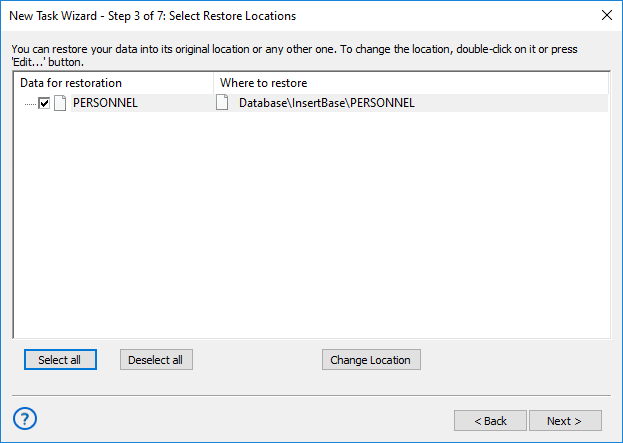
- Go to Step 3. Click onto the “Change location” button.
- Select a new destination (which can be either a different Interbase instance or another storage for Interbase backup files).
- Click OK, return to the task wizard and continue creating an Interbase recovery task as usual.
Benefits of InterBase Backup with Handy Backup
With using Handy Backup for InterBase backup you will benefit in a number of ways:
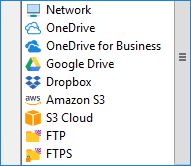
- A variety of storage media. Includes local drives, NAS, external USB disks, shared folders, FTP, SFTP, FTPS, private and commercial clouds etc.
- Backup to remote locations. Choose from backup to FTP and backup to SFTP options, or use our online backup service to maximize data safety.
- Little disk usage. The program itself is quite small and can use ZIP compression to minimize size and time of your Interbase database backup download.
- E-mail notifications. The program can automatically notify you about task status: completed, missed or stopped due to some error, as well as mail different reports to you.
Handy Backup also allows you to backup and restore different types of databases such as MS SQL, MySQL, PostgreSQL, Oracle, MS Access, DB2 and FoxPro.

For more information about functionality of Handy Backup, read the full list of backup features of InterBase backup software.
Download for Free
Version 8.5.3 , built on March 5, 2024. 116 MB
30-day full-featured trial period
Handy Backup is an unreplaceable instrument when it comes to InterBase backup!
See also: