Database Backup Software - Handy Backup
Database backup tool is essential for protecting critical data, as built-in system utilities may lack the reliability, flexibility, or automation required for professional use. Handy Backup fills these gaps by supporting both dedicated and generic databases, offering hot and cold backup options, and enabling partial backups. With automated scheduling, secure storage, and minimal downtime, it streamlines complex protection tasks while keeping your information safe and easily accessible.
 Download for Free
Version 8.7.0 , built on May 7, 2026. 152 MB




Reliable Database Backup Includes

Protection
Safeguard your critical information against hardware failures, or corruption, ensuring you can quickly recover and maintain business operations.

Continuity
Minimize downtime by having backups ready to restore, keeping your services and applications running smoothly even in unexpected situations.

Migration
Simplify moving databases between servers or environments and test updates, patches, or new features without risking production data.

Compliance
Maintain proper records and secure copies of your databases to meet regulatory requirements and demonstrate audit compliance effortlessly.
Best Practices for Database Backup

Scheduling and Automation
Set up automated backup to run consistently without manual intervention. Schedule backup tasks during off-peak hours to protect performance while keeping your data up to date.

Storage Strategies
Combine local, network, and cloud storage to balance speed, accessibility, and off-site redundancy. Protect data from physical damage while ensuring quick recovery when needed.

Security Options
Encrypt backups and manage access permissions to keep data safe. Only authorized personnel can restore or view sensitive information, ensuring protection even if a backup is intercepted.

Optimize Costs and Storage
Control licensing, monitor cloud archive expenses, and implement retention schemes to maximize storage efficiency and keep budgets predictable without compromising safety.

Maximize Performance
Use incremental backups and offload tasks to replicas or slave servers to reduce impact on production. Speed up both backup and restore operations while keeping your system stable.

Verify and Test Restores
Regularly test your backups. Automated restore tests and alerts help ensure that your backups are reliable, giving confidence that data can be fully restored when needed.
Advanced Features of Handy Backup

Take advantage of product maturity and support by relying on thorough documentation, an active community, and regular updates and bug fixes.
Automate your backups by scheduling tasks, chaining jobs, and using incremental or differential copies with encryption and compression.
Ensure full compatibility by performing hot backups without downtime, supporting transaction logs, and guaranteeing proper operation.
Strengthen security and compliance by encrypting data at rest and in transit, managing keys securely, and adhering to industry-specific regulations.
Validate backup reliability regularly by testing restores and receiving reports or notifications to confirm that every backup is fully recoverable.
Expand storage flexibility by backing up to local disks, NAS, cloud services like S3 or Glacier, and FTP/SFTP/FTPS.
Enable detailed logging and email notifications to track progress, errors, and failures for immediate response and quick issue resolution.
Implement off-site and 3-2-1 backup by keeping copies on different storage types and remote locations, while following clear retention policies.
Database Backup Software Testimonials

Good program, easy to use, powerful to backup databases and restore remote databases.
Linda Miller, System Administrator
In Handy Backup 8, the MSSQL backup plug-in allows me not only to copy and recover my database but also make clones in automated mode! This is a truly precious gift, as I can create a distributed network of MSSQL clones between our customers without additional effort.
Charles Brooks, System Administrator at Nortrope Chems, Inc., WA
Recommended Solution
Lifetime license

Handy Backup Small Business
To take full advantage of our database backup plug-ins, choose the Small Business edition. It comes with all essential plug-ins and storage options, designed specifically to protect and automate your small business server backups with ease.
Supported Databases

Back up MySQL databases and tables by generating readable SQL command sets, allowing quick and accurate restoration of original datasets.

Perform full backups of Microsoft SQL Server, including tables, SPFILE, and Controlfile, ensuring compatibility with all versions (2022, 2025, and earlier).

Back up PostgreSQL dbs, tables, and schemas, supporting both local and distributed environments for reliable restoration.

Leverage RMAN to back up Oracle natively, fully compatible with Oracle APIs, ensuring safe and complete data restoration.

Create and restore sequences of MariaDB SQL operations, supporting multiple engines, similar to MySQL for efficient table recovery.

Use the DB2 plug-in to create hot and cold snapshots, restore data, and replicate databases in full native API mode for maximum reliability.

Back up IBM Notes (Lotus Notes/Domino) files and tables to ensure secure, fast access and reliable restoration of dbs snapshots.

Easily back up Cacti using Handy Backup's MySQL plug-in for efficient and automated data protection.
Generic ODBC Database Backup
Use the versatile ODBC backup plug-in to secure SQL and non-SQL databases across multiple DBMS platforms:
- Sybase backup – preserving SAP structures locally or on a server.
- Firebird Backup – safeguarding Firebird datasets efficiently.
- FoxPro Backup – saving table content from this widely used desktop DBMS.
- MS Access backup – capturing snapshots of Microsoft Office data securely.
Hot & Cold Database Backups
Hot Backup
Perform hot (online) backups while the database remains fully operational, capturing all active transactions without interrupting user access. Handy Backup ensures transactional integrity, preventing data corruption even when tables are in use, making it ideal for mission-critical systems that cannot afford downtime.

Cold Backup
Cold (offline) backups are executed when the database is shut down, creating a fully consistent snapshot of all data files and configurations. Handy Backup handles this process efficiently, allowing you to restore the database to its exact state at the time of backup, ensuring complete data accuracy and reliability.

Types of Database Backups
Database backups can be performed in several ways, each balancing speed, storage efficiency, and recovery complexity differently depending on your data protection strategy.

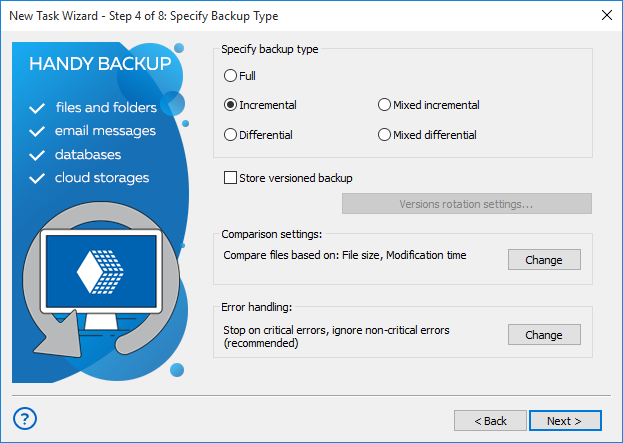
Full backup makes a complete copy of all data. It’s reliable and easy to restore but takes the most time and storage, so it’s done less often.
Incremental backup stores changes since the last backup of any type. However, recovery takes longer because every backup in the chain is needed.
Differential backup saves only changes made since the last full backup. You only need two files to restore, the full backup and the latest differential.
Database Backup Use Cases
Database backups are essential in practical scenarios where maintaining data integrity, availability, and compliance is critical. Companies use backups not only as insurance but also as tools for operational continuity, testing, migration, and legal compliance.

Business continuity and disaster recovery: A retail chain backs up its sales db nightly. When a server fails during peak holiday sales, the IT team restores it quickly, preventing lost transactions and minimizing downtime.

Development and testing environments: A software company clones its production database to a separate test server. Developers test new features and bug fixes on real data without affecting the live environment or risking user data.

Server migration and upgrades: A hospital moves patient records from an older SQL Server to a new version. Using backups, the IT staff ensures all data is transferred accurately, avoiding data loss or downtime during the migration.

Regulatory compliance: A financial firm maintains daily backups of client transactions. These backups provide auditable records for regulatory authorities, helping the company meet legal and industry requirements.
Licensing Information
Handy Backup offers two business-level editions, both including a full set of database backup plug-ins and additional features. For database backup solutions, choose either the Small Business or Server Network edition. A free 30-day trial is available.
Recommended Solution
Lifetime license

Handy Backup Server Network
Manage and protect all servers and workstations across your network from a single, centralized console with the Server Network edition — a complete, automated solution for seamless network-wide backup.
How to Use Database Backup Tool
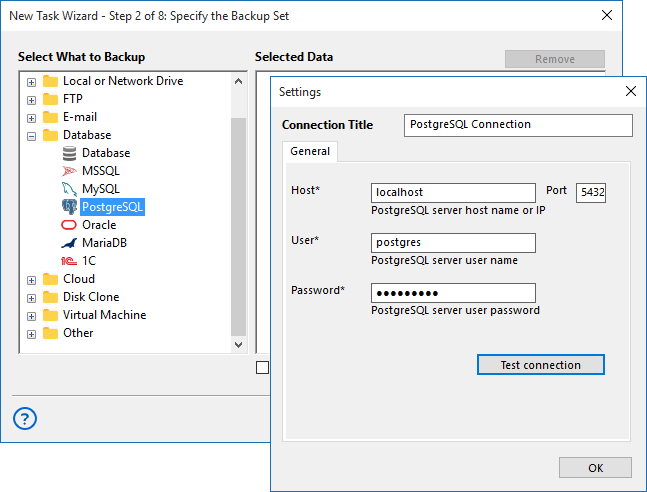
Here’s a practical example using PostgreSQL to illustrate how to set up automated database backups. The steps are similar for most database systems.
- Create a new backup task in Handy Backup and select PostgreSQL from the database group.
- Set up a new connection or select an existing one, then choose the tables or schemas to back up.
- Select the storage location and backup type (full or differential), and configure versioning or timestamps if needed.
- Finalize the task settings and schedule automatic execution at desired intervals.
Note: Ensure you have sufficient privileges to run SELECT statements required for creating the backup.
Video Demonstration of Database Backup
In this video, watch a best-practice PostgreSQL backup using the PostgreSQL plug-in. Follow a clear, step-by-step demo of saving and restoring tables while we showcase Handy Backup’s full feature set — from transactional consistency to fast recovery.
Handy Backup for Hosting Providers
We welcome partnerships with companies across the IT industry — including OEMs, service providers, and system integrators. Many web hosting providers already rely on Handy Backup to protect and automate database backups for their clients.
If you’re interested in joining our partner network or exploring collaboration opportunities, please visit the Partners section.
Download for Free
Version 8.7.0 , built on May 7, 2026. 152 MB
Experience the reliability and flexibility of one of the best database backup solutions. Handy Backup ensures consistent protection, effortless automation, and quick recovery of your critical data, whenever you need it.
FAQ
What criteria should be considered when choosing database backup software?
Key factors include automation, support for incremental and differential backups, encryption, compression, and a reliable scheduling system. Flexibility in storage options, compatibility with various DBMS, and the ability to perform hot backup without downtime are also important. Handy Backup meets these criteria with automated tasks, incremental/differential backups, encryption, compression, broad DBMS support, hot backup capabilities, and flexible storage options.
How can the reliability of database backups be ensured?
To ensure backup reliability, it is important to regularly test restores and verify the integrity of saved data. Monitoring and notifications help detect errors or failed backup tasks early. Handy Backup allows scheduled integrity checks, automated restore tests, and detailed reporting, ensuring that every backup is fully recoverable and consistent, even after unexpected issues.
What are best practices for storage strategies in database backup?
Effective storage strategies combine local and remote options, such as NAS, cloud services, and FTP/SFTP. The 3-2-1 rule is widely recommended: maintain three copies of data on two different media, with one copy off-site. Handy Backup fully supports these approaches, including local disks, NAS, and cloud storage like S3 and Glacier, making it easy to implement a robust 3-2-1 backup strategy.
See Also:
Cnet Editor’s Rating:

Outstanding