Lotus Notes | IBM Domino Backup Solutions
Lotus Notes backup is crucial for companies leveraging IBM Lotus products for messaging, browsing, collaboration, and more.
The Lotus software features a schema-less, document-based, partially structured database, along with robust support for rich content, powerful indexing facilities, and pre-built applications like email and calendar. Additionally, it offers a cross-platform distributed database/messaging framework and an application development environment.
Furthermore, to ensure seamless data protection and continuity, companies can explore the option of downloading a free trial version of a comprehensive Lotus database backup solution.
 Download for Free
Version 8.6.8 , built on Fabruary 13, 2026. 152 MB
30-day full-featured trial period

Best Practices for IBM Lotus and Domino Backup

Due to the highly intricate software design of this platform, traditional file-based backup methods are insufficient for backing up the data. To backup Lotus Domino server and data, specialized software such as Handy Backup is required.
Lotus Notes Backup Software
Compared to other types of data, databases and email clients pose the greatest challenge in terms of backup and recovery because they contain vast amounts of crucial data.

Lotus Notes handles various types of data (emails, calendars, shared documents, etc.), and IBM Notes backup may encompass an entire database or specific items, such as emails only.
Note! Handy Backup enables comprehensive backup of Lotus databases, as well as targeted backup of IMB Notes mail, calendars, or other components. Our utility is certified with the Ready for IBM Lotus Software logo, ensuring error-free backups.
Recommended Solution
$249 per license

Handy Backup Small Business
To initiate Lotus database backup, consider utilizing the Small Business software edition, which offers database backup consistency and a complete array of storage plug-ins tailored for IBM Domino backup.
Advantages of Backing up Lotus Domino Server or Lotus Notes with Handy Backup

Automation of Lotus Backup
Handy Backup offers a robust scheduler, enabling the automation of backups and related procedures, including compression, encryption, transferring backup to FTP servers, or to cloud storage, and more. Once you establish a schedule, the program will automatically backup Lotus data.

Dependable Backup Solution for Lotus Domino and IBM Notes Data
You have the flexibility to opt for backing up the entire Lotus database or select specific components like email messages, calendars, notes, and beyond. This approach helps conserve storage space by backing up only essential data.

Easy restoration
With Handy Backup, you can restore the entire Lotus database with just a few mouse clicks. The application's user-friendly interface offers a seamless and easy-to-understand method for restoring backed-up data, ensuring 24/7 stability and business continuity.
Backup Lotus Notes and Domino with Handy Backup
To back up Lotus Notes/Domino with Handy Backup, simply select the respective item in the menu, and the program will automatically locate all necessary data and add it to the task. It's important to activate the Lotus Notes database first to make its plug-in available for operations.
Preparing Lotus Domino for Backup
You can choose to back up the entire Lotus database or specific components, such as email messages, calendars, notes, and more. Save storage space by backing up only what you really require!
- Open the "System" section in the Windows Control Panel.
- Click on the "Advanced settings" option within the "Settings" section.
- Access the list of environment variables in the environment dialog window.
- If the PATH does not include directories for Lotus, append the paths to these directories to the list.
- Once done, click OK and restart Windows for the changes to take effect.
Important Note: You will not find the Lotus Notes/Domino plug-in in the list of active plug-ins until you complete the described sequence!
Using the Lotus Domino Backup Software Plug-in
To create a backup, follow these steps:
- Begin by creating a new task and selecting a backup task on Step 1.
- In Step 2, navigate to the Database group and click on the Lotus Notes option.
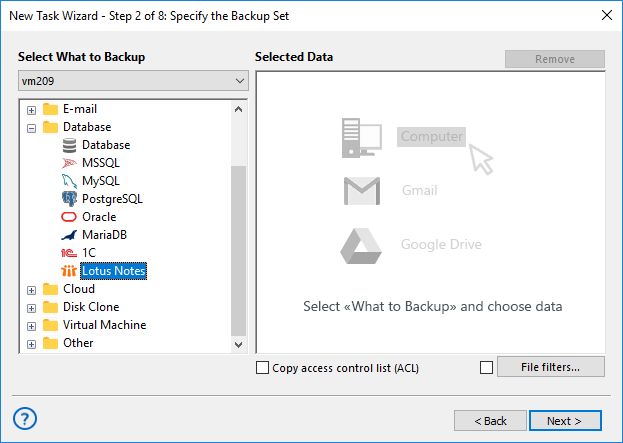
- Choose the folders for Lotus Notes or IBM Domino backup. You can either select all folders or choose specific subfolders as a backup dataset. Once you're done, click OK.
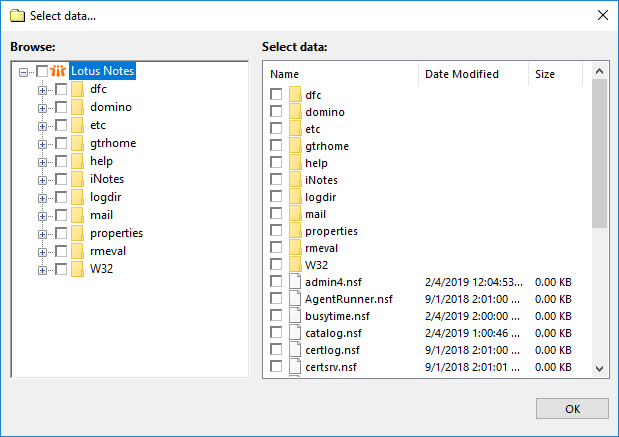
- Proceed with creating your backup task as usual, following the guidelines outlined in the User Manual.
Note: By default, Handy Backup utilizes the Domino VSS backup technique, allowing for hot backups of opened databases. To perform a cold backup, you can either manually stop the Domino server or use the advanced task wizard mode. In Step 7 of the wizard, add commands to stop and restart the server before and after the task.
Download for Free
Version 8.6.8 , built on Fabruary 13, 2026. 152 MB
30-day full-featured trial period
Regularly back up Lotus Notes with Handy Backup to prevent loss of critical data!
Related to Lotus Notes Backup: