Backup to iBackup Web Space
To understand backup needs, the business requirements that drive them need to be understood. With Handy Backup enjoy automated cloud-based backups and easily restore your site with 1-click. Backing up your website is now simple and easy.
 Download for Free
Version 8.5.3 , built on March 5, 2024. 116 MB
30-day full-featured trial period
How to backup to iBackup
To backup your files to iBackup service:
- Download and install Handy Backup
- Go to www.ibackup.com and register for an iBackup account
- Set up your account with your username and password
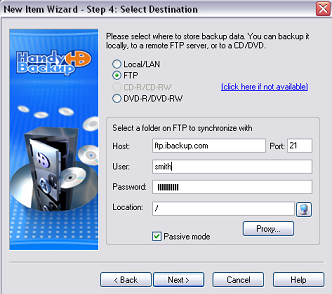
- Open your Handy Backup and set up your FTP access
- Your host is ftp.ibackup.com; username and password, you received in registration
- Now, configure a directory through which you will backup your files, and Handy Backup will immediately backup your database to your iBackup account
What does iBackup have to offer?
- Free 15-day trial of 5GB web space
- Economy Rates offered for people with standard requirements
- With the smallest web space running about 500MB, this is more suited for companies than end users
See also Web Hosting Services for backups and synchronizes data
You can download Handy Backup for backing up to iBackup, or back up to our company’s online storage. Novosoft Online Backup Service features multiple advanced functions:
- You can try Handy Backup Online 5 GB account for 10 days for free.
- Our Data Center is located in professional secured underground shelter in USA.
- Handy Backup Online servers are protected against fire, flood or burglary.
- More than 50 high-quality certified engineers monitor servers work 24x7x365.
- Handy Backup Online servers have 150 kVa Uninterruptible Power Supply and strong power grid.
- You access to your necessary files 99.9% uptime and you can work with program very fast and convenient.
Video Example
Learn how to backup a website with Handy Backup, step by step.
Note: Instructions in this video suggest that you already have Handy Backup installed on your computer. If you still haven’t done so, don’t hesitate to download it.
Download for Free
Version 8.5.3 , built on March 5, 2024. 116 MB
30-day full-featured trial period
See also Web Hosting Services for backups and synchronizes data:
⇒ Linode Backup & Restore: Tools of Linode Web Hosting Backup
⇒ JustHost Backup via External or Internal Solution
What to Back Up
My Documents backup - one click backup of the My documents folder including pics, videos, music, text files
Website backup - most reliable solution to protect your business web representation
Disk Image Backup - back up your hard drive by creating a hard drive image and saving it to the storage medium
MySQL backup - simple, comprehensive backup of the MySQL database tables
Data Backup Software - discover database backup solutions supporting various database management systems, including MySQL, MS SQL Server, and others.
Where to Back Up
Backup to DVD-R - record your backups to DVD-R with our in-built DVD burning tool
Backup to CD-R - record your backups to CD-R using data encryption and compression with one click
Backup USB - back up your data to any USB connected device such as USB flash key
Backup to FTP - transfer your backups to remote FTP server for more data security
Backup from FTP - back up data stored on a remote FTP server to your local computer or any removable storage medium
How to Back Up
Backup with ZIP compression - backup with 10 levels of Zip compression saves storage space
DVD backup verification - makes sure your data are restorable from DVD copy you made
Synchronizing files and folders - one click synchronization of files and folders across multiple locations including remote FTP servers