Automatic Backup from FTP
Backup from FTP is an operation of saving crucial data from an FTP server to some other storage, located either offline (local) or offsite backup (remote).
Handy Backup allows making any backup using FTP as a source or storage for data of any type. Encrypt and compress FTP backups on the fly, automate your FTP backup task with Handy Backup, and more.
 Download for Free
Version 8.7.3, built on August 11, 2026. 152 MB
30-day full-featured trial period

Advantages of Backup from FTP Server with Handy Backup

Internal FTP Client
Due to built-in the FTP Backup software plug-in (as well as advanced SFTP, FTPS plug-ins in higher editions of Handy Backup), you can make backup from FTP without using external connection utilities such as FileZilla.

Built-in Scheduler
Make your task for backup using FTP automatic, by setting up starting time and a repeating period from a minute to a couple of months. Alternatively, trigger your task by system events in advanced mode!

Overall Security
Encrypt and compress your backup from FTP on the fly, protecting both data consistency and storage space if you need it. Use versioned backups, time stamps and secure data storage where you want!
Where to Backup from FTP?
Handy Backup supports many storage types for backup using FTP as a source, including:
- Local, external (USB) and mapped network drives;
- Shared network storage folders, data servers and NAS units;
- Other FTP, SFTP and FTPS servers;
- Commercial and private networks supporting S3 and WebDAV data protocols;
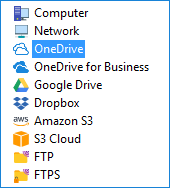
- Popular clouds such as Dropbox, Amazon S3, Box, OneDrive and Google Drive.
Review About FTP Backup by Handy Backup
Recommended Solution
Lifetime license

Handy Backup Standard
Even the simplest and most affordable Standard edition allows backup from FTP to most typical modern storage. Save your data with minimal efforts!
How to Backup from FTP Server with Handy Backup?
This is a quite simple task due to both an internal FTP backup plug-in and a comprehensible GUI. Open Handy Backup, create a new task and select "Backup" on Step 1. Then follow the next instruction.
- On Step 2, click on "FTP" plug-in name in the "FTP" group on the left panel.
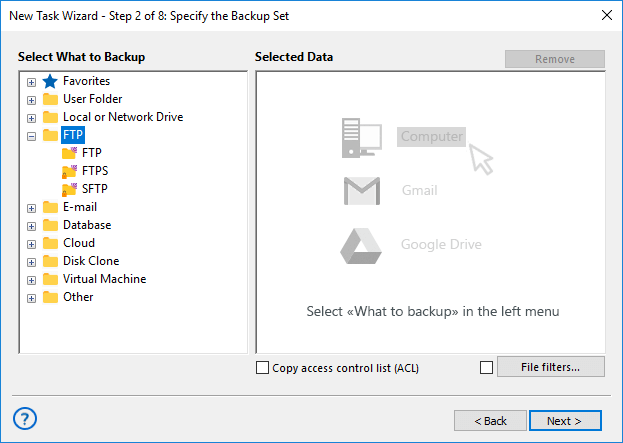
- Click onto "Create a connection". You will see a new FTP configuration dialog.
- Enter a configuration name that you want, and all necessary FTP parameters.
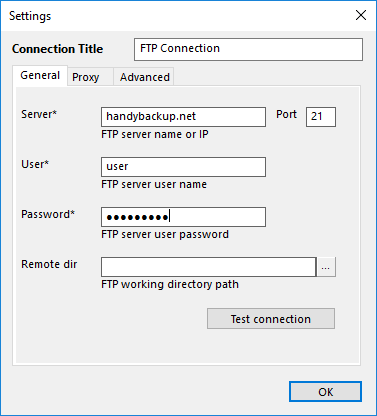
Note: These are many parameters to establish a typical FTP connection. To set up these parameters correctly, please get this information somehow and then fill it in the connection dialog, according to User Manual references.
- When entering all connection parameters, click OK.
- Select a name of your new FTP connection and enter onto a server.
- Here, mark all data to backup with checkboxes. Click OK.
- Continue creating a task as described in the User Manual.
That is all! After you complete task creation, this task will backup from FTP automatically, according to your settings and scheduling sequence.
Data Types to Backup Using FTP
FTP servers are common data storage, which can keep any data types processed by Handy Backup, from disk image backups to database to some uncommon file types such as Windows registry. Examples of these features include:
- Email backups, including MS Exchange and Gmail backup;
- User folders and Windows libraries, e.g., My Documents backup;
- Different desktop backup data: projects, photos, music libraries etc.
- Server-level backup data, including databases, virtual machines, website content, and data center backup.
- You can learn much more about Handy Backup features.
 Download for Free
Version 8.7.3, built on August 11, 2026. 152 MB
30-day full-featured trial period
Handy Backup is an excellent and easy-to-use data backup solution! Try to backup from FTP server with any edition of Handy Backup! 30-day free trial with all functions!
"I make an everyday backup from FTP server to my portable drive, to get a fresh copy of my work files. The option of taking a backup when plugging a USB disk to a laptop is amazing! Really, no one extra move to save all you want!"
J. K. Barrens, a product manager