Photo Backup Software - Save Pictures Online or to PC Automatically
Handy Backup is the automatic photo backup software for PC that saves pictures online or to a local storage. Lot of advanced settings help you to save your images safe and secure. Handy Backup provides fast and effective the My Pictures folder backups that allows you to use a variety of restore scenarios.
 Download for Free
Version 8.7.0 , built on May 7, 2026. 152 MB

Key Advantages of Photo Backup with HandyBackup

All Tricks in Six Clicks
Fast, convenient, easy to use – this is about Handy Backup. The clear and intuitive graphical user interface allows you to back up photos in six clicks. You select the My Picture, click OK and Handy Backup automatically includes the folder in the backup.

Copy and Use Your Backed up Photos without Recovery Procedures
Unless you use data encryption, Handy Backup will always take photo backup in native formats that allows you to store JPEG or GIF files in source format “as is”. You can browse, use or edit backup file contents with no recovery. Photo backup folders maintain timestamps.

Automatic Backup Photos and Advanced Backup Settings
You can schedule the backup task to run automatically without user intervention. The Photo Backup Software Setting allows defining the job schedule and starts the backup task at specific time daily, on defined weekdays or with specific periodicity. Handy Backup provides full, incremental and differential backup.
Note: You can also set up Photoshop auto backup to effortlessly safeguard your photos, settings, and other essential files from this iconic graphic design tool.
Storage Integration List
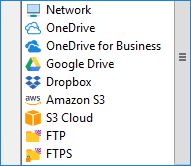
You can choose to back up data to HDD, external devices, NAS, FTP and different cloud services: OneDrive, Dropbox, Amazon S3, Box. The cloud backup solutions copy the data to cloud storage servers elsewhere. It helps you to keep data safe and to minimize the threat of physical disasters.
Tip: Nowadays, the best photo storage cloud services offer great features and storage tools and let you store the My Pictures folder securely. For example, you can share Google Drive content with other users and retrieve the data as often as you would like.
Customers About Photo Backup by HandyBackup
Recommended Solution
Lifetime license

Home Backup Solution
Handy Backup Standard for home PC contains features and plug-ins to automatic backup pictures to cloud, local drive or a home server.
Non-Photo Pictures Backup
Diagrams, vector graphics, Photoshop project files, layers and textures can be copied by Handy Backup. There are features to cloud and local backup photos. File masks with different file extensions – PNG or JPEG – help to work with common image file formats.
The Best Way to Backup Photos
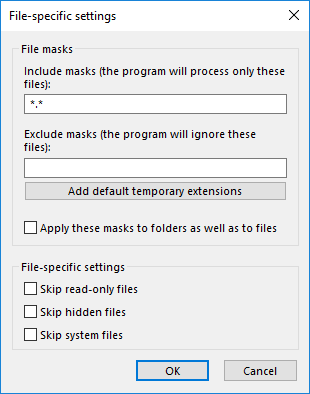
Turn a task wizard to advanced mode on Step 1, and then set up a file extension mask for file name on Step 2. Use the Computer (or other data source) to access picture storage. Handy Backup will find files with these extensions, and then auto backup photos to a chosen destination.
To run the backup job on a regular basis by photo backup software is an important step of backup strategy. Avoid the thought “It will never happen to me”. However, hard drives wear out and HDD failure occurs over time that causes costly data loss. Backup photos are the foundation of data protection, recovery, retention, and availability. You reduce the risk to data and save time on disaster recovery due to cyber threats.
How to Backup Photos in My Pictures Folder
Read a User Guide to create backup tasks and back up the My Pictures folder on the other place. The User Manual includes step-by-step instructions. Follow guidelines to help you create backup tasks.
Open Handy Backup and click on the button control panel Create.
- On Step 1, select Backup, then choose Use Advanced Wizard and click Next.
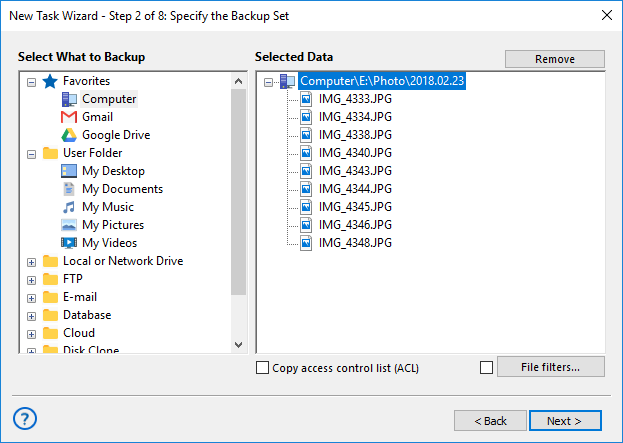
- On Step 2, in the field on the left, click My Pictures.
- In the Select data field, select files check boxes to specify files for the backup job.
- Click OK, and then click Next to go to Step 3.
Tip: You can use an option Computer in the Local or Network Folder field. The option allows saving different types of files and folders. You can use filters to define photos that you include in the backup.
- On Step 3, select a backup destination. You can store backup files in one of the locations Click the location where you want to back up your data.
Note: The program can ask about connection to some external resource (for example FTP or cloud). Click Create a connection and enter account data in the next window (or windows) to use selected storage. There is no configure local drive.
- Specify a path to the folder where backup files must be saved, click OK and then click Next.
- On Step 6, schedule the job to run the automatic photo backup job.
- Click Next. In the end, enter a name for the backup task. Click Finish.
Photo backup task will be created. You can run the backup job manually or schedule the job by the task properties dialogue box. Automatic My Pictures library backup will complete. Download the best free photo backup software for PC on a 30 day trial now.
Frequently Asked Questions About Photo Backup Software
- What is the best photography backup solution for PC users?
A reliable photography backup solution for PC should include automatic scheduling, support for different photo formats, options to save data both locally and to the cloud, and simple access to your files without complicated recovery steps. Handy Backup is one of the best photo backup software tools available. It offers all these features in a clear and easy-to-use interface, making it a great choice for photographers and everyday users alike.
- What is the best way to backup photos online?
Online photo backup means storing your pictures securely in the cloud, protecting them from hardware damage and giving you access from anywhere. It also makes it easier to share, organize, and manage your photo collection over time. A photo backup application like Handy Backup lets you send copies of your photos directly to services like Dropbox, OneDrive, or Amazon S3 — with full control over how and when your files are saved.
- How to backup images automatically on my computer?
Automation is essential for regularly backing up large photo collections, not only for professional photographers but also for hobbyists, content creators, and anyone who values their images. Handy Backup, a trusted photo backup software, makes this easy by allowing you to schedule backups by day and time. It also supports running custom scripts or applications before and after the backup task, giving you greater flexibility and ensuring your photos are safely stored without manual effort.
Video Tutorial: How to Back up My Pictures
In the video, we show how to create a photo advanced backup task by Handy Backup. We copy PNG digital picture files to Microsoft OneDrive. You can use other formats and storages. Video shows a cycle of advanced task wizard creation.
Video explains how to set up file filters on Step 2 to automatically define file extension, how to connect to OneDrive storage, and other steps of a backup task wizard.
Note: You can stay in a simple backup task wizard mode to create a common photo backup task. You can copy photos the same way from everywhere by using the option Computer.
Download for Free
Version 8.7.0 , built on May 7, 2026. 152 MB
Experience our convenient photo backup software by downloading a 30-day free trial version of Handy Backup!
"I always backup photos to OneDrive with Handy Backup instead of a built-in sync. It is great, with its automation and scheduling functions! This software helps me securing my photo backup collection on both a cloud and an external USB media drive."
Justin O’Hare, a still-life photographer
"I′ve used several photo backup solutions over the years, and Handy Backup is by far the best of them all. I′m a photographer, so it′s vital that I back up all my pictures. I can′t take a chance on losing any of them I like Handy Backup because it gives me the option of backing up uncompressed files and I can actually see my pictures in the backup. It′s also very flexible."
Chandra Clint, a wedding photographer and video maker