Cloud Based Backup Services
Windows server cloud backup is a contemporary way of keeping data for companies and individual users, providing data storage and restoring the information. Handy Backup is a cloud backup software that supports Windows server cloud backup.
Cloud Server Solutions for Enterprise Cloud Backup

Google Drive Backup
Google Drive is an intrinsic part of everyday work tasks with multiple advantages for data processing. It is probably one of the most popular cloud server backup solutions, storing data to an extended cloud with a reasonable price.
- Google Drive plug-in connects Handy Backup to Google Drive by its own API to manage data exchange with this cloud backup server.
OneDrive Backup
OneDrive is a windows cloud backup server, an affordable, safe, fast and capable method of storing data - from common files to big data arrays and images.
- The Handy Backup OneDrive plug-in is based on the API for this cloud server solution.

Dropbox Backup
Dropbox, a data-sharing and cloud storage solution, can comprise and synchronize hundreds of files and folders. It provides file-storing and cloud backup services to individual users and business owners, and has utilities to store and share files.
- For Handy Backup, the API-driven Dropbox plug-in manages all cloud server backup operations related to Dropbox.
Other Popular Cloud Backup Service
Handy Backup comprises some other plug-ins for accessing many other cloud servers. The list of these plug-ins includes Box, 4shared, Xref for AutoCAD, BackBlaze and some other cloud server backup solutions.
- Handy Backup continually has new supported clouds. You can find the upgrades (free for owners!) for new cloud server backup plug-ins!
Recommended Solution
Lifetime license

Handy Backup Small Business
The Small Business edition has a capability to use any available cloud server just off the shelf!
Dedicated Cloud Based Backup Services
Amazon S3 Backup
Amazon S3 provides a backup cloud server for enterprise-level data with both high security via the cloud API and a good productivity of big datasets.
- Handy Backup provides the Amazon S3 plug-in, allowing you to access your accounts (buckets) on this cloud server with extended authorization via the AWS4 protocol. Our S3 backup software gives you effortless, automated, and fully secure cloud backups, saving time and protecting critical business data.
Alibaba Cloud backup
With Handy Backup for alibaba cloud service, you can store in safety any private and complex information. Backup capabilities include: backup scheduling, backup encryption, backup with zip compression, advanced mode, file filters, backup reports,event logging etc. Alibaba cloud backup provides additional data protection with built-in Handy Backup tools as internal data compression and encryption.

 Download for Free
Version 8.6.8 , built on Fabruary 13, 2026. 152 MB
30-day full-featured trial period
Other Private and Commercial Cloud Backup Servers
You can also arrange windows server backup to a cloud of any type, from a local cloud server to an enterprise-level private service or cloud backup solution that does not yet have its own plug-in in Handy Backup. All you need is to have a WebDAV interface or bridge for that cloud, or the S3 protocol for data transfer between a cloud and other devices.
- The WebDAV multi-cloud plug-in manages all operations when you backup to cloud using the WebDAV protocol, as the S3 Cloud plug-in supports S3 connections, such as Wasabi backup, IBM Cloud Backup etc.
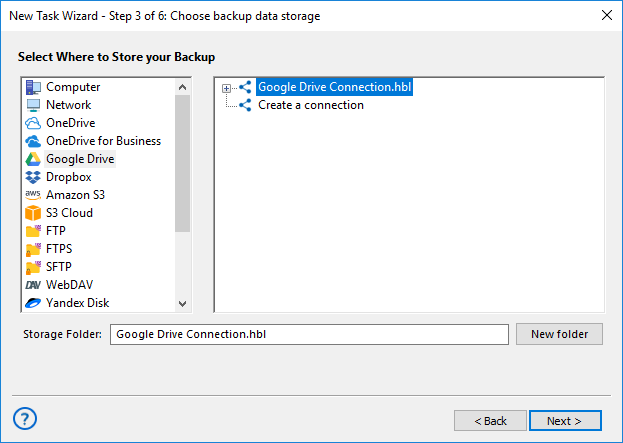
Note: When using any cloud plug-in as a backup source on the Step 2 of a task wizard, you can locate any cloud plug-in in the "Cloud" section on the left panel. When making backup to cloud, you can select each available cloud server plug-in from the open list on the Step 3.
Recommended Solution
Lifetime license
Handy Backup Server Network
The Server Network edition can organize centralized backup and restoration for a local network of any complexity, including managing data in any enterprise cloud backup tasks!
Other Advantages of Handy Backup
Together with the plethora of cloud server backup services, Handy Backup has some other compelling features:
- Keeping data in native formats, allowing browsing, viewing or even modifying files just from a cloud server, without restoring;
- Data encryption and compression options, built into the program, to enhance protection and wholeness of an archive;
- Scheduling tasks to run at an exact time, with a period from a minute to some months, or by some system event;
- Partition backup options (incremental, differential and mixed backup) to reduce the size of data archive for keeping on a cloud server backup.
- "Hot" backup for most data types available;
 Download for Free
Version 8.6.8 , built on Fabruary 13, 2026. 152 MB
30-day full-featured trial period
Try Handy Backup as your reliable software for backup to a cloud server! Download and install the free 30-day trial version of Handy Backup with all cloud server plug-ins and program features available for you!