Auto Backup Software for External Hard Drive
Automate external hard drive backups with Handy Backup on your Windows PC. Run backup tasks on a flexible schedule or have them start automatically the moment the drive is connected. Use our easy-to-use external HDD backup software to store important data wherever you prefer — locally, to other attached storage, network locations, or cloud, and restore them without specialized tools.
 Download Trial
Version 8.7.3, built on August 11, 2026. 152 MB
30-day full-featured trial period

Best External Hard Drive for PC Backup
Currently, all methods of backing up to an external hard drive showcase consistent reliability, irrespective of the manufacturer or the use of HDD or SSD for data storage. Whether you choose products from Western Digital, Toshiba, or any alternative supplier, Handy Backup remains a trustworthy external backup software solution for your external backup needs. The software seamlessly employs standard Windows drivers, ensuring a trouble-free USB drive backup.

Automatic Backup on USB Drive Upon Connection
Configure backup tasks to initiate automatically when you plug the specified device into any USB slot on your PC, regardless of the specific slot used.

Preserving Backups in Native Data Formats
Utilize backup information without restoration, as the program stores data on external storage in native formats, enabling direct use of this data from backups.

Backup Compression and Encryption
Benefit from options for compressing backup data to optimize storage space and encryption for the highest level of data security, featuring military-grade protection.

Backup Scheduling
Schedule your external drive backups to occur regularly, based on time or system event schedules. Additionally, establish a "silent" work mode by initiating the task as a Windows service.
External Hard Drive Backup Software Reviews
Recommended Solution
Lifetime license

Home Office Backup Software
Even the most basic version of Handy Backup functions as best backup software for external hard drive! Its user-friendly interface ensures a smooth, secure backup process, safeguarding your critical files with ease. For more advanced backup tasks, such as HDD image backup, the Professional edition is required..
Initiating Automatic Backup Tasks upon USB Drive Connection
Handy Backup exemplifies the best external hard drive for PC backup. It boasts a highly beneficial feature that automatically starts a backup task when a user plugs the designated USB backup drive into a PC.

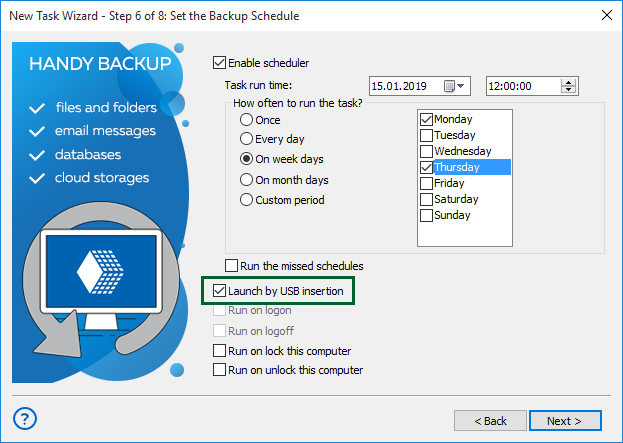
Whenever you connect your external hard disk to a USB port, the task associated with this device will commence as per the scheduled action. The program can remember the USB backup device you use for a task, identifying it regardless of the specific drive letter or USB port.
How to Back up Files to an External Hard Drive
When it comes to backing up files to external hard drives, Handy Backup prioritizes user convenience. If you are backing up common data types such as documents, images, or videos, there are pre-configured backup presets that streamline the process with just a few clicks.
- Launch Handy Backup and initiate a new task by using the "Create" option or pressing Ctrl+N. Choose a backup task;
- Enable the "Use Advanced mode" option;
- Select the data you intend to back up with this task;
- During Step 3, designate the external hard drive as the backup destination;
- Proceed to configure your backup task as usual. These steps are not exclusive to USB backup tasks;
- In Step 6, check the box that permits initiating the task when the USB backup device is connected;
- Complete the task creation process by assigning a name to your task.
External Hard Drive Backup Software for Entire Disks
In addition to simply copying any data to an external drive, you can perform a system backup or clone drive images to a USB disk. If you need to create a comprehensive Windows backup to external hard drive, you can accomplish this seamlessly, either by saving an image file or by cloning a disk to an external USB unit.

You can execute a Windows backup to an external drive with all system functions, including making the external disk bootable. However, to use it as a boot device, you must configure your BIOS settings to permit loading from USB, whether for Legacy or UEFI.
Note: Windows backup to external drive, as well as making a copy of a well-used data drive, can require a lot of storage space from a USB disk. For example, the best external hard drive for Windows 10 backup must have at least 250 GB of free space.
Why External Hard Drive Backup Alone Isn't Enough
- Often, external hard drives and computers are kept in close proximity. This proximity can make both devices susceptible to theft, fire, or other emergencies. In the event of a disaster, having your backup stored in a separate location is crucial to ensuring data recovery.
- External hard drive backup typically requires manual intervention. If new data is added, there's a risk of forgetting to connect the drive and perform the backup. This dependence on manual processes introduces the potential for gaps in your backup strategy, leaving your most recent data unprotected.
- When your external drive is not physically nearby, accessing your backed-up files can become challenging. This limitation is especially problematic if you need urgent access to crucial data and don't have the external drive on hand. Utilizing backup software to an external hard drive can address this issue efficiently.
External Hard Drive Backup Storage: What to Do and What to Avoid
Here are the pros and cons of using an external hard drive for backup. We present some of its advantages and challenges in the form of a comparison table.
| Features | Advantages | Problems |
|---|---|---|
| Storage cost | Relatively low | No |
| Theft counter-measures | Allows physical protection | Susceptible to loss and theft |
| Reliability | Good to excellent |
Mechanically unstable (HDD) Degrading while rewrite (SSD) |
| Backup and recovery speed | Very high (with USB 3.0) | No |
FAQ and Best Practices
How to make external hard drive backup automatically?
You can automate external hard drive backups by installing Handy Backup on your PC and creating a backup job that targets the external HDD as the destination; the task can run on a fixed schedule (daily/weekly or at specific times) or trigger automatically the moment the drive is connected.
What is the typical lifespan of a backup on an external hard drive?
The lifespan of an external hard drive backup varies based on several factors such as the drive's quality, usage, and environmental conditions. On average, external hard drives can last between three to five years. Regularly updating and replacing older drives can help maintain a reliable backup solution.
Is it better to use disk cloning or disk imaging for hard drive backups?
The choice between disk cloning and disk imaging depends on your specific needs. Disk cloning creates an exact copy of the entire drive, suitable for quick recovery, while disk imaging creates a compressed file of the drive's contents. Cloning is preferable for rapid restoration, while imaging provides more flexibility in managing storage space.
Automatic Backup to External Hard Drive: Video Example
This instructional video will walk you through the process of setting up auto backup to external hard drive. It covers selecting versioned backups with timestamps for organized version sorting, compressing backup files into a single ZIP file to optimize storage space, and demonstrating various additional techniques. These include triggering a task upon USB insertion, providing you with a comprehensive guide to efficient external hard drive backup practices.
Download Trial
Version 8.7.3, built on August 11, 2026. 152 MB
30-day full-featured trial period
Explore the capabilities of Handy Backup for backing up to external hard drives, your go-to
auto backup software for external hard drive!
"I like Handy Backup because I can see what has been backed up immediately and know it’s there on my external storage. It is a perfect external hard drive software solution, and you can trust it fully!"
Russell, President of NGO
"I’ve used this for years. I particularly like the fact that I can restore files by just going to the backup location and retrieving them without having to use a restore function. This is very important to me. Also, I glad to utilize its external hard drive backup software functions, such as making auto backups by plugging USB storage to a machine."
Jane, a Handy Backup business user