Download Handy Backup
The download file is common for all solutions
30-day full-featured trial period
Windows 11/10/8/7 SP1, Server 2025/22/19/16
 Download Trial
Version 8.7.4 • 152 MB • Built on September 29, 2026
- Installing Network Agents for Linux
- Download Handy Backup 7.22
- Upgrading from v.7 to v.8 requires payment

Commonly Asked Questions
Click the question to see the answer:
1. How to move task settings from version 7 to version 8?
If you have a version 7.8.2 or higher
Migrate tasks from old versions to version 8 is to export and then import tasks*. Follow these steps:
- Run Handy Backup 7 and export all your tasks.
- Install the version 8.
- Import your task list into the version 8.
Note: Tasks using MS SQL and Oracle plug-ins will not available for transferring to version 8, as these plug-ins are deeply changed now!
Learn more about Export and Import tasks.
* Note that you can import tasks only in a purchased version Handy Backup, not in a free trial version!
If your version is lower than 7.8.2
Create new tasks in Handy Backup 8, re-writing all properties for each task manually.
If you still have some questions about moving task settings from version 7 to 8, please send us an email at [email protected]
2. How do I know if I need 32-bit or 64-bit version of Handy Backup?
Handy Backup will automatically select the 32- or 64-bit version that matches your operating system a best way when installing itself on your computer. Both version share a common installation file.
Just download the latest version of Handy Backup and start the installation process, and Handy Backup will install a 32-bit or a 64-bit version, depending of your OS.
3. How can I download a specific edition of Handy Backup?
Handy Backup has a common installation file for all editions of the program (Standard, Professional, Small Server and Server Network). To select an edition, please download and install Handy Backup, then buy a registering key for a specific edition you are need to purchase.
4. Is there a difference between trial and paid versions?
The installation files are common for all editions of Handy Backup and contain all functions of the software:
- Files-based backup
- Image-based backup
- Database & server software backup
- Support for local, external and cloud storage
- Compression, encryption, scheduling and other options
- Incremental, differential, and other types of backup
- Wide range of control and administration options
- ...and much more!
The Backup software trial offers full functionality with no limitations, available for a limited time of 30 days.
For the first 30 days, you can evaluate all features free of charge. When the trial period expires, you will need to obtain a registration number and register the program. After registration, Handy Backup’s functionality will be defined by the registration number that you used. For example, if you purchased a Handy Backup Standard license, then you’ll be able to use features of the Standard edition only.
You can compare different editions in Handy Backup comparison chart.
5. How do I get Handy Backup in non-English languages?
Handy Backup is available in multiple languages, and if you want to use it in a different language, there is no need to specifically download a different version of the program.
You can change the program’s language in the Language menu:
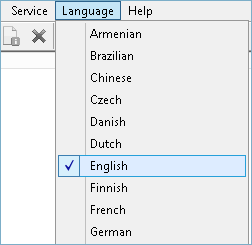
After you select a different language, the program automatically restarts.
6. Where can I find installation and startup instructions?
You can find installation and startup instructions here: www.handybackup.net/manual/installation.shtml
7. How can I uninstall the software?
To uninstall the software, use common Windows methods:
- Open the program’s folder in All Programs, and then click Uninstall Handy Backup.
- Open Control Panel, and click Uninstall a program in the Programs section. Find Handy Backup in the list, select it, and then click Uninstall on the toolbar.
After you select to uninstall the program, follow the steps of the Wizard.
When you uninstall the program, all settings, tasks and registration information are left on the computer. If you decide to install it again (e.g. if you are updating to a new version), you won’t need to create them again.
8. Where can I download old versions of Handy Backup?
As a general rule, you should always use the latest version of Handy Backup. However, there may be cases when you want to use some specific version of the program, or download some of its components.
To download old versions, please refer to the Download Archive.
9. Where can I read the license agreement?
Handy Backup™ is copyrighted and licensed software and you can read the license agreement here: www.handybackup.net/manual/eula.shtml
10. Which Version of Handy Backup Should I Pick for Windows XP or Windows Server 2003?
Unfortunately, if you are using Windows XP or Windows Server 2003, these versions cannot support newest backbone technologies of Handy Backup 8. Still, you can download and install Handy Backup 7.7.9, which fully supports older versions of Windows.
11. Can Handy Backup be installed on Linux?
Yes, Handy Backup supports the installation of network agents on Linux* operating systems as part of the Handy Backup Server Network edition for backing up file data. Detailed installation instructions are provided in the user manual.
*At the moment, Handy Backup provides distributions for RedOS, Ubuntu 22.04, and Debian 12/11. For backing up data from other Linux distributions, please contact us at [email protected] for additional information.
If you have any other questions, please don’t hesitate to write us.