Backup Software for Windows Server 2008
Windows Server 2008 backup software is a key part of data protection strategy for any business utilizing this server solution. Handy Backup is a secure, automatic and unified solution allowing Windows Server 2008 R2 backing up without efforts and risks.
 Download for Free
Version 8.7.0 , built on May 7, 2026. 152 MB
30-day full-featured trial period
Windows Server 2008 Backup Software Capabilities
Backup to Remote FTP Servers
The featured tool enables you to back up files to remote FTP servers. This is what you need if you want to secure your backup from data losses due to various hardware failures or theft.

Windows Server 2008 Backup via Command Line
Using Handy Backup, you are able to perform Windows Server 2008 backup via Command Line interface. Therefore, you can build your Handy Backup tasks into a batch file or other workflow solution based on the command-line interface.

Windows 2008 Server Backup Solution
Handy Backup makes backups of Windows Servers easy and automatic. With the help of our utility you are free to perform backup for various solutions based on Windows Server 2008 (2008 R2) like Windows Small Business Server 2008, Windows Essential Business Server 2008, and others.

If you are looking for Windows Server 2008 backup software, Handy Backup is what you need!
Recommended Solution
Lifetime license
Handy Backup Server Network
The Server Network is the best backup solution for Windows Server 2008, including definitely all the backup options you may need. Free 30 days trial to learn more about one of the best backup solutions for small business.
Windows Server Backup Features
Handy Backup has a task-based interface which allows creating separate schedules for any sets of data that you need to back up. As regards Windows Server 2008, some of the core features are listed below:
- Exchange Server Backup. Most companies choose Exchange servers to solve messaging and collaboration needs. Handy Backup provides an easy and reliable way to backup Exchange data without stopping its services.
- MSSQL Server Backup. The utility allows creating highly accurate MS SQL 2005 backup, MS SQL 2008 backup, MS SQL 2012 backup and backups for other versions of MS SQL databases with all tables, control data and settings.
- Hard Disk Image Backup. You can copy hard drive entirely, or any of its partitions (e.g. system partition). This feature can also be applied to clone hard drives.
- Backup to NAS. If you need much space just to store your data, Network Attached Storage is one of the best solutions. Handy Backup allows to backup to NAS computer automatically.
- Backup to Network Drive. With Handy Backup, you can automatically backup data to any computer connected via network.
Other features may include disk imaging, data deduplication, etc. To learn more, please see the full list of backup features.
Handy Backup Server Network
Besides backup software designed for individual Windows Servers, there is also an enterprise data backup edition of the program called Handy Backup Server Network. It is an all-included solution for complete backup of all workstations in the network, on a client-server scheme.
Handy Backup Server Network drastically reduces time, costs and efforts required for company’s backups: all tasks are managed through a single backup server which can be controlled by a single person.
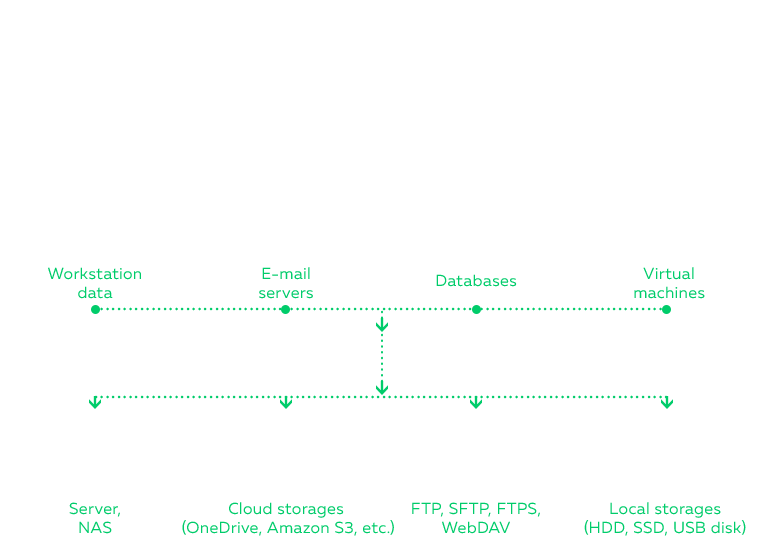
How to Install Management Panel and Create Agents for Windows Server 2008: Video Tutorial
Why backing up Windows Server separately, when you can do it automatically, from one controlling device and for entire network, no matter how many machines are connected?
Install the Management Panel to a central console computer, and from the Panel, install some Network Agents to remote computers in your network. It is quick, easy and it secures data, synchronizes files and allows sharing Windows Server 2008 backups throughout the network.
Note: Another advantage is that user interaction with Management Panel is minimal – it is enough to tune Windows Server backups once for all the machines under control and then the process will go by itself by months and years to come. Simple and convenient, as all things should be.
Download for Free
Version 8.7.0 , built on May 7, 2026. 152 MB
30-day full-featured trial period