Bootable Backup Software for Recovering Windows and Linux from External Drive
Bootable backup allows you restoring a bootable system image, such as Windows 11, Windows 10 or Linux, to an empty hard drive. As bootable backup software, Handy Backup creates restorable images of Windows and Linux partitions, and contains a utility to install these images from scratch.
 Download for Free
Version 8.7.0 , built on May 7, 2026. 152 MB
30-day full-featured trial period

The Goals of Bootable USB Backup Software Utility
Bootable System Backup to Restore PC

Our software is equipped with a Disaster Recovery module, which lets you create a bootable backup drive and use it to restore your PC after a crash. It has multiple first-aid functions and is fully compatible with backups made in Windows. Please contact us to obtain a copy of a Disaster Recovery utility.
Hard Disk Cloning

Backing up your HDD and restoring it to a different device is an easy way to clone all the information on your hard drive. You can clone your disk either when you running the program under Windows or when you installing a system on some PC from a bootable recovery drive.
Note! You must have a legal right to re-install a bootable backup image to other machine! For bootable backup Linux images, this is often not an issue, but when you use Handy Backup as Windows bootable backup software, beware the consequences for illegal re-installation or copying!
Hot Computer Backup

Unlike other bootable backup software, the program allows you backing up system drive without stopping Windows. Complete computer backup can be performed in a hot mode (e.g., making a bootable backup Windows without a reboot), and does not interfere with your work at all.
Recommended Solution
Lifetime license

Handy Backup Professional
To make bootable backup disk and use it as a recovery drive, you need the Professional edition, or higher. Free 30-days trial version!
Features for Bootable Backup Software

Integration with Handy Backup
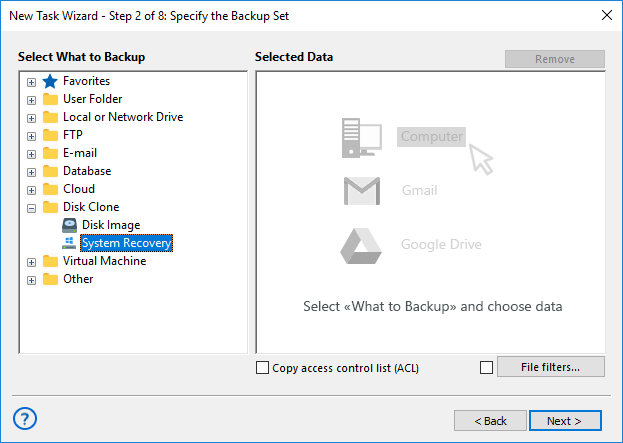
The Disaster Recovery utility can either use its own bootable backup or utilize a drive image created by Handy Backup during its regular operations by Disk Image or System Recovery plug-ins. It allows utilizing all features of Handy Backup software for bootable backup.

Wide Spectrum of Bootable Backup Storage
With Handy Backup, you have no need to store a bootable backup drive image on the same USB with the Disaster Recovery module. Use any storage freely, including local and external USB drives, network, FTP servers etc.

Creating Bootable Backup Windows 10 and Other OS
Handy Backup can be best bootable backup software for any OS including Windows 10, server editions of Windows, Linux and even Mac OS X or BSD. It creates and uploads a bootable image directly from disk with its Disaster Recovery module.
Using Bootable Backup and Recovery Drive
It is highly recommended to create at least one bootable backup Windows drive, because if your primary system crashes, you will not be able to launch the system to restore your backups. Besides that, you can copy your system by using Handy Backup as best bootable backup and recovery software, just for a case.
Installation and Setup Guide for Disaster Recovery

To create a bootable USB with Handy Backup Disaster Recovery, follow our detailed installation and user guide. This guide provides step-by-step instructions for creating and using the recovery drive effectively.
Easy-to-Use Graphical Interface
The Disaster Recovery is the bootable USB backup tool. Use some scratch flash drive or external HDD/SSD to backup bootable USB to ISO by using almost the same task-based engine as in “basic” Handy Backup! Disaster Recovery governs all operations via the interface based on modern Slax 9 Linux.
Note: Slax 9 supports almost all modern hardware, especially a full list of video drivers and Wi-Fi cards, for making your job smooth and comfortable!
Looking for a reliable Windows 11 full backup? Download our 30-day free trial version and see for yourself how it simplifies your backup process!
Download for Free
Version 8.7.0 , built on May 7, 2026. 152 MB
30-day full-featured trial period
Bootable Backup with Handy Backup Disaster Recovery - great help in case of emergency!