Enterprise Backup and Restore Software
Enterprise backup solutions allow making copies of different enterprise-level data such as databases, digital documents or virtual machine images. Good enterprise backup software, such as the Handy Backup Server Network solution, provide centralized backup via networks and "hot" backup mode.
 Download Trial

Why You Need Some Enterprise Backup Solutions?
These are many factors triggering an interest for enterprise backup. Some key factors include:
- Hardware maintenance. You often have a need to recover from some enterprise PC backup after repairing or upgrading key hardware units such as local storage.
- Ransomware attacks. Usually, recovering from some enterprise data backup is the best method to answer to encrypting viral attack. No payments for villains, no loss for data!
- Reducing money loss from downtime. Sometimes, full or partial recovery from an enterprise backup copy is the best method to overcome downtime and speed up daily job.
For these and more purposes, users appreciate powerful and efficient enterprise backup products, such as Handy Backup software.
Why Handy Backup?

When you buy a copy of Handy Backup, you purchase a full-scale tech support and free minor upgrades under a major version. Handy Backup requires no fees, no commissions, no additional payments, unless you are planning upgrading to a higher edition, adding some network agents or extra plug-ins!
Advantages of Using Handy Backup as Enterprise Backup and Restore Software
Complete Automation
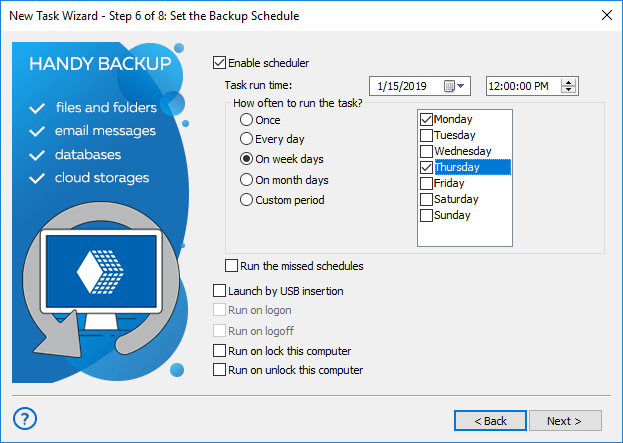
With Handy Backup, you can realize any enterprise backup strategy (including such complex things as Hanoi Tower), due to efficient internal task scheduler allowing starting any task at exactly predefined time, with exact intervals, or even triggering tasks by different system events.
Silent Backup on Background
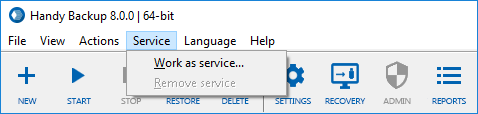
Handy Backup can run its Agents as Windows services, Linux or Java processes, allowing making no distraction from daily user work by backup procedures. It also provides "hot" enterprise data backup, which allows making no stops for saving data copies for most corporate data, unless you need other.
Centralized Enterprise Network Backup Solutions
Handy Backup can run its Agents as Windows services, Linux or Java processes, allowing making no distraction from daily user work by backup procedures. It also provides "hot" enterprise data backup, which allows making no stops for saving data copies for most corporate data, unless you need other.
Advanced Data Protection
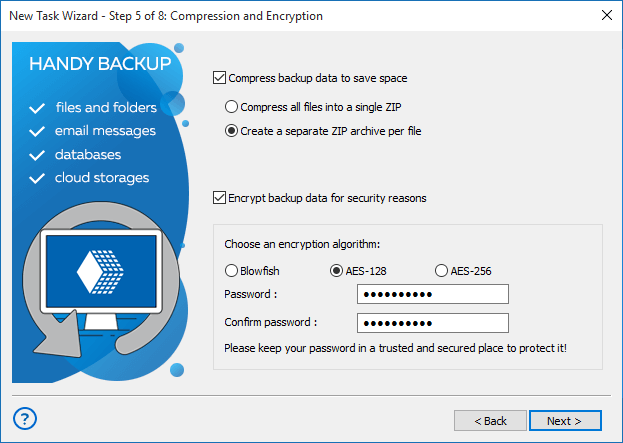
A part of Handy Backup solutions is a built-in encryption tool, allowing securing enterprise offsite backup or just adding an additional level of protection to store crucial data. Another data protection for enterprise offsite backup is a good set of API-based storage plug-ins with added transferring encryption.
Testimonials About Image Backup Software by Handy Backup
Recommended Solution
Lifetime license
Handy Backup Server Network
The ultimate edition for centralized backup, the Server Network is complete enterprise backup and restore software, allowing making all necessary remote operations from a management console.
Where to Backup OneDrive?
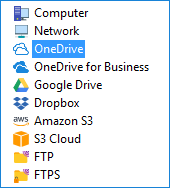
Handy Backup supports many storage types, from local drives to enterprise cloud backup services such as Amazon S3 or Box. For practical purposes, you can choose between any modern information storage devices and methods, including:
- Making an enterprise backup to cloud solutions by S3 protocol (Wasabi and other);
- Storing backup data onto a local disk or an external USB drive;
- Using a dedicated cloud service, such as OneDrive for Business, Box or Dropbox;
- Connecting to enterprise data backup storage on FTP, SFTP or FTPS;
- Utilizing a NAS unit, an enterprise backup server in a local network, or a mapped drive;
- Connecting via WebDAV to any cloud (e.g. making enterprise offsite backup to OwnCloud).
Granular Recovery for Enterprise Backup

For most data types and storage units, Handy backup preserves unencrypted enterprise-level data in native formats when copying backups. Therefore, it allows granular recovery for parts of data, up to single files or SQL tables, without complete restoration of big data arrays.
Enterprise Backup Use Cases
For convenience purposes, we are giving some examples of typical enterprise backup tasks here.
- Saving end-user files and folders. A typical task includes collection of files, folders, projects and other data from user workstations, thin clients or even from local servers (such as department-level servers).
- Saving Exchange and Outlook enterprise data. This function allows you to create a copy of a database containing company messages governed by MS Exchange server, as well as Outlook end-user folders, contacts and events.
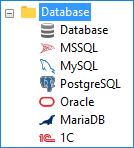
- Saving database server content and dynamic websites. This task can include replicating or backing up data from MS SQL, MySQL, Oracle, IBM DB2, Lotus Notes, MariaDB or PostgreSQL servers, as well as from any other database.
- Saving virtual machines and VM arrays/hosts. This feature enables you to perform reliable virtual machine backup for any platform, including VirtualBox, VMware, or Hyper-V. You can back up either from within the VM using the Handy Backup agent or externally by saving full VM images and servers.
- Saving drive images. For extreme security precautions or for migrating to other hardware without efforts, you can snapshot an entire disk image as a bootable copy in a VHD format. You do not need to shut down a system to create a drive backup.
- Saving corporate FTP content. You can back up an online FTP data from your company server, including static website content, to protect or to mirror it. For dynamic content and SMB backup, use database backup procedures.
- Saving copies from corporate data storages. You can copy an FTP content, a cloud account or a company server mapped drive to any other storage you want. Besides the protection, this function allows automatically sending any needed information to end-users.
Video Tutorial: How to Install and Configure Server Network Agents for Enterprise Backup
In the next video tutorial, you will see how to set up the basic components of Handy backup Server Network: the Management Panel and Network agents for remote machines. See how easy to use and convenient is a process of deploying remote enterprise backup tools under Handy Backup!
Download Trial
Explore the power and convenience of Handy Backup just now! Download the 30-day free trial version!
"It is easy to configure and set up a new job. We use Handy backup daily to backup critical equipment."
Todd A., an IT network admin
"I have used this product since version 1. I own 3 licences for my 3 different computer locations. It has saved my butt more than once. There is a small glitch with version 8 and one drive, but I&8242;m certain it will get fixed. This is part of my personal "Essentials" software that I keep for new computer set ups, or re-installations. I like the ease of use, and the total flexibility. It has kept up nicely with available technology."
Leigh F., an enterprise top manager