Registration
During the first 30 days after installation, you can use all features of the software without any limitations. When the trial period expires, you will need to register the program.
Exact set of features you can use after registration is defined by your registration number.

Obtaining Registration Number
- The exact functionality of the program after registration is defined by the registration number. Each number is unique and depends on the edition that you purchase (Standard, Professional, Small Business or Server Network).
It is delivered to you via e-mail immediately after the payment is processed. To order, please refer to the Order section. - When you register Handy Backup, some of its features may stop working (as compared to the trial version). This applies to all features that are not included into the purchased edition.
If at a later time you encounter the need to use the functionality that is unavailable, you can always enable it by upgrading your registration number. See Upgrades for details.
Registration can be made in a "common" way, over the Internet, and via e-mail.
Registering over Internet
To register the program, follow these steps:
- Click the Register button on the program′s toolbar.

The Registration window opens.
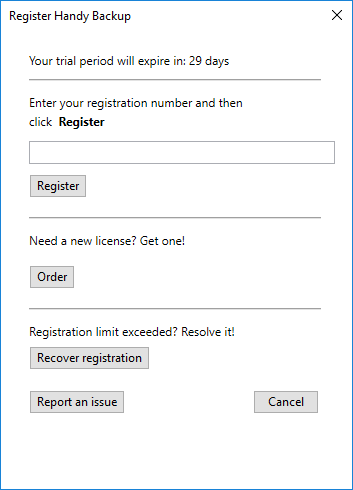
- Enter your registration number, and then click Register.
Note: If registration doesn′t succeed for the first time, it is recommended to try again. Sometimes it may fail due to connection errors.
Registering via E-mail
Sometimes the direct registration is undeserved or impossible (e.g. for registering a copy for the different computer not plugged to Internet). Then you can register the program via e-mail. To do it, follow these steps:
- Open the Help menu item and find the Register Handy Backup via email... option.
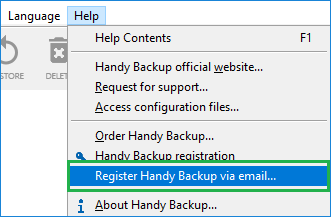
The Registration window opens.
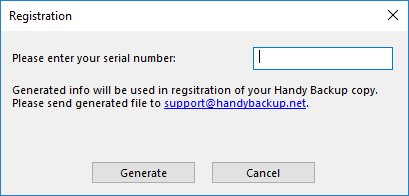
- Click Generate to create the email with your registering information.
The program generates a e-mail message and opens it in your default e-mail client. For example, if you have Microsoft Outlook, it will look as follows:
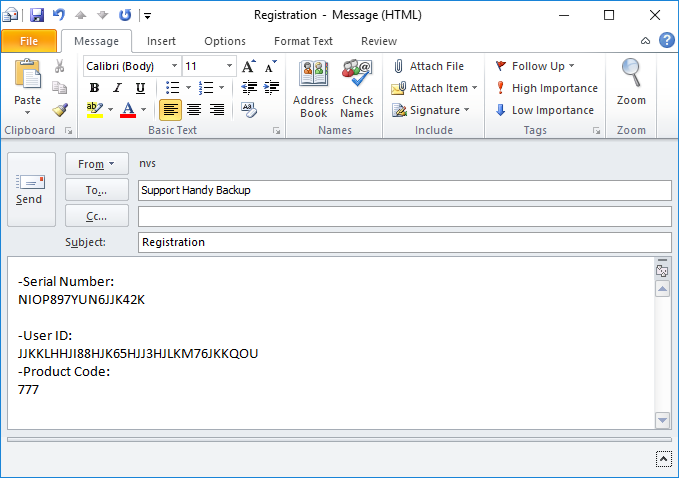
- You need to send this information to [email protected]. Upon receipt, we will send you a registration file that you will need to import into the program. The message from the support team will have all the necessary instructions.
Registering as Console Client
You can register your copy of Handy Backup when running it as a console application. To do it, just write the following console command:hbcc.exe -r registration_number
Here the registration_number is a substitution to the registration key number of your Handy Backup license. That is all; enjoy the possibilities of your Handy Backup!
Registering under Lunux
The Linux registration is almost identical to registering under Windows console. Type the following command in a terminal window:sudo hbcc --CoordinatorHost [HOSTNAME] --ServerName [SERVERNAME] --UserName root -r [KEY]
Here the [HOSTNAME] must be substituted with a name of your host, the [SERVERNAME] must be replaced with a name of your server (a computer containing the Management Panel), and the [KEY] is a substitution to your Handy Backup registration key number.
Contents: