Installing Network Editions (Server Network)
Network edition of the program (Server Network) allows controlling backups of multiple computers from one control point. The scheme is divided by two parts:
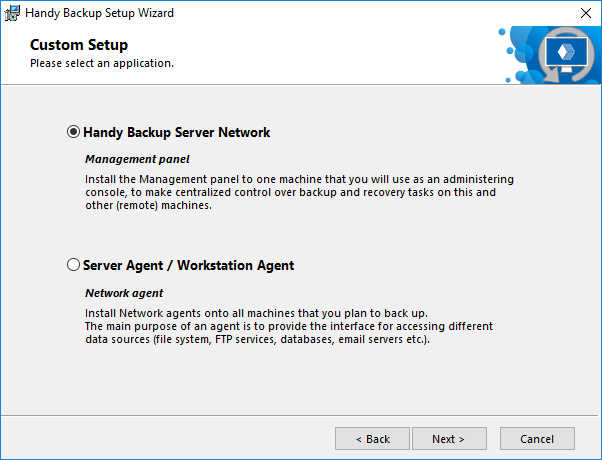
- Management Panel is installed on one computer (usually, administrator’s machine) that will be used to control backups on networked workstations and servers.
- Network Agents are installed on all computers that you want to back up.
Installation of network editions is similar to installation of standalone editions:
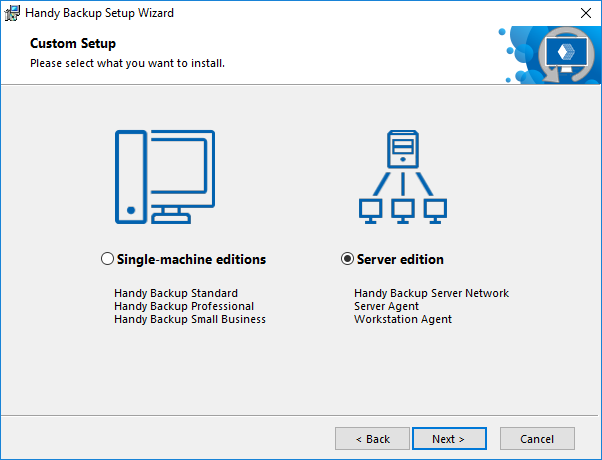
- On the Custom Setup step of the Setup Wizard, select Server edition, and then click Install.
- Select "Handy Backup Server Network", and then click Next.
- If you have User Account Control enabled, then you will be prompted to confirm the installation. Click Yes.
The Management Panel will be installed on your computer.
- On the final screen of the Setup Wizard, select if you want to start the program after installation, and if you want to see the Readme file with brief description of the program’s features.
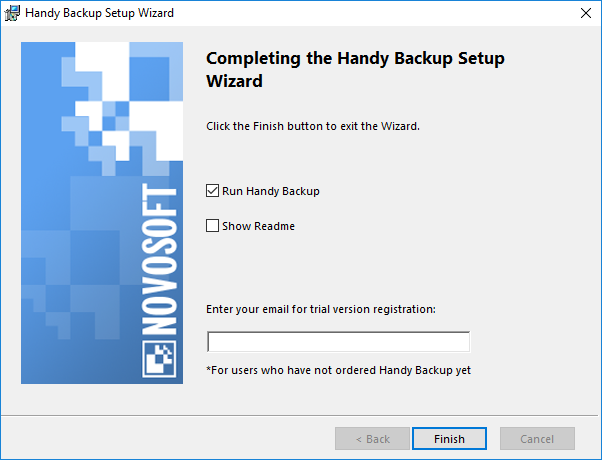
- Click Finish.
Besides network data, the Management Panel from the Server Network edition can be used to back up and restore data of a local PC. Technically, it is the same client-server scheme, in which a Network Agent installed locally, rather than on a remote computer. Local Network Agent always started from the user account under which you launched the installation. To learn more about user privileges and accessing computer data, please see Workstation.
After you install the Server Network edition, you need to install Network Agents (next chapter).
Related pages: Windows Server Backup
Contents: