Main Menu
Main Menu contains all functions of the program. While many of them can be found in other parts of the program (for example, you can control tasks via toolbar, or context menu in the Task View pane), some commands are available in Menu only, e.g. language selection, Service mode, and other.
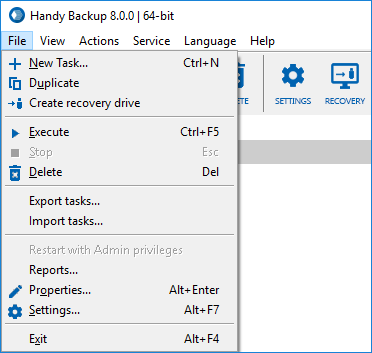
- File. Allows managing tasks, creating USB recovery drive, and changing settings of different components.
- View. Lets you change look and feel of the main window.
- Actions. Can be used to run tasks selected in the Task View pane of the main window.
- Service. (Standalone edition only) Enables you to run Workstation as Windows service. Workstation is a logical component of the software that is used to retrieve, process and store data. To learn about it and its communication with other components, please see Workstation...
- Server. (Server edition only) Allows connecting and disconnecting to different Servers. To learn more, please refer to Connecting to Server...
- Language. Lets you change language of the utility′s user interface.
- Help. Used to access User Manual, request support, and register the program.
To understand the Service and Server menus, please read Workstation and Connecting to Server chapters, respectively. All other commands in the menu are very understandable and don′t require additional explanation.
Contents: