Outlook Email Backup Software - Handy Backup
Outlook email backup tool is essential for system administrators and users looking to safeguard their emails and other important data. Handy Backup simplifies the backup process with an easy, automated solution that regularly backs up your Outlook data, eliminating the need for manual involvement.
Experience the power of seamless and efficient data protection with Handy Backup. Download 30-day trial to explore how our advanced features can enhance your backup strategy.
 Download for Free
Version 8.7.0 , built on May 7, 2026. 152 MB
30-day full-featured trial period

Automated Outlook Backup Software
Handy Backup includes a powerful plug-in for protecting your email client data. It can automatically back up messages, contacts, calendar entries and even create individual PST file copies. Restoring this data is just as straightforward and automated as the backup process itself.
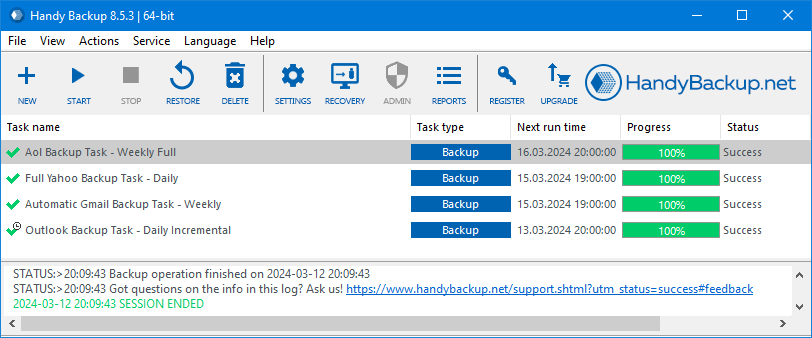
Key Features of Outlook Backup
As an ideal Outlook backup solution, Handy Backup provides users with the following key features:
Complete Compatibility

Handy Backup supports data protection for Outlook 2024/21/19/16/13 and earlier releases, as well as MS Exchange environments. It can capture mailbox data directly from both desktop clients and servers. Thanks to the dedicated plug-in, the program automates email backups across all supported versions.
Fast and Hot Backup

By utilizing the Volume Shadow Copy service (VSS), Handy Backup can protect Outlook data while the mail client is running, without interruptions or locking. The software works efficiently in the background and has minimal impact on system performance.
Rapid Restoration

Restoring mailbox data is just as simple as creating the backup. Using the same interface, you can launch a restoration task, choose the required copy, and quickly replace the existing profile data. Alternatively, you may save your information as PST files, which preserve messages in their native format.
Security of Backup Emails

Handy Backup provides several layers of protection, including secure transfer protocols such as S3 and SFTP, options for saving email copies to USB drives, built-in encryption for backup profiles, and support for running external security tools automatically.
Migration to Other Services and Clients

The "MS Outlook" plug-in supports not only standard backups but also full restoration and migration. For example, you can save data from an older release like Outlook 2019 and restore it on a newer version, or export mailbox content in .EML format for use with various email services.
All editions of Handy Backup include automated mailbox protection, with no additional components or purchases required.
Review of Handy Backup's Outlook Backup Solution

"It is so wonderful to have such a tool to make regular Outlook backup! These system crash events and ransomware attacks can rid me of my emails, but with Handy Backup, I can always protect my docs and letters together! I have no need for special knowledge for backup, as I have read an article about so-called 3-2-1 strategy, and then easily add it to my Outlook backup task."
J. P. Southern, a stock exchange broker
Recommended Solution
Lifetime license

Handy Backup Professional
Get the Professional edition, the ultimate Outlook backup software solution that effortlessly handles all your mail data protection needs with just a few clicks. Experience the power of streamlined, efficient backups designed to keep your email secure and accessible. Elevate your data protection strategy and enjoy peace of mind with our top-tier solution.
Other Key Features of Handy Backup
In addition to Outlook backup, Handy Backup automates the saving of copies for various other data types, offering a robust and convenient backup solution for all your data security needs.
- Backing Up in Native Format Handy Backup saves files in their original formats (e.g., PST file format), allowing you to use the backups directly without needing to restore them first.
- Scheduling Backup Tasks You can automate backup routines by setting intervals from minutes to months, ensuring that you always have an up-to-date copy of your data ready for recovery.

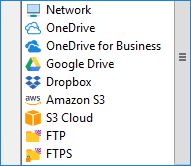
- Wide Choice of Storage Media Store your Outlook backup emails on local and remote hard drives, USB external and flash drives, commercial cloud services, NAS devices, or FTP servers. Advanced editions of Handy Backup offer even more storage options.
- Additional Backup Capabilities Handy Backup lets you protect all types of data, not just emails. You can combine multiple data sources into a single backup task, schedule it according to your needs, and optionally encrypt or compress the files for added security and efficiency.

Universal Outlook Backup Tool
Handy Backup is a powerful and easy-to-use solution designed to reliably protect all of your email client data. By setting up a backup task, you can automatically preserve emails, contacts, calendars, tasks, and PST files, ensuring comprehensive data security.
Restoring your data is just as simple — everything is done within the same intuitive interface. Select the necessary backup and launch the recovery process to return all items to their original state. OST files are restored to the exact same location and under the same account that was used during the backup.

Limitations of Outlook’s Built-In Backup Tools
While the built-in export features in Outlook exist, they have several limitations. For a more comprehensive and efficient backup experience, it is recommended to use a dedicated solution like Handy Backup.


- Lack of Automatic Export: The native backup process does not support automatic export, requiring manual initiation for each task, which can be time-consuming and inconvenient.
- Support for Various Email Systems: Built-in tools are mainly designed for use within Outlook itself, limiting compatibility with other email systems.
- No Notification Support: The default backup options do not provide alerts or notifications, leaving users unaware of completion or potential issues.
- Advanced Features: Incremental or differential backup options are generally not available in native tools.
Built-In Backup Tool Limitations:
- Automated Backup Processes: Handy Backup automates all backup tasks, removing the need for manual initiation and ensuring regular, reliable protection.
- Broad Email System Compatibility: Our solution works with a wide range of email clients and services, providing flexibility beyond just Outlook.
- Notification Support: Handy Backup includes alerts and status notifications to keep users informed of backup progress and completion.
- Advanced Features: The software supports incremental and differential backups, saving only changes since the last backup and optimizing both time and storage usage.
What Handy Backup Offers:
Export OST to PST Before Backup
Before creating an Outlook backup task, it is recommended to export your data from the OST file to PST format. This ensures that all emails, contacts, and calendar items are saved locally and remain accessible even without a connection to the mail server.
To perform the export, open Outlook and go to File → Open & Export → Import/Export. Select Export to a file and choose Outlook Data File (.pst). Then mark the folder(s) you want to export and make sure to check Include subfolders.
This method provides maximum reliability and portability of your backup copies for future restoration or email migration.

How to Backup Outlook Email
With Handy Backup's Outlook backup software, the process is straightforward and easy to follow.
- Run the program and create a new task by selecting "New task..." from the menu or pressing Ctrl+N.
- Choose the type of backup task. You can select simple or advanced mode for saving your email folders, depending on your preference.
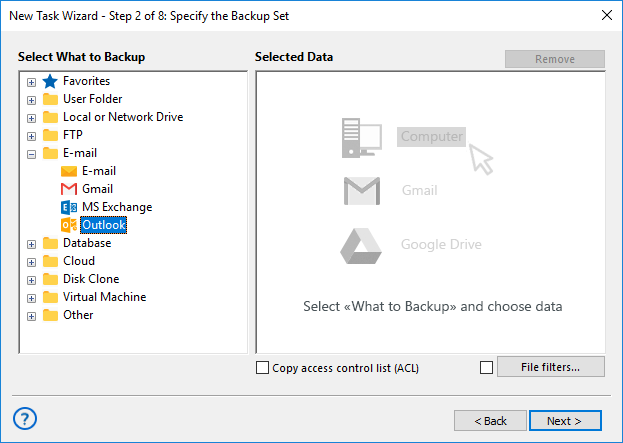
- In Step 2, click on Outlook from the list of backup data options in the E-mail section of the left panel.
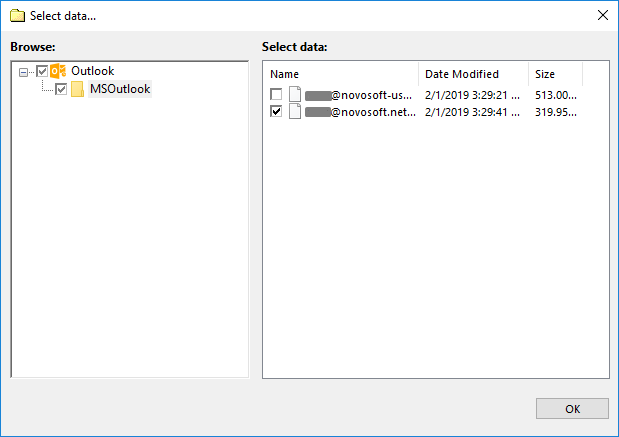
- A new window titled "Select data..." will appear. Check the box next to the "Outlook" option. You will then see a list of folders from Outlook, Outlook Express, and Windows Mail.
- Click "OK" to return to the task configuration.
- Choose additional settings, such as backup destination, compression, and scheduling. These steps are not specific to the mail client.
Outlook.com Backup via IMAP

Backing up emails from the webmail service Outlook.com is slightly different from backing up local email client data. This type of web service backup can be done using the "E-mail" plugin (located in the same group as the email client plugin).
How to Back Up Email via IMAP
It's simple. Create a new task as you would for a local client, but select the Email plugin in Step 2. Set up a new connection and provide the necessary details to access your account:
- Server: outlook.office365.com
- User and Password: Your account login credentials
Keep the other settings at their default values and assign a name to the connection. Once it has been successfully tested, you can use it to back up your emails and restore them to the account whenever needed.
FAQ on Outlook Backup Tool
Why should I export an OST file to PST before backing up Outlook?
An OST file is a cached copy of your emails, calendar items, and contacts created when connected to Exchange, Microsoft 365, or IMAP. It is tied to a specific profile and account, so it cannot be opened on another computer.
A PST file, in contrast, stores the same data in a portable format that can be accessed on any computer or version of the mail client. This makes it the preferred option for reliable backup and recovery.
If your OST file is the only copy and the account is no longer available, you can convert it to PST using an online converter or specialized software and then open it via File → Open & Export → Outlook Data File.
Can I restore a single email from an Outlook backup?
No, individual messages cannot be restored directly. The backup stores data as complete OST or PST files, and Handy Backup does not open these containers. To retrieve a specific email or contact, use the mail client or third-party utilities designed to browse PST or OST files.
Can I store my Outlook backup in the cloud (Google Drive, Dropbox, OneDrive)?
The Handy Backup tool for Outlook supports cloud backup to Google Drive, Dropbox, OneDrive, and other services. You can select the cloud destination when creating a backup task.
For enhanced protection, enable encryption — Handy Backup supports AES-256, AES-128, and Blowfish, keeping your files secure even online.
Can I open a backup without using Outlook?
Yes. If the backup is not encrypted, all files remain in their original formats and can be accessed without the mail client.
However, OST files are linked to specific accounts and cannot be opened directly. Converting them to PST allows many third-party viewers to read them.
Several tools also let you explore PST files — including emails, contacts, and calendar items — without installing Outlook.
How can I verify that my Outlook backup was successful?
Handy Backup generates detailed logs and reports for each task. You can also enable email notifications to receive task results and summaries, keeping you informed about the status of your backups.
Can Handy Backup back up Microsoft 365 Outlook?
Yes. Handy Backup supports Microsoft 365 if you use the desktop version installed on your computer. The program saves local data (OST or PST), including emails, contacts, calendars, and other items synchronized with your account.
Alternatively, you can connect via IMAP using the Email plug-in. In this mode, Handy Backup stores all messages in universal .EML format, compatible with any mail client.
The tool works only with local or network data and does not access the cloud directly, ensuring complete privacy and security.
If you experience connection issues via IMAP, contact [email protected].
Video Example: Backup Outlook Email
In this video, you will learn how to back up Yahoo email to Outlook.com. The process is fully automated, requiring only minimal adjustments. You can also use this method to back up your emails to other storage solutions or services, or recover data in EML format.
Download for Free
Version 8.7.0 , built on May 7, 2026. 152 MB
30-day full-featured trial period
Handy Backup is the ideal Outlook email backup software solution, crafted to meet everyone's needs with ease and efficiency!
Capterra′s Rating:

"Great product, very simple and effective backup program"