Auto File Copy Software Utility
File Copy Utility - HandyBackup is designed to automatically copy files from one location to another. It is commonly used to move or duplicate data for everyday tasks such as file transfer, updating files, or keeping an extra backup of important information. Handy Backup can be used as a reliable software that works with modern storage devices and locations.
 Download for Free
Version 8.7.0 , built on May 7, 2026. 152 MB





Data Copy Software Importance
Important data is always at risk if not managed carefully. Unexpected problems can affect anyone, and even small mistakes may have big consequences.

Accidental Deletion
Files can be accidentally deleted while cleaning up your computer or moving data. Without a backup, recovery can be difficult or impossible.
Hardware Failure
Hard drives, USB drives, and other storage devices can fail unexpectedly. Losing a device can mean losing all the data stored on it.
Software Errors
Applications, updates, or system crashes can corrupt or erase important files. Having a copy ensures you don’t lose valuable information.
File Copy Software for Everyday Use
A file copy tool by Handy Backup helps you move and duplicate personal files you use every day, without complex settings or technical knowledge.

User folders and Desktop: easily copy your documents, downloads, and other personal files to another drive or storage location for extra security.
Photos, music, and videos: safely backup your pictures, music tracks, and videos to keep backups or move them to a new device without losing quality.
Browser and app data: transfer browser profiles, bookmarks, and other application data in a simple and consistent way.

Handy Backup makes it easy to keep your applications and all their data safe. Visit our Application Backup Software page to see how you can protect your apps, avoid data loss, and manage backups effortlessly with just a few clicks.
Native Format: Restore Files Instantly
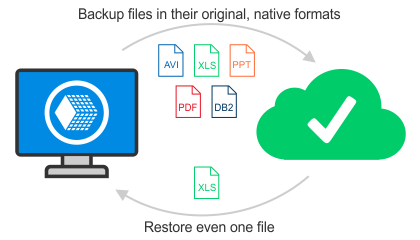
Backups are stored in a native file format, so you can access your data like regular files and folders. There is no need to run a full restore or wait for long recovery processes.
Why native format matters:
- Restore a single file without a full restore
- Open backups like normal folders
- Get your files back in seconds
- Save time and avoid unnecessary steps
Key Advantages of Handy Backup

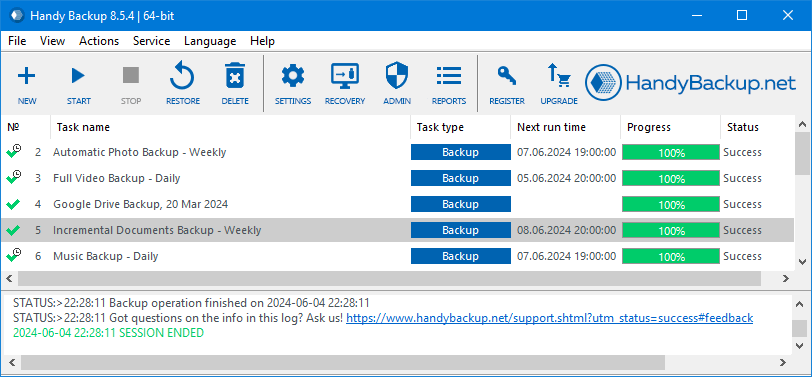
Automation: set up tasks once, schedule them, and run automatically with email alerts.
Partial Backup: only copy the files that changed since the last backup, saving time and space.
Encryption: secure backups with AES-128, AES-256, or Blowfish encryption to protect your sensitive data.
ZIP Archiving: store your backup as a ZIP file to save space and keep your data organized.
Multiple Data Types: backup documents, photos, music, emails, and databases in one simple process.
Multiple Destinations: save backups to local drives, external drives, NAS, FTP/SFTP, or cloud storage.
User-Friendly Interface makes managing backup tasks simple and straightforward.
Lifetime License: one-time purchase provides a lifetime license with no recurring fees or limitations.
Testimonials About Copy Software by Handy Backup

I have a great deal of important information on my computer - written papers, historical information, scripts, texts, essays, photos, etc - from the academic world. I fear losing it very much, much more than the computer itself. I have been concerned to find the right copy software for some time. The program I was looking for had to be simple, easy to use, and above all give me confidence that my data really was backed up. I tried a good number of copy utilities, but Handy Backup was the first to give me a real sense of confidence and a quiet mind.
Larry, Handy Backup User
Recommended Solution
Lifetime license

Handy Backup Standard
Handy Backup Standard is your easy file copy tool! Quickly and safely copy, protect, and manage your files without any hassle. Try it now with a 30-day free trial and see how simple keeping your data safe can be!
How to Make a File Copy
- Create a new task by clicking the New button or pressing Ctrl+N.
- In Step 1, select Backup. If you need more options, switch to the advanced wizard mode to use extended file copy features. Click Next.
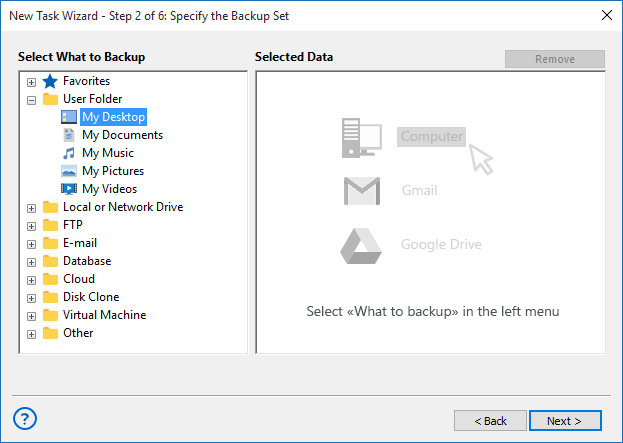
- In Step 2, choose the plug-in that matches your data source. For example, to backup files and folders from your local computer, select the Computer plug-in.
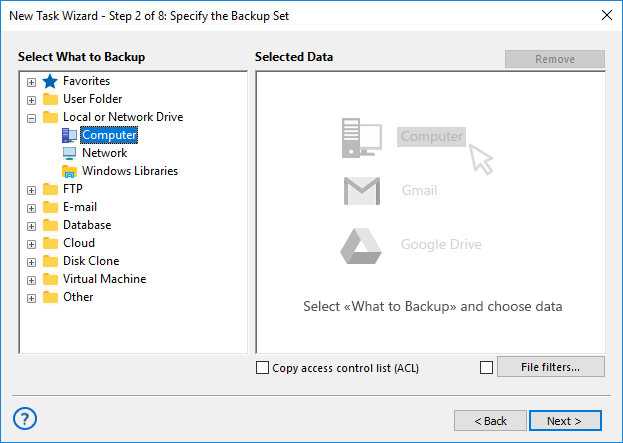
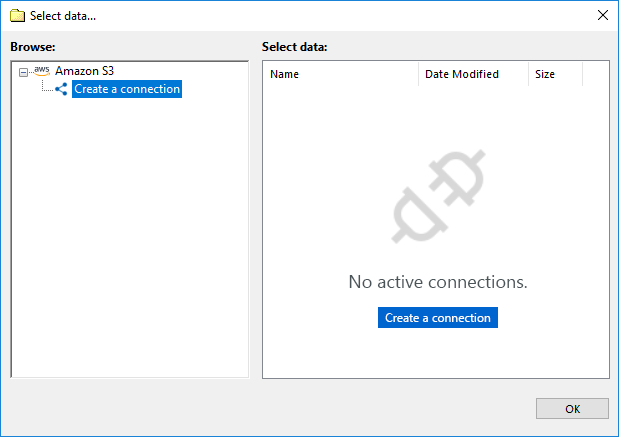
- Click Next, then in Step 3 select the destination where your data will be copied. Click Next again. These steps are common for most file copy tasks.
- In the following steps, you can set additional options such as compression, encryption, and automatic scheduling by time or by event.
Note: Detailed instructions for each step and every plug-in are available in the User Manual. Even in the simplest mode, Handy Backup works as a clear and reliable file copy tool. Just choose what to copy, where to store it, and, if needed, when to run the task, the software takes care of the rest.
Find and Copy Files Faster
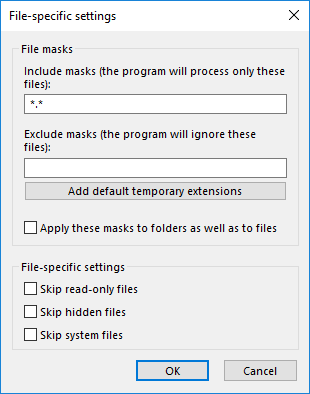
File masks let you copy only the files you need, even if they are stored in many different folders. Instead of searching manually, you just specify a file type, and the software finds everything for you.
For example, if you want to backup all your photos, enter *.jpg and the tool will collect JPG images from all folders automatically. It’s a quick and convenient way to work with large amounts of files.
Why file masks backup is useful:
- Find files by type in seconds
- backup photos, documents, or media from all folders at once
- No need to know exact file locations
- Save time and avoid missing important files
Why Handy Backup?

Unlike most file copy software that only handles basic functionality, Handy Backup offers unmatched flexibility and versatility for any task you can imagine. You can use it not just as a data copy tool, but also for syncing, mirroring, protecting data, and a wide range of other tasks with ease.

Files and folders
Backup files, folders, and Windows libraries with clear structure preserved, making everyday data protection simple and reliable.

Applications and system data
Safely back up application data, including system settings and registries, ensuring fast recovery without complex manual steps.

Disk and drive images
Create full drive images for system recovery or virtual machine use, allowing you to restore an entire environment when needed.

Email data
Backup emails from local clients or IMAP servers, keeping messages, attachments, and folders securely stored.

Databases
Protect business-critical databases such as Oracle, MySQL, and PostgreSQL with consistent database backups designed for reliable restoration.

Cloud services
Secure cloud accounts and data by copying files and content locally, maintaining control over cloud-stored information.

Virtual machines
Back up virtual machines as complete units, ensuring quick recovery of virtual environments without reconfiguration.

Websites
Copy website files and content to protect projects, updates, and configurations from data loss or hosting issues.
Available data types and backup options depend on the Handy Backup edition you use. Additional data sources can also be supported by purchasing dedicated plugins. For a full feature breakdown, see the Handy Backup edition comparison.
Have questions? Contact our support team and get help!
Common Questions About File Copy Software
What utility allows you to make an exact copy of a file?
A file copy utility is software that creates an exact duplicate of a file while preserving its structure, content, and attributes. These tools are commonly used for transferring, storing, or protecting data. In practice, many modern solutions combine file copying with backup functionality. Handy Backup, for example, allows you to create precise file copies while also supporting automation and recovery features when needed.
What is the best file copy software for Windows 11?
For Windows 11, a good data copy software should fully support modern file systems, work reliably with large files, and offer automation for repeated tasks. Ease of use and system compatibility are also important factors. Handy Backup meets these requirements by providing stable file backup operations on Windows 11 along with optional backup and data protection features.
How to copy software from one computer to another?
Copying software usually involves transferring not only program files but also related configuration data and settings. Specialized software tools help ensure that all required components are included. Handy Backup can be used to backup application-related data and system elements, making the transfer process more structured and reliable.
Download for Free
Version 8.7.0 , built on May 7, 2026. 152 MB
Discover the power of Handy Backup as your go-to file copy tool! Download the 30-day free trial today and get full access to all plug-ins, so you can easily copy, sync, and protect your files with speed and reliability.