Backup Software with Encryption for Secure Backups
Encrypt backup data to avoid an unauthorized access to its content. This technique is as simple and effective as a door lock. Handy Backup is a perfect example of backup software with encryption. The solution supports 256-bit AES encryption (plus 128-bit AES and 128-bit BlowFish encryption).
 Download for Free
Version 8.7.0 , built on May 7, 2026. 152 MB
30-day full-featured trial period

Supported Backup Encryption Algorithms

Backup encryption protects your data copies by mixing it into an unreadable, inconvenient heap of binary codes. You can restore these data at any time by running a restoration task and entering a recovery password that you set up during backup. No one other than you can access backup data!
Handy Backup supports three types of backup encryption algorithms:
- 256-bit AES encryption
- 128-bit AES encryption
- BlowFish encryption
Advantages of Backup Software Encryption
As backup software with encryption functions, Handy Backup provides some important advantages and possibilities. Let us shortly mention some of these advantages here:
- Secure transferring: Sending encrypted files via networks with minimized risk of hacking;
- Reliable keeping: No peril can damage or modify backups when being unnoticed;
- Data protecting: Obviously, no secured information can fall into unauthorized hands;
- Consolidated backups: You keep your backups as a whole, minimizing the risk of degrading it.

While Windows backup encryption often consumes some time and system resources, Handy Backup uses effective data-processing algorithms almost eliminating any distractions and lags.
Principles of Backup Software Encryption
By default, Handy Backup stores backups with preserved native data formats. It allows browsing, restoring or even changing backup contents by any user who have an access to backup folders with traditional file-managing tools like Windows Explorer. To prevent it, encrypt backups.

The Technique
When you create a backup task, select encryption by marking the appropriate checkbox on Step 5 (in an advanced mode) or Step 4 (in a simple mode).
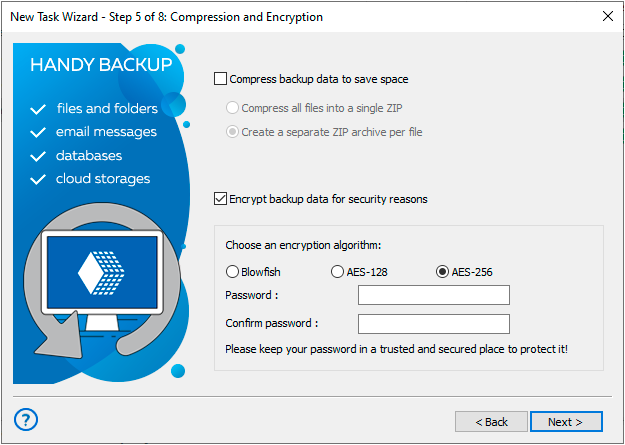
After selecting this option, enter and confirm a password for your backups created by this particular task into appropriate fields below the checkbox.
Note: If you lose or forget this password, data restoration from this backup will be a very difficult task, as the Handy Backup Team has no access to your password or tools to recover or crack it! Please keep all your passwords in some secure place, to get access to your data when you need it!

The Process
Handy Backup performs Windows backup encryption “on-the-fly”, in a simultaneous mode with copying and compressing the files (if selected). As a result, it forms consolidated encrypted backups, which are allow no browsing or changing after. All you can do with these backups is to restore.

The Restoration
When you create a backup restoration task working with encrypted backups, you must enter an appropriate password for data decryption on Step 2* (regardless of a task wizard mode):
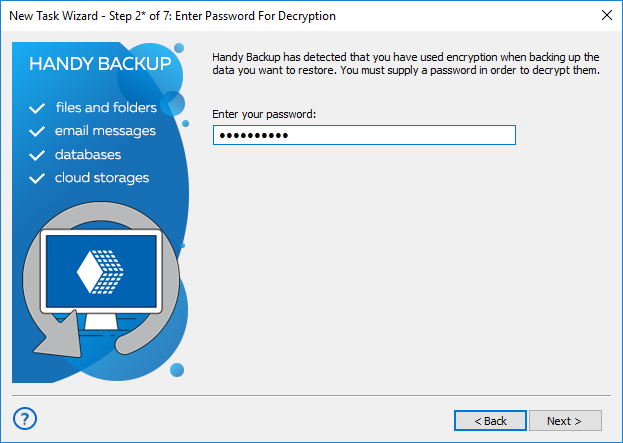
No additional actions to decrypt your backups are required.
Recommended Solution
Lifetime license

Handy Backup Standard
Download Handy Backup Standard edition of our software and start encrypting backups of your critical data. Full-featured 30-days trial!
Top 5 Data Types Constantly Eligible for Backup Software Encryption
Some data types often are more valuable, more unstable or more prone to some hazards and perils (including voluntarily hacking attacks, damage by ransomware, theft and unscrupulous changing) than most other information. These data require backup encryption on a regular basis.
- Databases. The blood of a modern IT world, databases almost ever contain crucial data.
- Projects. Losing or missing some project often leads to financial and other losses.
- Websites. Website content is a fruit of joint labor of many people, highly prone to theft.
- Reports and logs. These documents often contain vital information, definitely not for all eyes.
- System images and data drives. It is a sweet candy for hackers, unless you encrypt backup disk.
For any particular activity or a task, there are some other usable applications for encrypted backup software. Handy Backup can serve for any of all of these needs, effectively protecting your data of any type with just a single password per dataset. Please download and try it!
Secure Storages Support
In conjunction with an encrypted backup software tool, Handy Backup supports many storage types to protect your encrypted data from ransomware, theft or accidental destruction. Use one of these options, according to particular tasks:
- For keeping big amounts of data for regular decryption and recovery, utilize local drive, backup external USB disk or NAS unit connected by a fast local network. Encrypt local backup files to protect data from unauthorized access or steal.
- For storing smaller quantities of information that you will plan to move or share, use S3-driven secured clouds (such as Amazon S3 or OneDrive) or protected FTP connections (SFTP and FTPS).
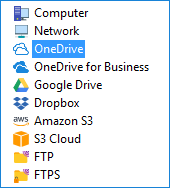
Besides storage types mentioned here, Handy Backup supports many other data vaults, including commercial cloud backup storages, WebDAV-driven online services, mapped drives and shared folders on a local network, and even memory cards or sticks.
Review about Encrypted Backup Software
"We have a big amount of files to transfer and backup, and, therefore, we have a constant need to encrypt those data we save. I’ve purchased a copy of Handy Backup, and I’m completely glad to use it for protection. It is a 256-AES encryption, which is considered secure even for US government!"
J. Scott Pearsey, a team leader of PolyGrain Software