Registration
Disaster Recovery is a shareware program. During the first 30 days after creation of the recovery drive, you can take advantage of all features, without any limitations. After the trial period expires, you will have a need to register your copy of the program.
In an unregistered version, you can only restore existing backups, but cannot create new ones.
You can register Disaster Recovery in two ways. To start a registration process, please follow these steps:
- Click Register on the desktop toolbar (the registration window will always appear in an unregistered version). The registration dialog will open.
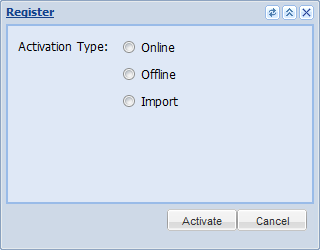
- Select the preferred type of registration, and then click OK.
- Online registration. This option requires you to have an Internet connection. To register online, enter a registration number, and then click OK.
Note: Users of Windows version of Handy Backup, starting with Professional edition, can register Disaster Recovery with the same registration number. This is a valid option for all customers since August, 2010.
- Offline (e-mail) registration. This option lets you register by receiving registration data from our support team. To register via e-mail, enter your registration number, and then click OK.
The program generates a special file that you need to send via e-mail to [email protected] and receive a registration file in return. For further instructions, please see the next option.
- Import registration. This option lets you select a registration file and import it into the program. Browse for the activation file sent by our support team, and then click OK.
Then you can use this file to register Disaster Recovery on the same computer.
Related Feature Pages
Contents: