English
Other Languages
Search site:
 image MS Windows® Vista/2000/XP/2003
Handy Backup 6.1

Step 2: Specify Index File


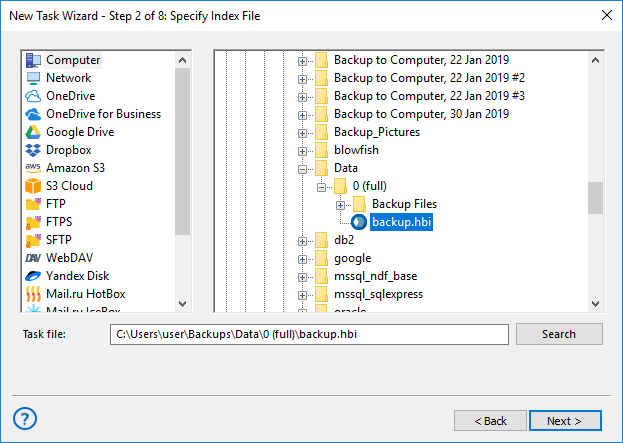
In the second step of the New Task Wizard you need to specify where your backup is stored.


Handy Backup: Selecting Restore from Local Disk/USB Disk/Flash/LAN/CD/HD-DVD/Blu-Ray
  • Select the location of the index file of the backup you want to restore, and then click Next.

  • You may choose between four locations.


    Restoring from a local/external/network/removable drive


  • Select Local Disk/USB Disk/Flash/LAN/CD/HD-DVD/Blu-Ray if the backup is stored on a local or external location seen by Windows Explorer.
Handy Backup: Locating Restore Index File

Type a path or click the Browse for folder button to browse for the folder with the index file.


Restoring from an FTP server


  • Select FTP if the backup is stored on a FTP server.
  • Handy Backup: FTP Settings

To restore from FTP you will need to specify Host, Port, User, Password, Location and Proxy settings.


  • Host: Enter the FTP server name.
  • Port: Enter the port number. The default value is 21.
  • User: Enter your FTP user name.
  • Password: Enter your FTP password.
  • Location: Type a path of a remote directory to store your backup to, or click Select FTP folder button to select it via the Select FTP folder dialog.

The Select FTP folder dialog window consists of two parts. The upper part contains the list of folders available on the FTP server, while the other shows the FTP session log messages. After establishing an FTP connection, the list of remote directories will appear. Select the desired directory, and then click Select. To create a new directory, click New folder.


  • Click Proxy if your computer is inside a firewall. The Proxy server settings dialog will appear.
  • Handy Backup: Proxy Server Settings
    1. Check Use FTP proxy if you want to use FTP proxy. Specify FTP proxy host and, if necessary, authorization data.

    2. Check Use SOCKS server if you want to use SOCKS server. Select type of the SOCKS server, specify the server name and, if necessary, authorization data.

    3. When finished, click OK.

  • Click Try in passive mode to initiate the FTP connection, rather than relying on the remote server to set it up. This may be necessary if a firewall does not allow establishing a connection from the outside.

Restoring from an SFTP server


  • Select SFTP if the backup is stored on a secure SFTP server.

Restoring from SFTP server is very similar to restoring from FTP, except that Port is 22, and Proxy and Try in passive mode are unavailable. To restore from SFTP you will need to specify Host, Port, User, Password and Location.


Restoring from a Handy Backup Online account


  • Select Handy Backup Online if the backup is stored on your Handy Backup Online account.
  • Handy Backup: Online Backup Service Authorization

    To use the Online Backup Service, you need to register an account. To do it, click the About Online Backup Service link which will open your default web browser and take you to the web page where you will be able to choose an appropriate storage plan and register your account. You can also access this page at the following URL: http://www.handybackup.net/online-backup.shtml.


    To restore from your Online Backup Service account, specify the following options:

    • User: Enter your login name.

    • Password: Enter your password.

    • Description (optionally): Write a brief description of your backup set.

    • Click Proxy if your computer is inside a firewall. Specify settings of your proxy server.

    • Click Update to download the list of tasks to restore, and then select the needed backup from the dropdown menu.


Data to Back Up:

File Backup - back up individual files and folders stored in local, LAN and FTP locations
Email Messages Backup - back up e-mail box directly from your mail server
Image Backup - perform complete hard disk image backup with all data and operating system
Email MS Exchange Backup - back up and restore Microsoft Exchange Server stores
Lotus Notes Backup - back up Lotus Notes without stopping the service
ODBC Database Backup - protect your databases by regular backups

Backup Destination:

Backup to LAN, Local and External Drives - store your backups at any drives visible in Windows Explorer
Backup to FTP - offsite backup to remote FTP server provides maximum reliability
Backup to SFTP - transfer sensitive data to a remote server via secure SFTP protocol
Backup to CD-R/CD-RW - burn your backups to optical disks with multi-drive spanning and verification options
Backup to DVD/HD DVD/Blu-Ray - record important data to DVD disks using the integrated burning tool
Handy Backup Online - store backups at Novosoft Online Backup Service instead of third-party providers