Internet Backup Service | Backup over Internet

Internet backup service software allows data backup over Internet. Among all Internet backup solutions, Handy Backup is an example of a convenient, fast and versatile software, allowing Internet backup for almost any type of network-oriented information existed.
 Download for Free
Version 8.7.0 , built on May 7, 2026. 152 MB
30-day full-featured trial period
Key Features of the Internet Backup Service
Advanced Technologies behind a Solution

Ensuring its quickness and reliability, Handy Backup includes such modern Internet backup services as multi-threaded backup, utilizing data-specific API for optimizing access to different sources and storages, “hot” backup of server data locked by other applications, and many other tech solutions.
Security and Reliability Precautions

For backup software Internet is a big source of problems, including malware, hacker activity, backdoors and simple hardware failures. Handy Backup fights these problems by a couple of counter-measures, including direct internal encryption for backups, informing users by emails and restarting missed tasks.
Internet Backup Versatility

Good Internet backup solutions must access as much different data sources and potential backup storages as possible, providing a versatile server or remote data object backup just from a single application. To do it, Handy Backup has many Internet-related plug-ins, including cloud tools.
A Note about Clouds
Clouds in Handy Backup can be either data sources or destinations for storing an Internet backup content. For example, Handy Backup provides an access to a healthy list of popular clouds including:
- Google Drive
- Microsoft OneDrive
- Dropbox
- Amazon S3 (a must for commercial users storing a big amount of data simultaneously!)
- Box, 4shared, Xref for AutoCAD and other commercial cloud services
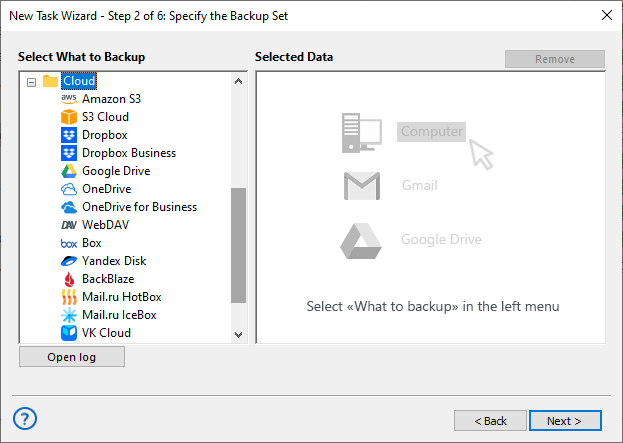
In addition, Handy Backup provides a WebDAV interface, which grants an access for any cloud (either commercial or private) supporting this type of interface. A list of cloud services supported by Handy Backup is potentially unlimited, especially considering different WebDAV bridge services.
Recommended Solution
Lifetime license

Handy Backup for Small Business
The Small Business edition contains a full set of tools provided by Handy Backup, including all Internet backup services available as Handy Backup plug-ins. Free 30-days trial version!
Backup over Internet for Websites
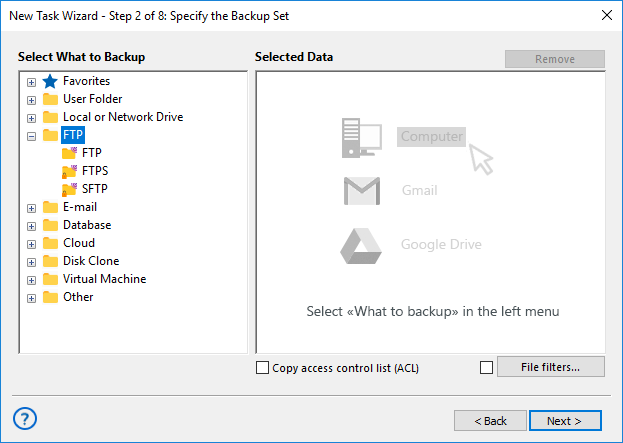
Another popular task for Internet backup services is a website backup. Handy Backup allows saving both static and dynamic website content, using some FTP protocol (including SFTP and FTPS) for static data, and an appropriate SQL-type database plug-in for a dynamic or CMS content.
Automation Advantages
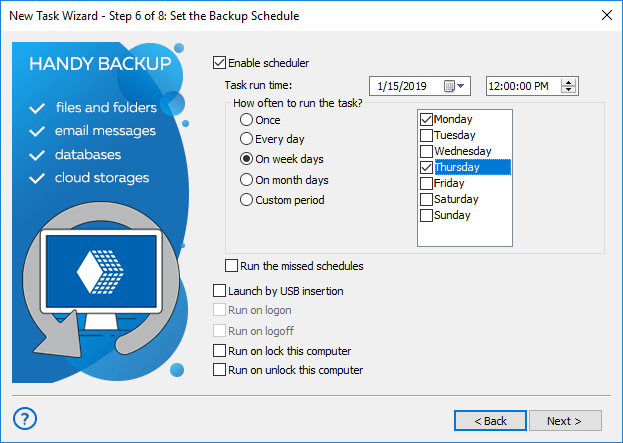
Any Internet backup service task used by Handy Backup has an option of running at an exact time, with a repeating period, which can be as small as one minute or as big as months. In addition, you can start your task when some system event (such as logon of a particular user) will occur.
Other Advantages of Handy Backup
There are many other features and functions useful for Internet backup, including optional auto compression of each file into a separate or whole ZIP archive, a possibility to run other programs before or after a task, a detailed reporting about task results, a partial backup, and other.
Download for Free
Version 8.7.0 , built on May 7, 2026. 152 MB
30-day full-featured trial period
Try Handy Backup as your trusted Internet backup service!
Download a free 30-day trial edition of Handy Backup with a complete set of plug-ins and functions, to learn all the advantages and features of this simple and versatile Internet data backup program!
Also interesting:
Online Backup - cloud protection of your data with Handy Backup
Amazon S3 Backup - back up to Amazon cloud storage to save your data
Google Drive Backup - the cloud can be used as a source of data, backup destination or as a folder to synchronize with