Microsoft Access Database Backup Software
Handy Backup provides a dedicated tool to backup Access database automatically on a regular schedule to minimize data loss, while also serving as a universal solution for database backup that supports SQL Server, MySQL, PostgreSQL, and more via built-in plug-ins.
 Download for Free
Version 8.7.0 , built on May 7, 2026. 152 MB
30-day full-featured trial period





Key Features
Handy Backup provides a set of specialized features to automatically back up Access databases, allowing you to create any backup strategy you want to apply.
Hot Backup Database in Access
The solution lets you to back up database without interrupting a work. There’s no need to close Microsoft Access; your workflow continues seamlessly during backup. Our software ensures uninterrupted operation while creating reliable copies of your data. This is a core feature of Handy Backup, which allows you to backup a database of any type efficiently and safely.


A Choice of Storage Types
The program supports different options for saving MS Access files, including Computer, Network, FTP, FTPS/SFTP, clouds by S3 or WebDAV protocols, and many commercial clouds such as Dropbox, Google Drive, OneDrive for Business or Box storage.
Preserving Original Database Format in a Copy
As long as you will not choose compression or encryption options, Handy Backup saves copies of all your data, including MS Access databases, in original formats. This can be useful for browsing or changing databases just in backups, without a restoration, for manual copying or cloning data.


Compression and Encryption Options
Data compression allows reducing the size of the backup. If you need better protection for your backup files because of security reasons, you can also choose “Encrypt the backup” option, to apply a modified 256-bit AES algorithm, which will provide strong protection for your data.
Automatic Backup Scheduling
You can back up Access database in a fully automated mode, selecting an interval for repeated backups (every day, workdays or any other period from months to minutes for automatic backups). If you are an active database user, you can set up your own convenient interval to repeat the backup procedure.

Various Backup Methods
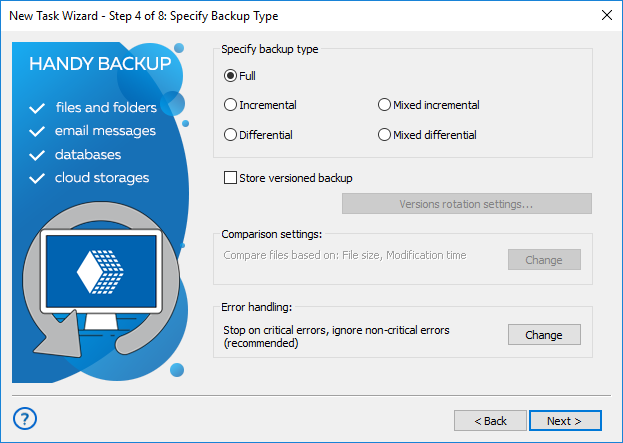
In addition to the full backup, incremental, differential and mixed backup options are also available. These types of backups are saving only changes between new and backup files. Therefore, these techniques process much less data, saving storage space and reducing Access database backup time.
MS Backup Software Testimonials

I copy all my home office files with Handy Backup, including Access databases and Word text documents, to our corporate cloud via S3. I set up tasks to do it twice per day, on a lunch break (2 pm) and after a workday ends up (7 pm). Handy Backup fully automates all necessary actions, creating an exact copy of my home workfiles and Access data on a cloud.
Samantha Georges
Recommended Solution
Lifetime license

Handy Backup Small Business
The Small Business edition contains a generic Database option out of the box, which acts as a reliable Microsoft Access backup tool, capable of backing up databases via an appropriate ODBC driver pre-installed on your computer system.
How to Backup Access Database?
To build a backup task for saving MS Access tables, follow the steps below.
-
Set up an appropriate version of an ODBC driver for MS Access via Windows Control Panel.
Note: An ODBC driver for your database is not a part of Handy Backup. Install it manually and add this driver to the list of data sources in Windows.
-
Start or open Handy Backup. Create a new task by clicking the button (or via the menu).
-
Select a Backup task on Step 1. You can also choose simple or advanced wizard mode.
-
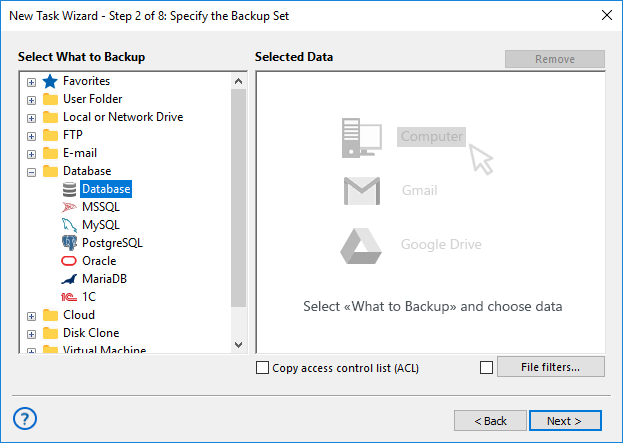
On the next step, select the Database data source in the Database group.
-
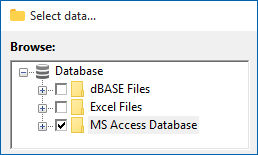
If an MS Access ODBC driver is installed, the MS Access database option will be available.
-
In the right-hand data list, select the database you need to copy.
-
Click OK and complete the remaining parameters as in the User Manual: choose storage, method, compression/encryption, schedule and controls, and name the task.
How to restore DB from Backup
To restore your Microsoft Access database from backup, follow these steps.
-
Create a new restoration task and choose either Simple or Advanced mode.
-
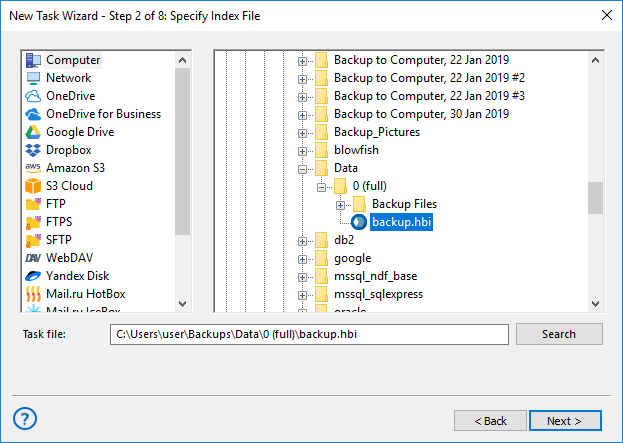
On Step 2, select the backup.hbi file in your backup folder.
Advice: In Advanced mode you can change the restore destination (useful for cloning an Access backup). Click Change location on Step 3 and pick a new location for the restored database.
-
On Step 3, Handy Backup will display the list of available databases for recovery. Select the one you need.
-
Continue configuring the task as described in the User Manual, then run the restoration.
Download for Free
Version 8.7.0 , built on May 7, 2026. 152 MB
30-day full-featured trial period
Try using Handy Backup with all its functions for a 30-days trial period, to get a personal experience about database backup.
FAQ
How to backup Microsoft Access?
The traditional method in Access involves going to File > Save As, selecting Save Database As, and under Advanced, choosing Back Up Database. This creates a copy of your database with a default name including the source and date.
With Handy Backup, you can take your backup strategy to the next level. The software allows automatic scheduling, hot backups without interrupting your work, and flexible storage options including local drives, network shares, or cloud services. This ensures your data is always safe, up-to-date, and easily restorable in case of any issues.
Which backup software for Microsoft Access is best?
Access databases can be backed up using manual methods or third-party tool. Manual backups work but require careful attention, are prone to human error, and often lack automation.
Handy Backup provides a reliable and professional solution. It offers automatic backups, support for multiple storage destinations, incremental and differential backup methods to save time and space, and security features like compression and encryption. With Handy Backup, protecting your databases becomes effortless, safe, and fully customizable.
What are the best practices for backing up MS Access databases?
Best practices for Access backups include creating regular copies, storing them in multiple locations, and maintaining version history. It is recommended to avoid keeping backups solely on the same drive as the original database and to use incremental or differential backups to save storage space and reduce backup time.
Handy Backup simplifies following these best practices. You can schedule automatic backups, choose from local, network, or cloud storage, and apply incremental or differential backup methods. This ensures your data is consistently protected, reduces risk, and saves time compared to manual methods.
How often should you back up your Access database?
The frequency of backups depends on how frequently your database changes. Actively used databases benefit from daily or even hourly backups, while less frequently updated databases may only require weekly or monthly backups. Regular backups minimize the risk of losing recent data and help maintain business continuity.
Handy Backup allows you to fully automate backup schedules according to your workflow, from hourly to monthly. It ensures your Access databases are always up-to-date, protected from accidental loss, and ready to restore in minutes, giving you peace of mind and operational reliability.