News 2011
Version 6.9.2 with Renewed User Interface
February 15, 2011
We are delighted to announce an update to Handy Backup 6.9 with several new options and features!
The new version brings a range of improvements and design enhancements aimed at making computer backups easier and more comfortable.
 Download for Free
Version 8.7.0 , built on May 7, 2026. 152 MB
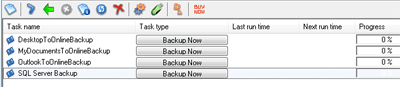
- The most obvious change to the user interface is the Task View window: now instead of a task type you will see a button that launches the respective action.
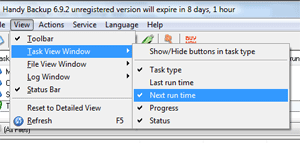
- The File View window is now hidden, by default. According to our survey-based studies, it was used by a relatively small group of advanced users, so we decided to remove it and not confuse the new users. If you want to try it, simply open the View menu, then point to File View Window, and then click Hide/Show File View.
- All areas of the main window are now fully customizable: virtually every element of the graphical interface can now be shown or hidden. This is also done via the View menu.
- Users of the Image Backup will now see a special hyperlink in their task logs, offering them to create a backup/recovery drive with Handy Backup Disaster Recovery:

- Several performance optimizations have been made to the Oracle Backup plug-in. Earlier, restoration of an Oracle database to a new server could work incorrectly if the new server’s environment was different from the original one. Now this issue has been resolved.
- As always, there are many minor user interface improvements, including automatic refreshing of the task list, more details on possible errors, changes to localization settings, and much more.
Download for Free
Version 8.7.0 , built on May 7, 2026. 152 MB
Download reliable and easy backup software for any Windows PC or server!
You can try Handy Backup for 30 days for free!
Version 6.9.3: Improved GUI and New Tasks
March 17, 2011
We are happy to release Handy Backup 6.9.3 that further continues our commitment to making the program easier to use:
- The Documents Backup task has been split into several tasks to back up music, videos, pictures and documents, separately:
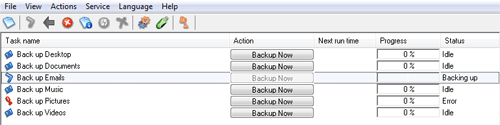
To create sample tasks, simply check the respective option during the installation.
- The program now handles more correctly situations when you change locations of User Folders (Music, Videos, Pictures, etc.)
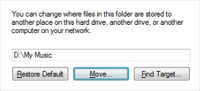
For example, if you change the Music folder path to D:\My Music, the respective backup tasks will start copying files from a new location.
- Localizations of non-English versions of Handy Backup have been updated (Czech and Russian languages).
- Several users reported that restoration tasks showed Warning messages when restoring incremental and differential backups, even though everything had been restored correctly. This issue shouldn’t appear any longer.
- The Buy Now button on the program’s toolbar now analyzes your usage of the program (particularly, plug-ins used in your tasks) and suggests the most suitable product to purchase - so you don’t need to study and compare different editions of Handy Backup:
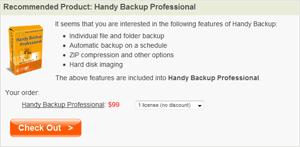
- As always, there are many minor improvements to user interface, notifications, and general performance of the utility.
Version 6.9.4: Step Towards Easier Network Installation
March 31, 2011
We are happy to announce an update to Handy Backup. The new version 6.9.4 features several new functions designed to help administrators deploy the software in an easier and more comfortable way.
- Automatic Registration. The installation package (handybackup_setup.msi) now accepts the REGISTRATION_KEY parameter which automatically registers the program during the first launch. It can be applied in the following way:
msiexec /i "handybackup_setup.msi" REGISTRATION_KEY="XXXXXXXXX"
(change the value inside the quotes to the desired registration number)
- Silent Installation. Another new installation option allows performing quiet setup, when no installation dialogs are displayed, and the program is silently installed to a default place. For silent installation, use the /quite parameter:
msiexec /i "handybackup_setup.msi" /quite
- Logging. To track errors during silent installation (or for any other administration purposes), you can now turn on event logging through the use of the /log parameter. The usage is as follows:
msiexec /i "handybackup_setup.msi" /log install.log
- Remote Installation. Handy Backup can now be installed remotely over Active Directory, by creating and applying the respective Group Policy on a network.
To learn about installing software over Active Directory, please see https://support.microsoft.com/kb/816102.
We hope that these features will make it easier to set up backup plans on any Windows network!
- Several users have reported that the option to delete unnecessary files during restoration (see Advanced Restore Settings for details) didn’t work correctly. This problem has been fixed now.
- Names of default tasks in localized (non-English) versions of Handy Backup were updated.
- There are some minor enhancements and fixes in graphical interface, logging engine and general performance of the program.
Version 6.9.5: Easier Data Selection and MySQL Plug-in Added
June 23, 2011
Dear friends! It is a great pleasure to announce the release of Handy Backup 6.9.5! Here are some of the highlights of the new version:
- MySQL Plug-in. We are happy to respond to multiple user requests and add a new plug-in for backing up MySQL databases:
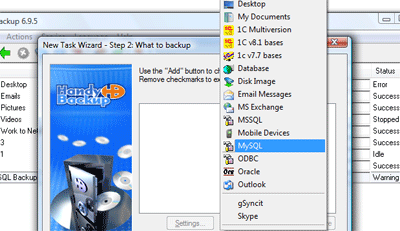
To back up MySQL, you need to click MySQL in the list and create a connection. Please read detailed description of MySQL Backup...
- Folder Lock. We have added a new option to “lock” folders selected for backup, which prevents new child objects from being backed up. Please see the explanation below.
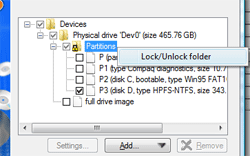
When you select a folder partially, it is ambiguous what you want:
- Back up only objects you selected
- Back up the entire folder, but skip the objects you excluded
On the screenshot above, it is clear that the user wants to back up Partition P3, and not back up any other elements that may appear in the Partitions folder.
Here is an opposite example:
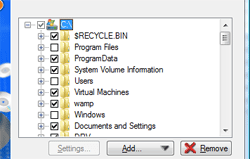
In this case, the user wants to back up the entire disk C:\ and skip folders C:\Windows\, C:\Users\ and C:\Program Files\. But the selection is similar to the above, and the program doesn’t know if it should back up only checked objects, or back up the entire folder without the excluded ones.
The Solution
Basically, this can be solved with file masks (which have been in Handy Backup for years). But the use of file mask filtering is not very obvious and requires a lot of attention for complex backup task (especially in Server Data Backup). This is why we decided to go further and introduce a new option of “locking” folder contents:

When you “lock” the folder, new objects that appear in it will not be backed up, i.e. the backup will be limited only to elements you selected during task creation.
Download reliable backup software for Windows workstations and servers! See download details...
- Handy Backup Standard. Buy for $39
- Handy Backup Server Network. Buy for $299
- There are several fixes and minor improvements to user interface and general performance of the utility.
Version 6.9.6: Support for 64-bit MS Exchange and MS SQL Server
August 12, 2011
Dear friends!
We are delighted to release of new version of Handy Backup. You can read about the new features below:
- Version 6.9.6 comes with two new plug-ins for protecting 64-bit versions of MS Exchange and MS SQL Servers.
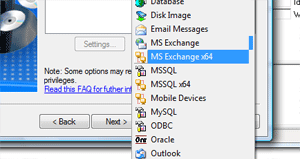
Designed specifically for 64-bit systems, Handy Backup Workstation x64 allows the core application to back up and restore 64-bit applications.
Using New Plug-ins in Handy Backup Server Network
- Local Backup. Users of Handy Backup Server Network who need to back up Exchange 2010 or MS SQL on a local system, need to simply install Handy Backup Workstation x64 on the same computer.
- Network Backup. If you want to back up Exchange or SQL Server located on a remote workstation, install the 64-bit Workstation on that computer, and perform common configuration of Backup Network Workstation. Make sure that Workstation name is different than the name of the original workstation (by default, the configuration utility will add the "_x64" postfix), or otherwise it will replace the original workstation in the Handy Backup Server Network’s backup network.
64-bit Workstations are licensed individually, i.e. the use of both 32-bit and 64-bit Workstations on one computer requires two “spots” in the backup network of Handy Backup Server Network. You can add more workstations to Handy Backup Server Network for $19 per unit. To do it, please contact us at [email protected].
Other Improvements
- Several users have reported that the MySQL Backup plug-in worked incorrectly when backing up databases or tables with names starting with digits. In version 6.9.6 this issue has been fixed.
- Minor optimizations were made to the FTP backup engine, user interface, and other parts of the program.