Backup Exchange 2010 Mailbox Database

Backup Exchange 2010 to keep your business messages intact from disasters both expected and unexpected, such as ransomware attack or re-installing your Windows Server. Handy Backup will backup Exchange 2010 database through the dedicated, easy-to-use “MS Exchange” plug-in.
 Download for Free
Version 8.7.0 , built on May 7, 2026. 152 MB
30-day full-featured trial period
Advantages of Handy Backup as Exchange 2010 Backup Software
Task Automation
To instruct Windows to backup Exchange Server 2010 on a regular basis, you can schedule backup task, with an exact time to run and an exact period of repeating, which varies in length from a minute to some months. Additionally, you may run your Exchange 2010 backup task by system event (e.g., logon).

Internal Security
Ensure that your Windows Server backup Exchange 2010 data to some secured place, such as to an SFTP, FTPS server or an Amazon S3 bucket, by using an encrypted transferring protocol! Another possibility is to use the internal encryption by BlowFish, either standalone or along with compression.
Big Selection of Data Storage Methods
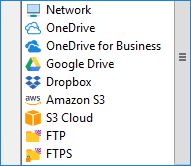
Besides the protected storages mentioned above, you can backup Exchange Server 2010 messages to many other places, including local and network disks, external USB drives, NAS and FTP servers, as well as to clouds (example, backup to Google Drive, Dropbox, OneDrive, OneDrive for Business).
Advantages of Exchange 2010 Backup and Restore with Handy Backup over Stock Utilities
Besides the crucial features described above, the main advantage of Handy Backup over dedicated Exchange 2010 backup utilities is its uniformity, which allows making backups for any server-level or user-level data from a single program, and, if you need it, from a single task. Other advantages are:
- “Silent” running of preset tasks as Windows service;
- Hot backup via Volume Shadow Copying (VSS);
- Mailing notifications and key reports for system administrators;
- Possibilities for manual and granular recovery (for unencrypted backups only);
- A comprehensible, comfortable graphical interface for users of any level.

Customers about Exchange 2010 Mailbox Backup by Handy Backup
Recommended Solution
Lifetime license

Handy Backup Small Business
This powerful solution for a single machine allows your Windows Server backup Exchange 2010 data automatically, quickly and easily, just out of the box!
How to Backup Exchange 2010 with Handy Backup
For backing up Exchange 2010 database, as well as any other edition of the Microsoft messaging server, please use the “MS Exchange” plug-in. To save the mailbox database with an automatic backup task, please use this instruction:
- Run Handy Backup. Create a new task by clicking onto the button on the panel.
- On Step 1, select the backup task type and click “Next”. You can choose either simple or advanced task wizard mode on this step.
- On Step 2, expand the E-mail group on the left panel and click onto MS Exchange.
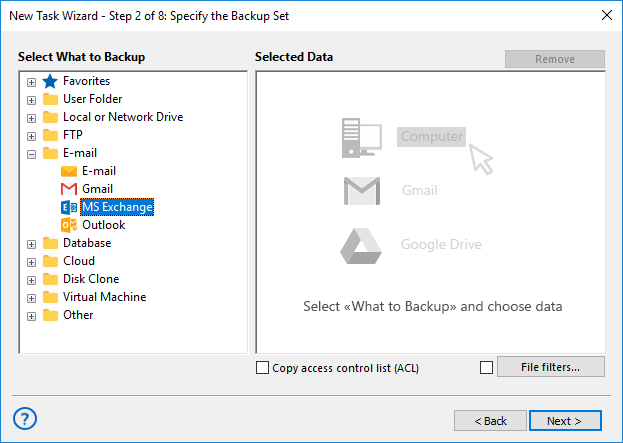
- You will see the plug-in data selection dialog. Mark checkboxes against the names of databases associated with particular accounts and mailboxes.
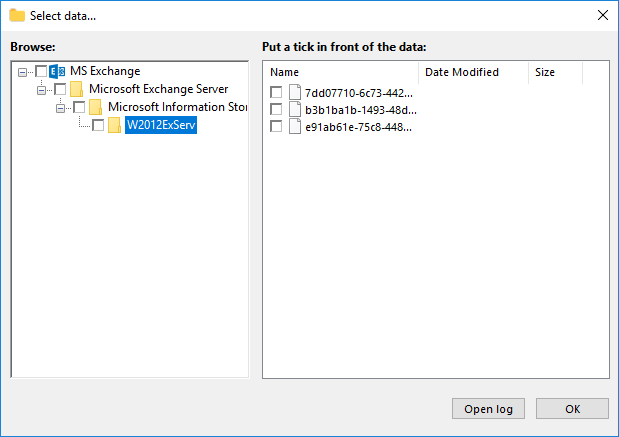
- After selecting all data to backup Exchange 2010, click OK and return to Step 2.
- Continue creating a task according to the User Manual. These steps are not specific for backing up Exchange 2010.
Restoring the Exchange Server 2010 Backup
You may want to create an auto recovery task when you need to make Exchange 2010 restore mailbox from backup. This is as simple as backup task.
- Create a restoration task by making a new task and selecting data recovery type on Step 1. Use either simple or advanced mode, as you wish.
- On Step 2, select your backup storage and find a file called backup.hbi, which contains your Exchange Server 2010 backup data.
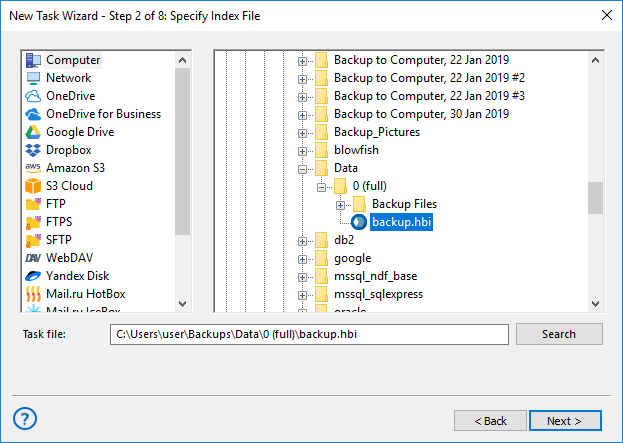
- Select this file and click “Next”. This will restore Exchange 2010 database from backup into its original place.
- Continue creating a recovery task as described in the User Manual.
Note! Current version of Handy Backup allows you to restore Exchange 2010 mailbox database to its original location only. This restriction is a result of Exchange internal architecture, and is not a Handy Backup flaw. Still, our Development Team works to avoid this restriction later.
Download for Free
Version 8.7.0 , built on May 7, 2026. 152 MB
30-day full-featured trial period
Experience how easy is to backup Exchange 2010 with Handy Backup! Try it just now by downloading the latest version with all plug-ins for the 30-day free trial period!
"I backup and restore Exchange 2010 files regularly, along with other server data such as MS SQL bases. It is my job, and Handy Backup allows me to do it very quickly and reliable. Big thanks!"
Charles Brooks, a system administrator for “Nortrope Chems, Inc.”, WA