OpenLDAP Backup and Restore for LDAP Database Server | Coming Soon

LDAP backup allows saving user-specific data by using a LDAP protocol. Some software partially or fully supporting LDAP, such as Microsoft Active Directory or OpenLDAP, will utilize this protocol to keep user data, and a Handy Backup plug-in for LDAP backup will bring a new level of security for LDAP software.
Features of a New LDAP Backup Plug-in
Automatically Backup LDAP Server Data
The new plug-in will automate all operations over LDAP backup, such as OpenLDAP backup and restore actions. Such features as scheduling tasks by time or by events, compressing and/or encrypting LDAP backup files and running other software before/after actions will bring full automation to LDAP backup!

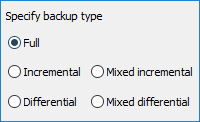
Controlling LDAP Backup and Restore Algorithms
You will make flexible LDAP backup operations with a new plug-in by doing such things as incremental, differential or mixed (full/differential) backups, keeping some versions of the same dataset when LDAP backup database several times from one source and making time stamps for backup LDAP server data.
Selecting LDAP Backup Storages
You can choose not only how to backup OpenLDAP or other LDAP database but also where to store a resulting backup set. You can select an online storage (the Handy Backup own online backup vault, a cloud such as Amazon S3 or Google Drive, a SFTP etc.), or offline storage such as an USB hard drive.
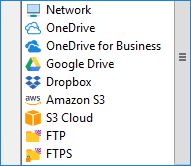
How to Backup LDAP Server Online
To utilize LDAP backup and restore in online mode, you will need a network-oriented backup solution of Handy Backup, which can operate LDAP backup actions on remote machines from a centralized management console.
Read more about Handy Backup Server Network
Other Useful Features of LDAP Backup with Handy Backup Plug-in
Among the principal advantages of Handy Backup when organizing backup database content are many things not listed as crucial features above. We are shortly describing some of these useful options just here:
- Making time stamps on LDAP backup versions;
- “Hot” LDAP backup without stopping a server instance;
- The possibility of restoring LDAP backup to other place (e.g. to clone an OpenLDAP database);
- Running other programs before and/or after a LDAP backup task.
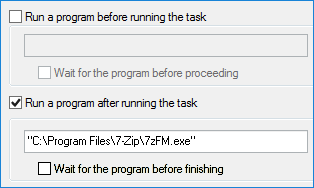
Interested at a New LDAP Backup and Restore Feature?
Very well! Please do not hesitate to write us a letter with your opinions, needs and wishes about this new plug-in! We will glad to make a new LDAP backup instrument according to the opinions of our friends and customers, so you are sincerely welcome to send us a letter about LDAP backup!