DVD Backup: Backup to DVD, HD DVD, Blu-Ray
DVD backup enables the transition to modern data storage solutions. Handy Backup serves as an exemplary DVD backup software, featuring a dedicated "DVD" plug-in supported up to Handy Backup 7.x.x (32-bit) versions. Experience a 30-day free trial, accessing all functions and features!
 Download for Free
Version 8.7.0 , built on May 7, 2026. 152 MB
30-day full-featured trial period

Compatibility and Acquisition of DVD Backup Software

Our product is tailored for Windows 10/8/7/Vista and Windows Server 2022/2019/2016/2012/2008. Additionally, it can function as DVD data backup software for various Linux distributions. Please be aware that the final version supporting backup on DVD is Handy Backup 7! In Handy Backup 8, such a plug-in is not available.
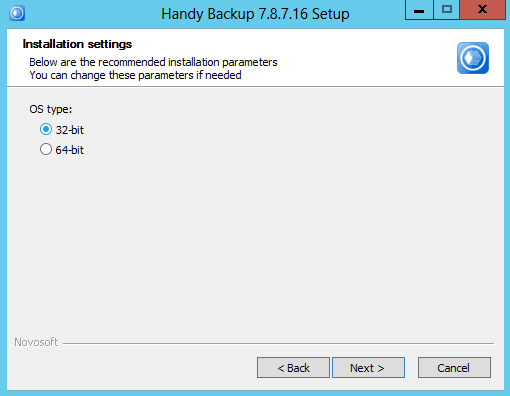
Installing a 32-bit Version of Handy Backup
After running the installation process, please select the “32-bit” mode in the Installation Wizard screen. Note that the installer automatically selects an appropriate version for your system; if you do not force the change from 64-bit to the 32-bit solution, you will not obtain a DVD backup software plug-in!
DVD Backup Features

Support for Different Types of Optical Discs
Handy Backup supports backup DVD discs of all kinds including DVD-R, DVD+R, DVD-RW, DVD+RW. When you select CD/DVD/Blu-ray, the program automatically detects the type of optical media and uses it. It is also true when selecting backup to CD or DVD; you do not need to set up a disc type.

Back up Everything: From Files to HDD Images and Server Apps
You can back up individual documents, hard disk images, system files, SQL databases, and much more - depending on the edition you use (and yes, you can perform DVD data backup for any data source).

Compression, Encryption and Other Options
To store DVD data backup in the most efficient way, you can use compression, encryption, and other options. You can also run other software before or after a task, e.g. a batch RAW converter when you backup photos to DVD.
Recommended Solution
Lifetime license

Handy Backup Standard 7
The Standard edition for a single home PC can replace backup on DVD with all modern data storage technologies, including cloud backup and scheduling online data copying.
Recording Backup to DVD

To backup files to DVD, make sure your computer is equipped with a DVD-R drive. Our software supports all types of CD/DVD/Blu-ray discs and the respective burning devices.
Tip: When backing up large files onto multiple DVDs, make sure to label them with numbers. You'll need to insert them in sequence during the restoration process. (This advice also applies to recording backups onto CD disks and any other removable media).
How to Backup DVD Collection with Handy Backup
It is easy. To use Handy Backup as DVD data backup software, please follow these simple steps:
- Create a new backup task.
- Select CD/DVD/Blu-ray from the Local or Network Drive group as backup source on Step 2.
- Click “Next” and select a new backup location (for example, backup DVD to hard drive) as backup destination on Step 3.
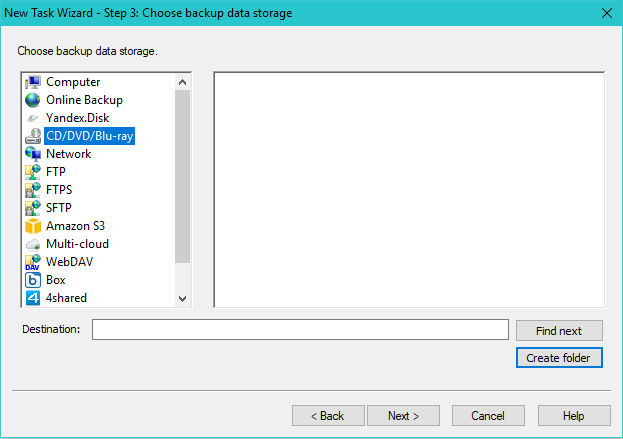
- Now you can choose between the four types of backup: full, incremental, differential and mixed full/differential techniques. Best backup to DVD allows you to skip files already backed up:
- Full backup merely copies selected data to DVD disc.
- Incremental backup copies changes since previous full or incremental backup.
- Differential backup copies only changes since the most recent full backup.
- Mixed backup makes a copy of your data, and then perform several differential backups. After reaching a preset quantity of repeating backups or a predefined time interval, it will make a new full backup, repeating all cycle again.
- Other steps are optional: you can enable compression, encryption, scheduling, etc.
That is all you need to do to backup DVD!
Important Note: When considering backing up a commercial DVD, please be mindful of the legal aspects involved. In most cases, such actions are prohibited by law. We advise against backing up DVDs unless you have obtained the necessary permissions, such as the right to back up DVDs for personal use.
DVD vs HDD Backup
Backup to DVD:
While DVD backup continues to serve as a functional means for storing data, its relevance has declined in light of more advanced options available today. Although still preferred by some for its simplicity and affordability, especially for smaller data volumes, DVD backup faces limitations in terms of storage capacity and convenience compared to modern alternatives like cloud storage and external hard drives.

Backup to HDD:

Backup to External Hard Drive offers several advantages over DVD backup. HDDs provide larger storage capacities, faster data transfer speeds, and are reusable, allowing for easy overwriting or updating of backups without requiring new physical media. Additionally, HDDs are more durable and reliable for long-term data storage compared to DVDs. Overall, HDD backup provides greater flexibility, efficiency, and durability compared to DVD solutions.
HD DVD
The advantages of HD DVD backup include time-saving benefits, reduced overall effort required for backing up large amounts of data, cost-effectiveness compared to hard drive or multiple CD/DVD backups. HD DVD attempted to enhance DVD with higher resolution and capacity but failed to gain widespread support and was replaced by Blu-ray. However, if you require HD DVD backup, Handy Backup version 7 supports various backup formats, including this one.
Blu-Ray Backup
Currently, Blu-ray discs are still used, primarily for storing high-definition video content and console video games. However, their usage has somewhat declined compared to previous years due to the rise of digital streaming services and cloud storage solutions, such as backup to OneDrive or Dropbox, for instance.
Backing up Blu-ray discs with Handy Backup is straightforward. To begin, create an ISO copy from any Blu-ray disc in your collection. Once you have completed this "primary" backup of Blu-Ray to ISO, utilize Handy Backup and choose a folder containing your ISO files using the "Computer" plug-in on Step 2.
Benefits of Blu-ray Backup with Handy Backup
- Disc spanning: Handy Backup splits data across multiple discs if needed, ensuring all essential data is backed up, particularly when creating disk image backups.
- Blu-ray backup verification: Handy Backup verifies data on Blu-ray, CDs, and DVDs for integrity and security.
- Scheduling: You can schedule automatic backups conveniently. Blu-ray discs offer ample storage, requiring less frequent replacement than CDs or DVDs.
FAQ: Transfer Your Backup DVD to ISO or Separate Data
Here are the most common questions and answers about backing up on DVD.
Question (Q): How can I back up a DVD to HDD?
Answer (A): You can back up a DVD to ISO images and then save these images to a hard drive or other media.
Q: Can I back up an encrypted DVD with Handy Backup?
A: No, it is illegal. The exception is when Handy Backup created this particular encrypted DVD itself.
Q: How can I back up DVD video?
A: These are also legal matters. Technically, you can back up a DVD to MP4 or create an ISO file image.
Q: Why should I consider backing up my DVD collection to another location?
A: DVDs are obsolete now. Most PCs in the 2020s no longer have a DVD drive slot. Please consider using another media to store your crucial data nowadays.
Q: Which media can replace backing up on DVD in Handy Backup?
A: The current version of Handy Backup supports local and network drives, shared folders, USB external drives, FTP, SFTP, and FTPS protocols, access to private and commercial clouds via S3 and WebDAV interfaces, as well as popular online storage such as OneDrive, Google Drive, Dropbox, and Amazon S3.
Upgrade Your Backup Strategy

Due to advancements in data storage technologies, we highly recommend transitioning from DVD backups to more modern, reliable, and manageable storage solutions. Consider utilizing options such as cloud storage, external drives, and fast SSDs to replace DVD backup plans with more efficient and convenient methods. For more details, explore the pros and cons of DVD backups.
Download for Free
Version 8.7.0 , built on May 7, 2026. 152 MB
30-day full-featured trial period
Welcome and try our backup to DVD Handy Backup 7 software! A free version for a 30-day trial!