Upload to Dropbox via FTP
FTP to Dropbox backup technique is one of the most popular implementations of cloud technologies to mirror, backup or remote-administering website content or other FTP information. Automating this process is a way to save many time and efforts.
 Download for Free
Version 8.7.0 , built on May 7, 2026. 152 MB
30-day full-featured trial period

Advantages of Dropbox FTP Backup via Handy Backup

Direct Connection. To simplify entering and tuning all Dropbox FTP settings, Handy Backup uses plug-ins for both data storage media, allowing direct connection between FTP and Dropbox folders.

Task Automation. With Handy Backup, a user can schedule automatic tasks for saving FTP to Dropbox. A scheduling engine allows starting these tasks by time with a selected interval.

Convenient Controlling. If you want to upload to Dropbox via FTP, you can just make a new task by using the New Task Wizard with simple and advanced modes, as well as control a task via intuitive GUI.
Method of FTP to Dropbox Backup

Moving copies of FTP files to Dropbox via Handy Backup is simple: a task will copy files from an FTP server and move these data directly to Dropbox account. This method uses no third-party software such as Dropbox Agent – only the FTP server as the data source, and Dropbox account as the destination.
Recommended Solution
Lifetime license

Handy Backup Professional
The Professional edition is a perfect utility to upload to Dropbox via FTP or vice versa. It contains all necessary plug-ins and tools just out of the box!
How to Place FTP Files into Dropbox: Short Instruction
To create a task backing up FTP to Dropbox account, please follow the action sequence listed below:
- Create a new task by pressing Ctrl+N or clicking the button on the control panel;
- Select “Backup” on Step 1. Also, you can choose between simple and advanced modes;
- To go to each next step, click “Next”. On Step 2, select “FTP” in the “FTP” group as data source;
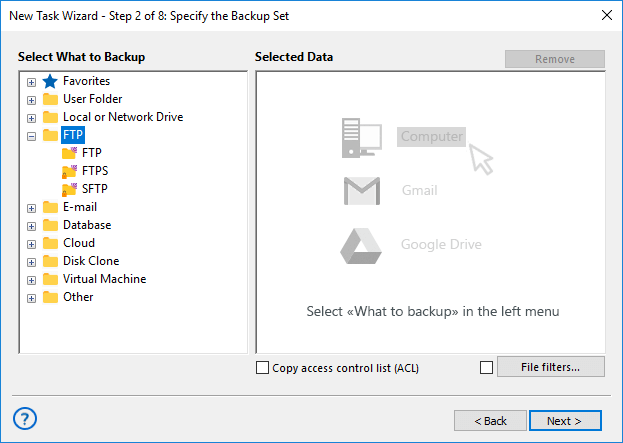
- Click onto the “Create a connection…” option;
- Enter your FTP connection settings in a setup dialog;
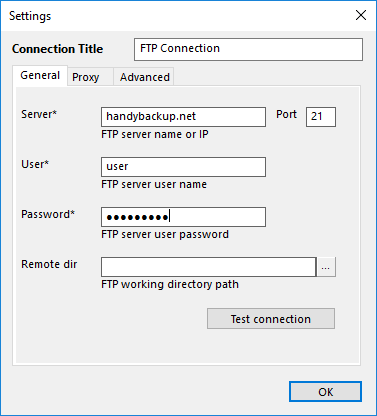
- Test your connection. If successful, press “OK” to return to task wizard;
- On Step 3, select the “Dropbox” option as the destination;
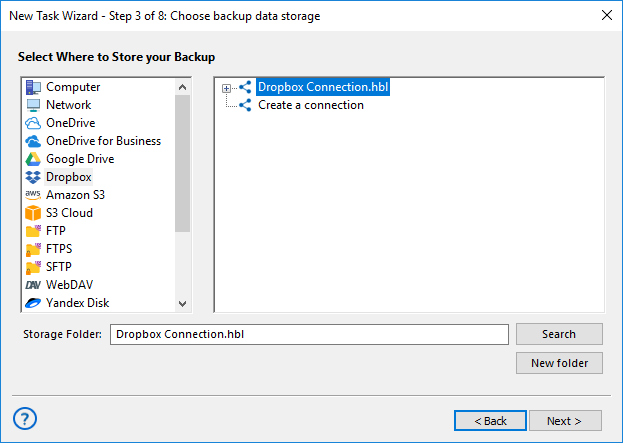
- Again, click “Create a connection…” and set up your Dropbox account parameters.
- Select a destination folder in your new connection, then click “Next” to proceed.
- Continue with all other task options like scheduling and data encryption as usual.
Following this sequence, you will create an effective Dropbox backup task using FTP as the data source. Each time the task will start manually or by scheduling, it will make Dropbox-FTP download without any need for further interference by user.
Note: You can use a protected FTP server connection (SFTP or FTPS) instead of FTP by selecting an appropriate plug-in. These plug-ins have slightly different configuration dialogs than a plain FTP. In all other cases, all things are just the same as for FTP to Dropbox backup!
Manual Methods

It is no difficulty to copy any file to Dropbox folder, although it may be a tricky process to grab this file from FTP. Specialized client software, like FileZilla, or a browser-level FTP access, must be implemented to take some FTP files or folders without automation.
Dropbox FTP Backup Scripts

Performing FTP to Dropbox backup actions manually or by script is principally possible, but saves up to no efforts when compared with automatic actions, and have much more risks of human failures or operational insecurity.
Download for Free
Version 8.7.0 , built on May 7, 2026. 152 MB
30-day full-featured trial period
Experience Handy Backup as a mighty tool for Dropbox-FTP connections!Try it personally by downloading a 30-day free trial version!