Server Backup Software - Handy Backup Server Network
Server backup software - Handy Backup is an easy and powerful solution for both Windows Server backup and local network data copying. This utility controls an entire network backup from a single panel. It supports Windows Server 2025, 2022, 2019 and earlier editions, as well as Linux files backup.

List of Supported Databases: MySQL, MS SQL, Oracle, Postgre SQL etc.




Comprehensive Network Backup Coverage

Workstation Data
Securely back up files, user profiles, and settings across multiple workstations to ensure reliable recovery and centralized management. This reduces downtime and preserves user productivity in case of data loss or system failure.

Email Services
Protect communications and configurations by backing up Microsoft Exchange, IMAP, and other mail systems. Reliable access to email data supports uninterrupted business communication and prevents loss of critical messages.

Virtual Machines
Protect virtual infrastructures with Hyper-V and VMware backups that secure machine data and configurations. Regular VM snapshots reduce risks from hardware failures and simplify disaster recovery for virtual environments.

Databases
Back up critical databases including MySQL, PostgreSQL, SQL, and Oracle to maintain secure data operations. Regular database protection ensures business continuity and prevents loss of transactional information.
List of Supported Databases
Create backups with Handy Backup Server Network via the Central Console








Handy Backup Server Network: Basic Terms

Management Panel: a component of the program that contains a graphical user interface (GUI), which allows creating and controlling network backup, recovery and synchronization tasks.

Network Agent: a component for installing to any target computer, either server or workstation, on a network, which will make all actual data processing for backup and recovery.
- Workstation Agent: a type of Network Agent that can process only user-level data, such as files, folders, emails, MS Outlook data and registry, as well as FTP or cloud content.
- Server Agent: a type of Network Agent that processes both user-level and server-level data, such as virtual machine arrays, databases and MS Exchange content.

Central Console: a machine in a local network that contains a Management Panel, required for controlling all tasks from a single point. It also contains a copy of a Network Agent for backup.

Remote Machine: a server or a workstation with an appropriate type of Network Agent installed to, which can send or receive backup data via network.
Example of Network Backup
Here we describe a sample setup for centralized backup. Imagine a small network with six user computers, a data server running MySQL and SFTP (also hosting the company website), and a storage server managed by the system administrator.

Install the Management Panel on the storage server to serve as the central console.
Install a Network Agent on the console to manage tasks for data protection and recovery.
Deploy Workstation Agents on all user computers for complete network coverage.
Install a Network Agent on the data server to include it in the network backup.

How it works:the system administrator oversees all tasks from the central console using the Management Panel. Each task can involve any machine via its Network Agent to carry out data management, recovery, or synchronization operations.
Intuitive Interface for Centralized Management
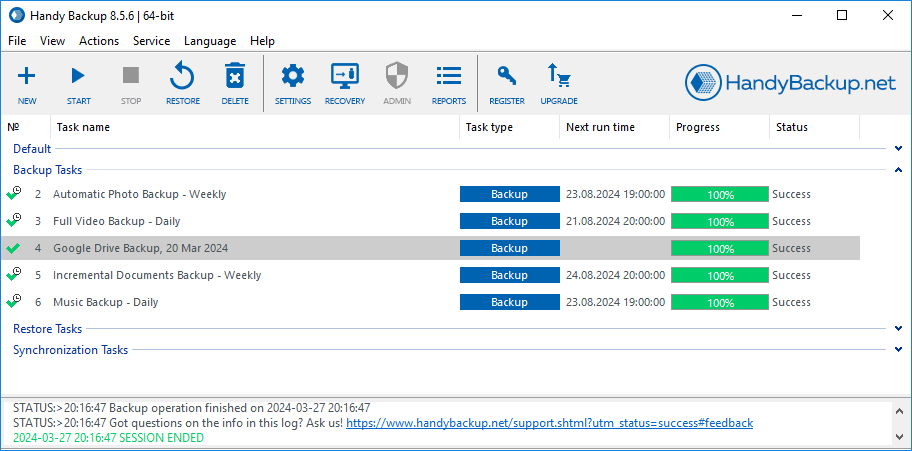
Server Backup Software Interface
Handy Backup’s main console lets you easily organize and group your tasks, providing a clear overview and faster management. With intuitive task grouping, you can prioritize jobs, monitor progress at a glance, and streamline your workflow for maximum efficiency.
Centralized Configuration and Deployment
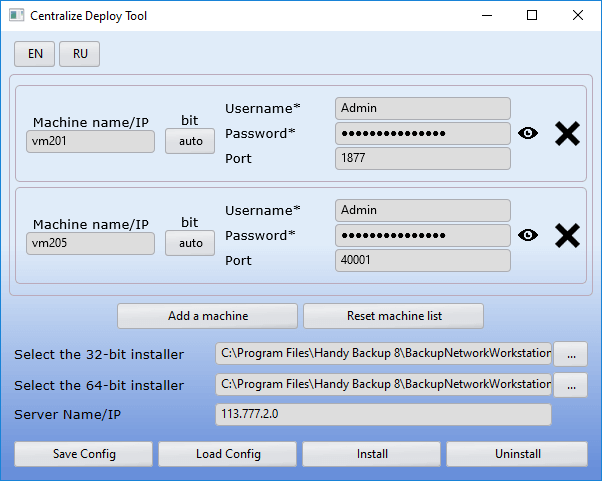
Newest versions of our Windows server backup software allow creating pre-configured installation packages and deploying Network Agents across a local network directly from the central management panel. This greatly streamlines implementation of data protection architecture in large or heterogeneous IT environments, eliminates manual installation overhead, reduces setup errors, and enhances overall security by avoiding reliance on third-party deployment tools.

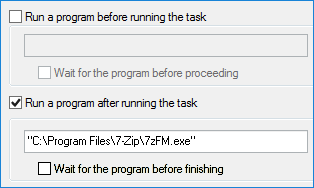
Calling for External Software
You can run an external program or batch file automatically before or after a particular task, allowing Handy Backup to be part of an integrated data workflow.
For example, you can execute antivirus scanning with an external program before your Windows Server 2025 data protection task, ensuring that the dataset is free from viruses.
Web-based Interface
Handy Backup’s web-based interface lets you manage and monitor data protection and restoration tasks from any device using just a browser. You can create, edit, and run jobs remotely, track progress in real time, and get instant notifications about issues. While task processing requires a Windows workstation, the web interface allows access and management from any operating system.

Silent Mode – No Distractions for Users
Client components of the Windows server backup tool will run as Windows services or hidden Linux processes, making no distraction for remote users. The central console also has a service mode.
 Download for Free
Version 8.7.0 , built on May 7, 2026. 152 MB
30-day full-featured trial period
How to Create a Network Backup Task?

Our website features articles on setting up various network backup tasks. You’ll find guidance on saving files and folders from remote machines, as well as copying database content from file servers and other networked machines to different storages. Discover all the details and best practices for using our backup software for servers in the User Manual.
Why Choose Our Windows Server Backup Tool

Wide Storage Options: Use local and network storage, along with FTP, FTPS, SFTP, NAS, and cloud storage (e.g., Amazon S3, WebDAV). Ensure your data remains safe and reliably accessible.
Partial Protection: Optimize storage and processing time with incremental tasks that save only changes since the last full copy, and differential tasks capturing changes since the last complete snapshot.
Strong Encryption: Protect sensitive data with advanced encryption methods like AES-256, AES-128, or Blowfish. These ensure that your Windows server data is secure both during storage and transfer.
Advanced Scheduling: Configure automated schedules to ensure consistent data protection without manual intervention. Avoid peak usage hours and perform tasks during optimal time windows.
Centralized Management: Use a centralized solution to manage data across multiple devices in real time. Monitor and control all tasks from a single interface, ensuring consistent protection of your information.
Flexible Restoration Options: Quickly restore your data using both file-level and full-system recovery options. Recover a single file or rebuild an entire file server with precise and reliable restoration tools.
Cross-Platform Support: Ensure full compatibility across various Windows environments, and also with popular Linux distributions such as Ubuntu 22.04 and Debian 12/11 for seamless operations.
Individual File Restore: Thanks to native-format storage, you can easily and quickly recover individual files. Restore specific files reliably without performing a full system copy.
Cross-Platform Support
The remote PC and server backup solution Handy Backup Server Network is designed for Windows 11, 10, 8, 7 and Windows Server 2025, 2022, 2019, 2016, 2012, 2008(R2). The program is also compatible with Ubuntu 22.04, Debian 12, 11 and other Linux distributions*.
*Network agents (workstations) running on these Linux operating systems are centrally managed through a control panel on Windows OS. For backup solutions on other Linux distributions, please contact us at [email protected].


Virtual and Physical Server Backup Software
Virtual Server Backup
Our solution also provides seamless support for Hyper-V and VMware backup and restore. The program can take live snapshots of virtual machines, back up VM hosts and guest systems, and restore them with minimal downtime. As a full-featured virtual server backup tool, it ensures reliable protection and quick recovery for all virtual environments.

Physical Server Backup
Our physical server backup software designed to protect critical infrastructure. It enables centralized execution of data protection tasks for real hardware, including full disk images, databases, mail systems, and system states. The solution provides system administrators full control from a single panel while keeping performance impact minimal.
List of Supported Clouds


Step-by-Step Guide: How to Backup Windows Server with Handy Backup
In this guide, we’ll show you how to back up a MySQL database from a remote server to a network NAS using Handy Backup. The same workflow applies to other server data types as well.
- Click "Create" in the Management Panel, then select the backup task type and enable advanced mode to access all options.
- In Step 2, click "Next" and choose the appropriate backup data, then select a remote machine from the drop-down list in the upper left corner.
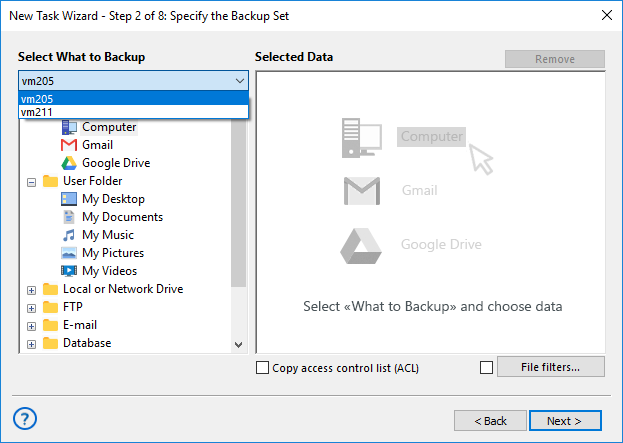
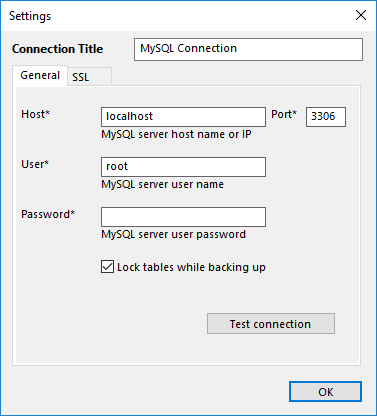
The Server Network edition works with the local machine by default, but you can choose another from the drop-down list. Available data plug-ins depend on the Network Agent type installed: Workstation Agents back up files, folders, and drive images, while Server Agents also back up databases and virtual machines.
- To back up MySQL, install a Server Agent on the remote machine, select the computer, click the "MySQL" plug-in, enter the connection parameters in the dialog, and click "OK".
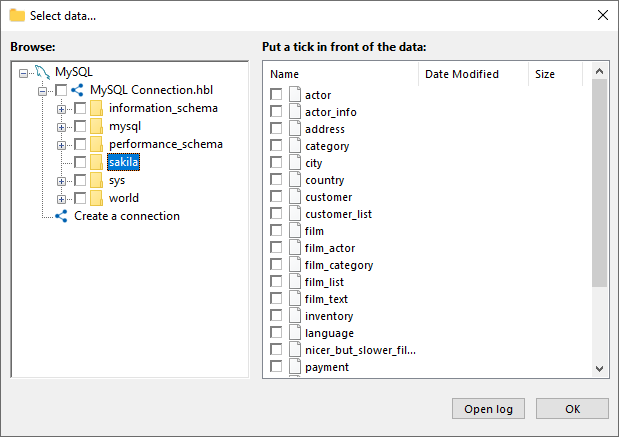
- Click the new connection name in the data selection dialog. Mark the checkboxes next to the MySQL tables you want to include or exclude, then click OK when you're done. Next, click "Next" to proceed to Step 3 and select the storage location for your remote backup.
The file system provided by the MySQL plug-in treats folders as databases and files as tables.
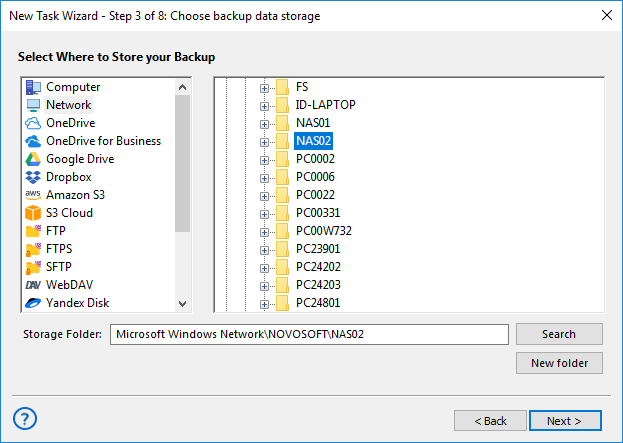
- Choose a remote computer from the drop-down list in Step 3, then click on the "Network" plug-in name. Select the appropriate folder on the NAS server from the list of available network resources.
- Click "Next" to proceed with configuring settings such as encryption, automation, and more. For further details, refer to the manual. Give your task a name in the final step, and your Windows Server backup to NAS is all set!
Licensing Information
To order server backup solutions for a network, you need the Management Panel and Network Agents:
Handy Backup Server Network** |
$299 |
Workstation Agents |
$39 per unit |
Server Agents |
$149 per unit |
** Handy Backup Server Network installation also includes one Server Agent to back up the computer where it is installed.
Note: Tech support and all upgrades under the major version are included in a basic price tag — no additional fees or commissions required!
Review About Handy Backup Server Network

We have Handy Backup Server Network on many of our office machines, and we use it actively for several years. It is great for making both routine copies of data on an office NAS and complete system snapshots of our workstations and servers before crucial maintenance actions. It is a quick, powerful and convenient solution for a company network.
Setharam Pranasend, a system administrator
Capterra′s Rating:

"Great product, very simple and effective backup program"
Server Backup Software: Step-by-Step Guide
The video tutorial below thoroughly instructs on how to install the Management Panel and then create Network Agents. Handy Backup Management Panel provides a user-friendly interface that simplifies the process of backing up computers across an entire network, making it an effective physical server backup software for managing a large computer pool.
Management Panel not only automatizes Windows server backup, it also connects and synchronizes all devices under its control. It allows to perform complex backups, sending data anywhere throughout the network and to cloud. The user part of job is quite simple and requires minimum efforts.
Instructions for Collecting Log Files in Handy Backup (PDF)
Download for Free
Version 8.7.0 , built on May 7, 2026. 152 MB
30-day full-featured trial period
Common Questions About Windows Server Backup Solution
How to backup server data?
To back up server data, use reliable software that supports file-level, image-based, and database protection with automated scheduling and secure storage. A proper setup includes selecting data sources, defining storage destinations, and enabling encryption. Handy Backup provides centralized management, incremental and differential modes, and support for physical and virtual servers, ensuring consistent and secure data protection.
How to set up a backup server for Windows?
Setting up a backup server for Windows requires installing backup software, configuring storage, and defining automated policies for connected machines. Centralized monitoring and encryption are essential for reliability. Handy Backup simplifies deployment with a Management Panel and Network Agents, allowing administrators to configure and control tasks across the network from a single interface.
How to backup a file server?
File server backup involves selecting shared folders or volumes, choosing secure storage, and configuring automated schedules. Incremental and differential modes help reduce storage usage and speed up processing. Handy Backup supports file-level and full-disk protection, enabling centralized control and secure storage across local, NAS, and cloud destinations.
Why do servers need a backup?
Servers store critical business data, applications, and configurations, making them vulnerable to hardware failure, cyberattacks, or accidental deletion. Without backups, downtime can cause serious financial and operational losses. Handy Backup ensures business continuity by providing automated protection, encryption, and flexible recovery options for server environments.
What software features are required for reliable server backup?
Reliable server backup software should include automation, encryption, centralized management, and support for databases and virtual machines. Flexible storage options and monitoring tools are also essential. Handy Backup combines these features with scalable Network Agents and advanced scheduling to deliver secure and dependable server protection.