Windows Vista Backup Software
Windows Vista backup software is an essential tool for protecting the Windows Vista operating system from crashes, cyber attacks, and hardware failures. Handy Backup provides several built-in features that enable fast and effortless Windows Vista backup, ensuring system safety with minimal time and effort.
 Download Trial





Windows Vista Complete PC Backup with Handy Backup

Handy Backup is a powerful utility capable to perform Windows Vista backup of any difficulty. This page describes features of both built-in tools for Windows Vista recovery from saved copies and of Handy Backup software designed for work in full compatibility with Windows Vista Home and Premium.
How to Backup Files on Windows Vista Using Handy Backup

Under Windows Vista, all plug-ins and functions of Handy Backup will work correctly, which is proof-tested by millions of users throughout the world. For specific details about particular Windows Vista backup, please refer to the User Manual, where you will find examples for utilizing any plug-in.
Handy Backup is Windows backup software for all modern versions of Windows, both in standalone segment including Windows Vista, Windows 7, Windows 8/8.1 and Windows 10, and in server segment, including Windows Server editions of 2008, 2008R2,2012, 2016 and 2019. All its functions are completely available for any edition of Windows Vista. Here are some crucial features of Handy Backup related to Windows Vista backup.
Advantages of Handy Backup as Windows Vista Backup Software

Automating Data Selection for Backups
Handy Backup has a capability to select different types of data to perform the particular backup or restoration task. These data types include databases, MS Exchange, Outlook, e-mails, user-defined files and folders selected by smart file masks, Windows libraries, FTP content and images of entire disks.

Scheduling and Notification
The program can schedule all tasks performed by the software under Windows Vista backup strategy by a regular basis with a period from minutes to months. Performing tasks can notify users on results of activity using E-mail notifications and logging, as well as starting other software along with a task.

Windows Vista-Compatible Backup Software
The "Works with Windows Vista" logo shows that Handy Backup has been tested for baseline compatibility with PCs running the Windows Vista operating system. The core functionality of Handy Backup works with Windows Vista and delivers great results under any system configuration.
Recommended Solution
Lifetime license

Handy Backup Professional
The Professional edition for standalone computers can either make Windows Vista backup image or save any Vista data. Try it freely for 30 days!
Where to Save Windows Vista Backup Computer Data?
Handy Backup allows many storage types for Windows Vista complete PC backup. As examples, you can save a Windows Vista backup to external hard drive, to a popular cloud such as Amazon S3 or OneDrive, to another local drive or to an FTP server.
Most of these storage types allow Windows Vista backup restore not only by Handy Backup itself but also with a featured Disaster Recovery utility, which can either create a Windows Vista system backup or to recover it to a bare-metal drive or over an existing file system.
Handy Backup Vista Certification

The "Certified for Windows Vista" logo ensures that each component of Handy Backup is fully compatible with Windows Vista, verified to work perfectly with all of its premium features.
All these features makes Handy Backup the perfect Windows Vista system backup solution, designed and dedicated to protect user data from any perils at very long time. Try it and see all the might of Handy Backup using under your copy of Windows Vista, regardless of home or premium edition in use!
Note: The program satisfies the whole range of requirements regarding availability, reliability, security and supportability, and delivers a high standard backup solution for both home users and business enterprises.
Windows Vista Backup and Restore Built-in Tool
Windows Vista contains the built-in backup service named Backup and Restore. It has two different functions related to safeguarding data. One of these functions is saving and recovering any files or directories specified by user, when the other possibility is a backup of an entire system image.
Attention! Both methods are quite straightforward; it is direct copying of specified data to a selected location or restoring these data to its original place.
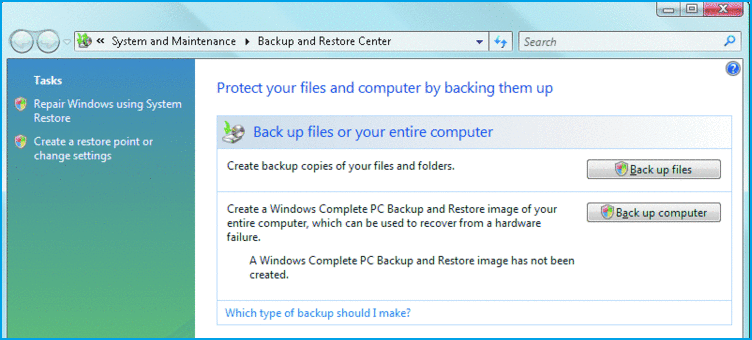
This is a short list of Windows Backup and Recovery features below:
- Copying and restoring user-defined files (all versions);
- Scheduling backups (all versions except Home Basic);
- Using network drives as backup destination (all except Home Basic);
- Snapshot an entire system image (Business, Enterprise and Ultimate editions only).
Such functionality can satisfy the need of casual backup or create an emergency-basis images of crucial files, but it is still far from usefulness when matters touches the organized, regular backup workflow supported by tons of automation for some business processes.
Tip: We are recommending using a third party backup solution for either Windows Vista Home or Premium editions!
Download Trial