How to Backup Windows 7 witn Handy Backup Tool
Windows 7 Backup Software by Handy Backup is a powerful, fast, and easy-to-use solution designed for seamless data protection on this OS and other modern Windows versions. It offers a comprehensive set of advanced features for secure and convenient backups, including system data and disk images.
To experience the full power of Handy Backup's Windows 7 backup tool and start protecting your data today, click here to initiate the Windows 7 backup download!
 Download for Free
Version 8.6.8 , built on Fabruary 13, 2026. 152 MB
30-day full-featured trial period





Windows 7 Backup Software for Effortless Integration
Handy Backup is officially Compatible with Windows 7, meeting all security and reliability standards for seamless OS backup and smooth operation on certified hardware.

Diverse Data Types Supported for Backup
With Handy Backup, you can quickly backup and restore Windows 7 data in just one click. Easily protect your system, user files and folders, Outlook, Exchange data, and even entire disks with System Backup and Disk Image features — plus much more.

Network-Based Client-Server Backup and Restore
If you're managing multiple Windows workstations or servers, our Server Backup Solution makes it simple and efficient to backup Windows 7 systems. Our Windows 7 backup program supports full hard drive backups, SQL databases, and other critical data across your enterprise network.
Windows 7 Backup: Built-in Tools
Windows 7 includes a built-in backup and restore tool designed to protect user files and system data. However, this tool has limited features and lacks the usability required for modern backup needs, which is why it's been replaced in newer versions of Windows. These are the primary limitations of OS’s native backup system that may impact your data protection needs:

Limited Backup Options
Windows 7’s built-in backup tool only covers user files and system data, leaving out applications and certain settings, which limits comprehensive data protection.
Limited Storage Options
OS’s built-in tool only supports local disk storage for backups, with no native cloud integration or flexibility in choosing external storage locations.
Complicated Recovery
The recovery process can be cumbersome and often requires technical knowledge, making it difficult for average users to quickly restore their systems after an issue.

Protect Your Data with Reliable Windows 7 Backup Software!
Handy Backup offers a comprehensive range of features that provide superior security, flexibility, and peace of mind for your data backup needs. Don't rely on outdated backup programs for Windows 7 — take control of your data with a modern and reliable backup solution!
Essential Features for Windows 7 Backup and Restore in Handy Backup

Hot Backup and Archiving
Get hot backup options for files that are open and locked by other applications, ensuring that your data is always protected. You can also archive backups with ZIP compression, saving space and keeping everything organized.

Flexible Scheduling
Schedule your backups or restoration tasks at any frequency you prefer, from minutes to months. Plus, you can automatically run external programs before or after any task to streamline your workflow.

Encryption
Protect your data with top-level encryption options, including AES 256, AES 128, and Blowfish. Ensure your Windows 7 backup files are secure and safe from unauthorized access.

Supported Storage Solutions
Choose from a wide range of backup storage options, including local and external USB drives, FTP/SFTP servers, NAS devices, network folders, or cloud services. Get the flexibility you need to secure your data wherever you prefer.

Partial Backup Options
Get full, differential, or incremental backups. Choose file backup types using masks, perform system recovery from a previously created image, and back up entire disks with ease.

Windows 7 Registry Backup
Backup Windows 7 registry as part of a full system image or separately to preserve your system settings and preferences. This ensures faster recovery by restoring both files and essential configurations after a system failure.

Email Notifications
Receive email notifications to stay updated on your backup tasks. These alerts will inform you about the status, progress, and completion of each task, helping you quickly address any issues if they arise.
Administer Backup Tasks
Advanced users can manage backups via the command-line interface, receive email updates, enable fast backups, and access various other configuration options.
Recommended Solution
$89 per license

Handy Backup Professional
Handy Backup Professional is a fast, reliable, and user-friendly solution designed to protect data on personal computers, including home, office, and business workstations. It enables you to back up individual Windows files and folders as well as create full system image backups for complete recovery when needed.
How to Backup Windows 7 to External Hard Drive Automatically?
-
Step 1: Create a new Backup task. You can also enable Advanced Mode for additional backup features.
-
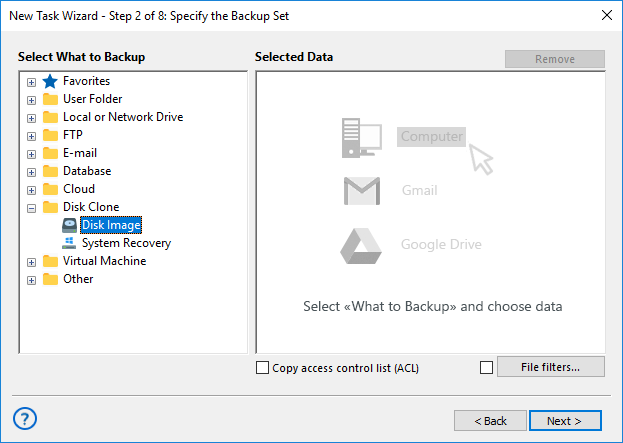
Step 2: Open Disk Clone and pick one of these options:
- Disk Image: Binary backup of a single partition
- System Recovery: Full OS image in readable VHD format
-
Step 3: Choose your external drive and pick a folder. You can also back up to a network folder or cloud storage.
-
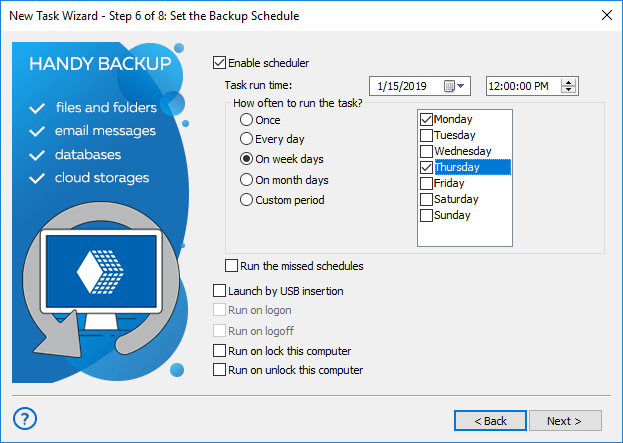
Step 6: Use a regular schedule (for example, weekly at night) or set it to run automatically when the external drive is connected via USB.
File Backup
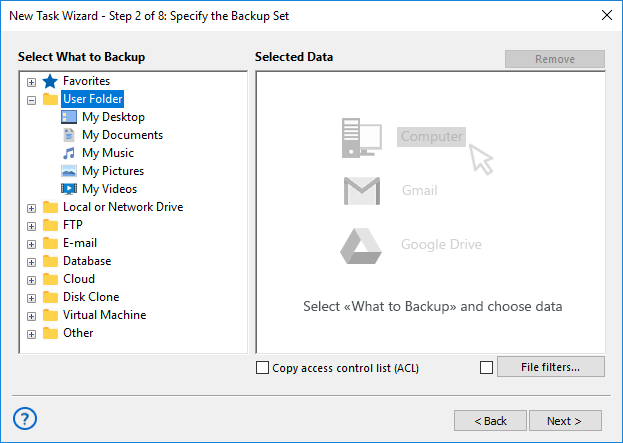
Handy Backup provides multiple plug-ins for backing up different Windows 7 components, ensuring comprehensive data protection. Supported backup sources include:
- Files, folders, and system data – including Windows Libraries, Windows Registry, and essential settings
- Databases, emails, and remote storage – backup of databases, email accounts, and FTP/SFTP/FTPS servers
- Cloud services and virtual machines – Google Drive, Dropbox, OneDrive, Hyper-V, VirtualBox, VMware
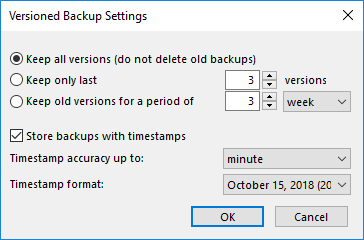
Choosing advanced mode in Step 1 unlocks additional options, including flexible backup versioning. With our Windows 7 backup utility, you can retain all backups, keep only the most recent ones, or automatically remove older backups based on a set timeframe. Each backup is timestamped, allowing precise recovery based on the date and time of creation.
Note: Discover the power and convenience of Windows File Backup with our reliable and efficient Windows 7 backup software.
List of Supported Clouds


Restore from Windows 7 Backup
If you've backed up specific files or data from Windows 7, you have two options for restoration:

You can either set up an automatic Windows 7 restoration task, or manually transfer the files from the backup to any desired location using a file manager. Handy Backup stores unencrypted files in their native formats, making manual transfer easy and efficient.

For complete system recovery, the best option is to use the dedicated Disaster Recovery utility, which is included at no additional cost with most editions of Handy Backup. This tool is ideal for backing up and restoring an entire drive or partition.
Seamless Data Protection Across Platforms
Handy Backup is not just backup software for Windows 7; it is a comprehensive backup utility designed for all modern versions of Windows.
Supported versions include Windows 8, 8.1, Windows 10 and Windows 11 backup support, as well as server editions such as Windows Server 2012, 2016, 2019, 2022, and 2025.
Handy Backup also supports Linux backup when the control panel is installed on a Windows machine and agents are installed on Linux OS for seamless backup in heterogeneous environments.


 Download for Free
Version 8.6.8 , built on Fabruary 13, 2026. 152 MB
Experience Handy Backup, the Windows 7 backup software. With advanced features and seamless integration,
your data is always safe and easy to recover.
For Windows 7 backup download, simply
click the button above!
Frequently Asked Questions About Windows 7 Backup
How much space does Windows 7 backup need?
The amount of space required for a Windows 7 backup depends on the data being protected and the type of backup selected. File backups usually require storage roughly equal to the size of the chosen files.
If you create a System Image, it is important to plan additional space for future images and versions. Microsoft support examples often recommend using a drive significantly larger than the initial estimate. For example, when a 62 GB system image was created, a 200 GB external drive was recommended to allow room for multiple backup versions and long-term flexibility.