Handy Backup Professional - Secure Files and System Backup Software
Handy Backup Professional is a speedy, effective and comprehensible utility capable for backing up data from personal computers including home, office and business-level workstations. It is a tool for saving both user files and pro-level data such as databases, websites or entire system images.
Buy 2 for $178 $151.3 - Volume Discounts




Key Features of the Professional Solution
Handy Backup Professional provides some options highly required for experts and advanced users.

System Backup and Recovery
The Professional edition can save an image of any drive as a VHD file. Users can restore this image later (including the possibility of creating a bootable device), or attach this VHD file as a virtual drive and browse its content, or even run it as a complete image of a VirtualBox machine.

Backup to All Popular Clouds
Professional edition is capable to save copies of data to all popular clouds such as Google Drive, Amazon S3, OneDrive for Business, Backblaze and other. You can use backup information without restoration, as Handy Backup saves data in native format, allowing using this data directly from cloud.

Secured Server Connections
In the Professional edition, not only FTP servers are supported but also the protected FTP exchanging protocols, SFTP and FTPS. These features allow connecting with any type of FTP servers, for backing up such an information as website static content and secured FTP data. Learn more about FTP backup.
Extended Options
Handy Backup Professional shares many control and automatizing options with other editions, allowing users fully controlling their backup, restoration and synchronizing tasks.
Automating Backup and Restoration Processes
- A rich set of data source features for backup, including files, folders, Outlook data;
- Selecting files and folders by masking filenames, allowing saving only crucial data;
- Scheduling task execution for a repeated period from months to minutes, or by an event;
- Starting automatic backup to external hard drive when it is plugged in to a PC.

Controlling Backup Operations
- Preserving native data formats, allowing using data just from backups without restoring;
- Compressing and encrypting data when a user need it for security or other purposes;
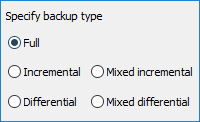
- Full, incremental and differential backup, as well as mixed (full/differential) backup type;
- Keeping many versioned backups for one dataset, removing obsolete data.
- Remote management of backup tasks and monitoring through the web-based interface, providing full control from any device.
A Plentiful Selection of Data-Keeping Storages
- Local disks, external USB drives, mapped network disks and NAS units;
- FTP, SFTP and FTPS storage servers;
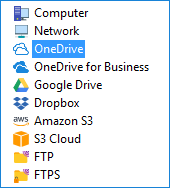
- Clouds: Google Drive, Amazon S3, Box, OwnCloud, Backblaze, OneDrive, etc.
Planning the Activities
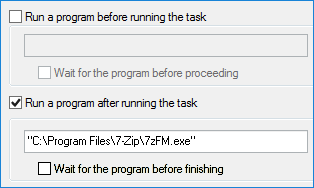
- Running other programs before or after the particular task (e.g. for cleaning garbage);
- Notifying users by emails of any operation results, as well as logging all the job done;
- A backup reports window allowing viewing any task performed or attempted in details;
- Starting the program as a Windows service, removing distractions from a user during the job.
Handy Backup Pro Database Bundles
You can buy only the things that you really need by purchasing extra plug-ins for the Professional edition or some prepared bundle, such as those listed here:
If you plan to back up and recover more than one database engine, we recommend you to buy the Small Business Backup edition or to order plug-in!
System Requirements
- Standalone OS: Windows 11, 10, 8.1, 8, 7;
- Server OS: Windows Server 2025, 2022, 2019, 2016, 2012, Small Business Edition 2008, 2008 R2;
- Other requirements: 1 GB of free disk space, 512 MB of RAM, Internet connection.


Download Handy Backup, to try all the might of this solution by a free 30-days trial period.
 Download for Free
Version 8.7.0 , built on May 7, 2026. 152 MB
30-day full-featured trial period

"I have a Pro version on each of my team workstations. It is a perfect tool, as it allows me saving both project workflows and whole system images. I also have a Pro copy on my management console, with MySQL and Exchange plug-ins to keep our office data and website copies intact. It is a very good price-to-efficiency bargain!"
Allan Richie, a team leader of Southwest Serenity Studios, Inc.
Capterra′s Rating:

"Great product, very simple and effective backup program"
Review About Dropbox Backup Solution by Handy Backup
"My Handy Backup Professional is a wonder for me, as it allows creating and scheduling any of my typical backup tasks for less than a minute! I back up my emails in both Outlook and Web-driven IMAP servers, with a built-in encryption that provides much more security than I really need! I have no single error or fault for more than 7 years with Handy Backup, and I warmly recommend it for everyone who want to protect his or her data!"
Gregory Dawson, a stock broker