ICQ Backup Tool | Backup ICQ Message History and Contacts
ICQ backup is possible via quite simple copying to a new location a folder ICQ is installed in, however, this way is somewhat restricted. Fortunately, Handy Backup can greatly expand your backup possibilities providing a variety of useful features to automatically backup ICQ message history and contacts.
 Download for Free
Version 8.7.0 , built on May 7, 2026. 152 MB
30-day full-featured trial period

What to Backup in ICQ?
- ICQ contact list;
- ICQ message history;
- ICQ settings;
- ICQ log.
Handy Backup doesn’t treat ICQ backups like copying “faceless” chunks of memory, but also extracts all necessary registry entries and allows recovering everything in the tweaked-to-perfection state you’re used to.
Advantages of Handy Backup as ICQ Backup Tool
Handy Backup allows you as much beneficial features for ICQ backup as for any other data type existed on your computer.
Let us demonstrate some of our ICQ backup tool advantages:
ICQ Automatic Backup
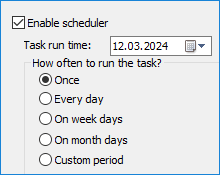
Handy Backup’s capability of backup scheduling allows to repeat backups with any kind of regularity, with an option to run on logon/logoff and run missed tasks. Backup ICQ history and contact list each day, each week, or whenever you want from minutes to months.
Compression, Encryption and E-mail Notifications
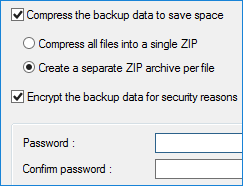
An integrated ZIP compression engine makes your backups take the least disk space and save it for other important things! Handy Backup can also be set to encrypt ICQ history backup - 128-bit BlowFish encryption algorithm reduces possible risks. Also there is an option to automatically send e-mail notification with task results which is a very effective way of control.
Variety of Storage Media for Keeping ICQ Backup
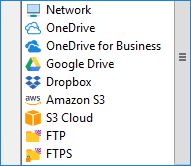
The program supports all types of storage devices and can store ICQ chat backup to local drives, FTP, clouds such as Amazon S3, Google Drive, Dropbox, OneDrive, Backblaze, Yandex.Disk or our dedicated cloud service HBDrive.com.
To learn more, please refer to the full list of backup features of our software.
Other Capabilities of Handy Backup for ICQ Backup History
- Full, incremental, differential and mixed backup types;
- Detailed logs and reports providing all crucial information about the task and its results;
- Preserving native format of backup copies;
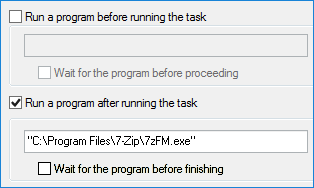
- Tools to run other programs before and/or after backup tasks;
- Comprehensible and intuitive-looking GUI.
Recommended Solution
Lifetime license

Handy Backup Standard
Download Standard edition and start backing up ICQ data with all settings and preferences today! Free 30-days trial version!
How to Backup ICQ Contacts and History with Handy Backup
To backup ICQ message history and contacts with Handy Backup, please follow next instruction:
- Start Handy Backup. Create a new task by using the button on the Management Panel, the menu or Ctrl+N keys. Select a backup task.
- The second step of task creation lets you add data that will be backed up upon task execution. Select the “Computer” option as a data source.
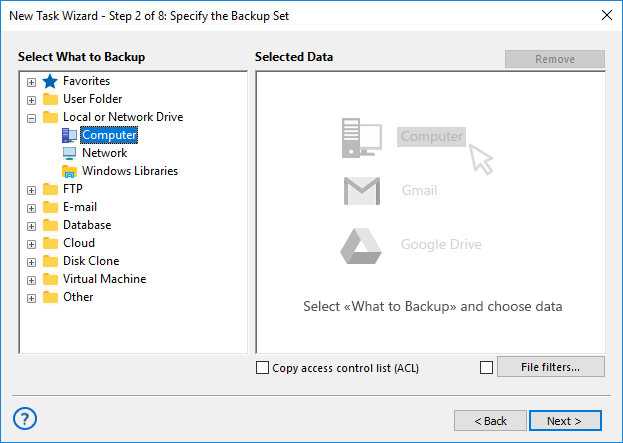
- Click on “C:” and select the folder (folders) containing your ICQ settings. By default settings are located at:
C:\Program Files\ICQ\
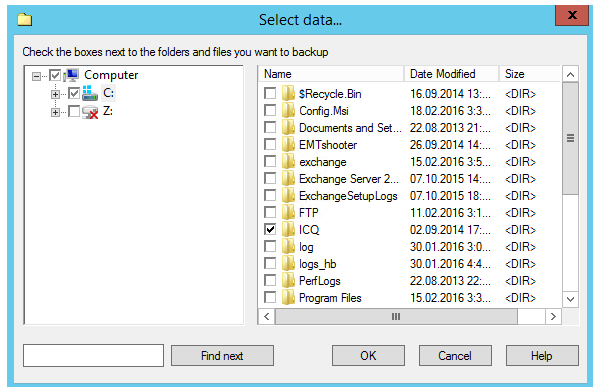
- Press “OK” to finish selection.
- On the next steps you can select a destination for your backup, set compression or encryption, schedule backup task and make other steps for completing the ICQ backup action (if you feel these options are necessary for ICQ contact list backup).
- Finally name your ICQ backup task. You may run it manually any time you need it, or instead, select an automatic execution. Now all things done and your ICQ is absolutely secure with Handy Backup!
Download for Free
Version 8.7.0 , built on May 7, 2026. 152 MB
30-day full-featured trial period
Handy Backup is a reliable ICQ backup tool that enables to completely automate everything related to protection of your chatting! Give it a try!
Besides ICQ backup, you may also consider to backup My Documents folder or creating Desktop backup. We really hope that our users will find Handy Backup useful and suitable for protection of their PC data!
See also: