How to Backup Documents on Computer
Backup My Documents refers to the process of creating duplicates or copies of the contents stored within the corresponding folder on a computer system. In various versions of Microsoft Windows, such as Windows 11 and earlier versions, folders "Documents" and "My Documents" serve as designated locations for storing various types of data, including personal information.
Maintaining these folders is essential in managing information effectively. Handy Backup serves as automatic backup software, providing not only automated backups but also reconstruction of the contents of the My Documents folder. Download the free trial version now to experience its benefits firsthand!
 Download for Free
Version 8.7.0 , built on May 7, 2026. 152 MB
30-day full-featured trial period
Backup Storage
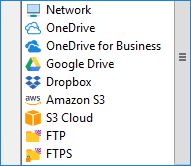
Typically, copies of My Documents or Documents are stored on a local drive. There are several locations available for saving files. Examples of where to preserve them include:
- External devices such as a USB drive, flash memory stick, or memory card;
- A mapped drive, network drive, or NAS device;
- A remote network machine (for network-oriented editions of Handy Backup);
- An FTP, SFTP, or FTPS storage;
- Synchronization feature enables users to synchronize folders across various devices and platforms
- Online cloud backup services including, Google Drive, Dropbox, OneDrive, Box, Amazon S3, 4shared, etc.
Auto Backup of Documents
You may continuously back up your Documents or My Documents folders for various reasons. These include storing data at an alternate location other than a hard drive, providing shared access to these data via a cloud, creating an auto-updating FTP storage for crucial documents, and more.
Note: Handy Backup preserves native document formats in backup copies, unless you specify encryption and/or compression for these data. Therefore, you can open, browse, modify, or even restore any document from a backup copy without needing to completely recover the Documents folder!
Additional Benefits of Handy Backup for Backing Up the Documents Library
Handy Backup offers options to save the Documents folder to locations other than its default position.
Utilizing Partial Backup Methods
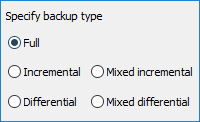
Handy Backup offers various data backup techniques including full, incremental, (a combination of full and differential backups). Each of these methods helps save space on backup storage and/or reduces the time required to repeatedly restore your Documents folder.
Versioning, Compression, Encryption
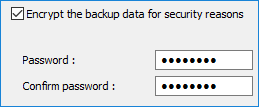
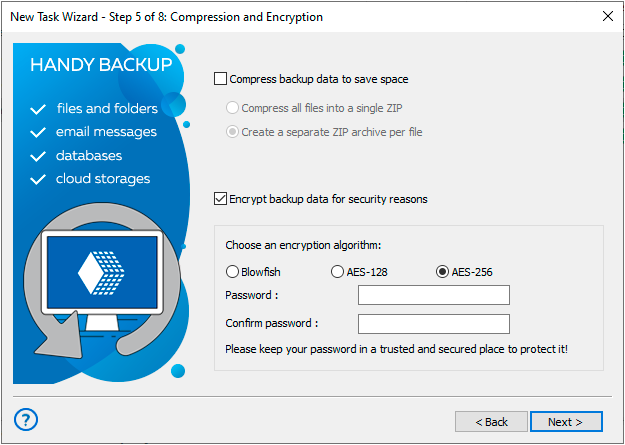
Each dataset is duplicated to the specified location and identified by versions and/or timestamps in the backup folder titles. Furthermore, documents undergo encryption using either 128-bit BlowFish, AES-128, or AES-256 encryption algorithms, and the dataset is then compressed into a ZIP archive.
Task Execution Control
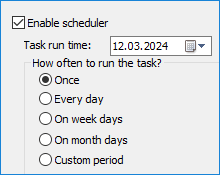
The backup scheduler feature lets you set tasks to repeat at intervals from minutes to months. You can customize tasks to start automatically on logon/logoff or when a specific USB device connects to your PC. Additionally, you can run programs or batch files before or after a task to ensure smooth execution.
Recommended Solution
Lifetime license

Handy Backup Standard
The Standard Edition of Handy Backup lets you back up My Documents folder with ease, whether you want to store it locally on your computer or securely online. Plus, get a free 30-day trial to see how it works!
Steps to Backup My Documents Using Handy Backup
Below are instructions for backing up My Documents using Handy Backup:
- Open Handy Backup. Create a new task by clicking the corresponding button on the panel or using a menu item.
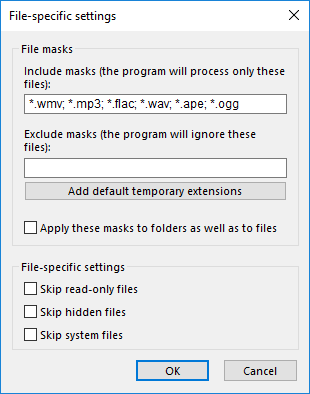
- Choose the type of backup task. In advanced mode, you can also specify the format of files to be backed up. Click the "File filters..." button on Step 2 to access the corresponding function. A new dialog will appear, enabling you to select files by masks of file names for inclusion or exclusion from file backup.
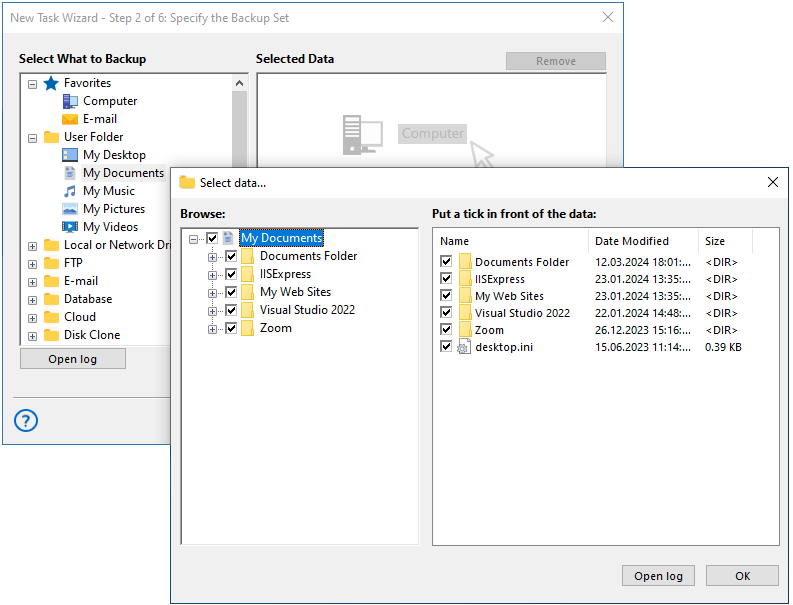
- To continue with your documents backup, select My documents from the User Folder menu at Step 2.
- Double-click on it to open the My Documents plug-in.
- Select folders or files you want to backup from the list on the left side of the window and click “Ok”. Press “Next” to move to the third step of backup creation task.
- At Step 3, choose a suitable location to store your My Documents backup. Learn more on how to backup your files online by visiting the corresponding page.
- Proceed with creating your task, configuring settings such as encryption, scheduling, and others.
- Lastly, provide a name for your task, for example, "Backup Documents", and complete the task wizard. Now your backup is good to go!
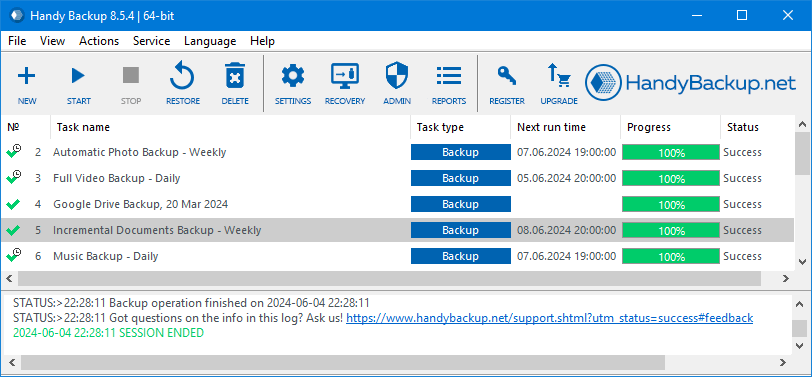
This is a brief instruction. You will need to wait until the scheduled sequence occurs. Additionally, you can manually run the task whenever you want to backup My Documents folder.
To learn more, please refer to the comprehensive list of backup features of our software.
Watch a Video Tutorial on How to Backup Documents on Computer
This video shows you the entire process, and since it works the same way for all your User Folders, you'll learn everything you need to know.
Tip: This video provides a comprehensive guide on how to back up documents, covering topics such as creating multiple backup versions, automatic backup on USB drive connection, timestamping for easy organization, and ZIP compression for space saving.
Download for Free
Version 8.7.0 , built on May 7, 2026. 152 MB
30-day full-featured trial period
To ensure the protection of your personal documents, a quick and easy method is to back up documents folder. Handy Backup functions as a secure vault, ensuring the safety and accessibility of your files!