Backup Any Data
Network Backup Software Solution
Network backup software for complex networks allow copying the important information through local or Internet connections. Handy Backup is a perfect example of a remote backup solution, providing plug-ins for both user files and specialized data, such as databases or website content.
 Download for Free
Version 8.7.0 , built on May 7, 2026. 152 MB





Latest review:
Advantages of Automatic Network Backup Software

Regular and Scheduled Job
With an automated backup program, you can forget about taking regular backups manually! Handy Backup allows you saving your data at an exactly specified time, with an interval from months to one minute, or by some event such as user logon, or even when you are placing USB storage into a PC.
Automated Access to Any Data
The plug-in system of Handy Backup allows you taking snapshot from any data you can imagine in automatic mode. A database? No problem. A virtual machine or an array of these machines? Yes, got it! A group of files selected by a name mask? OK. Take your network data backup automatically!
Different Data Destinations
Best network backup solutions can store taken backups onto as many vault types as possible. For example, Handy Backup can store data to local and USB drives, to NAS units, common and protected FTP storages, remote drives and folders, as well as cloud services such as Dropbox or OneDrive.
Centralized Planning and Running
Users guide all tasks in online-oriented editions of Handy Backup from one single machine, which contains a GUI-based Management Panel controlling all remote backup agents on other machines. Thus, you have no need to use separate backup task management on each of your remote computers.
Other Principal Features of Handy Backup

Full and Partial Backup
Take full backups of your datasets online, or select between incremental, differential and mixed (full/differential or full/incremental) backup methods, to save worktime, traffic and space for backups!

Keeping Backup Versions with Time Stamps
For network backup from many sources, it is a reasonable idea to keep some versions of the same backup dataset simultaneously, providing a version number and a time stamp for each copy.

Encryption and Compression
You can compress your remote backups as ZIP, encrypt saved datasets with BlowFish, or even keep your backup data unchanged, which allows you to browse and use your data directly from backup folders!

Running Other Programs Along with a Task
If you need it, start any external software or a batch file before and/or after running a network backup task. This can be very useful for different data and connection managers, garbage cleaners etc.

Efficient Auto Restoring
Restore your network data with a dedicated task to the original location from that you saved these data, or to completely different location (which allows cloning, submitting, mirroring and exchanging data)!

Detailed Task Reports
For big quantity of linked machines, results of every backup and restore task is still principal. Take remote backup task reports on your central console, or by receiving an email from the program!
Create Backups with Network Backup Software via the Central Console


To Any Storage Location



Recommended Solution
Lifetime license
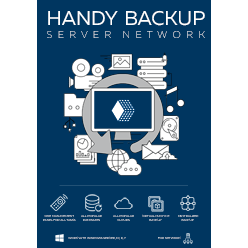
Handy Backup Server Network
The mighty edition capable to drive remote backup from many locally connected servers and workstations, this solution can save backups from different types of databases, VMs, data servers, private and clouds, websites etc. – all controlled from just one master console!
The Network Plug-in
This plug-in allows accessing to "shared" network resources, such as drives and folders, in a local infrastructure. You can access a shared resource in a network of any type and architecture, including domain and non-domain networks, as well as heterogeneous infrastructures.
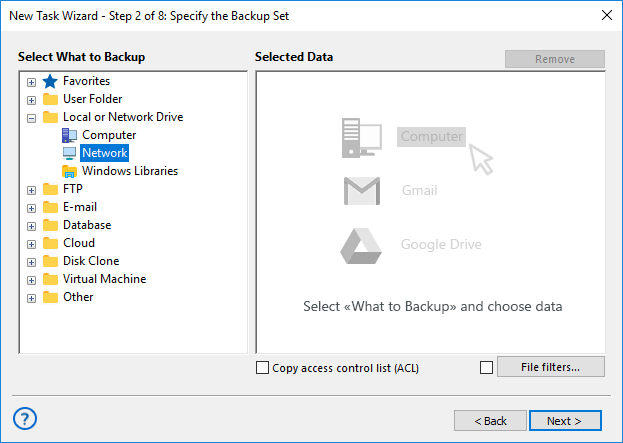
Note: If you plan to use a network data source, ou will find the Network plug-in in the Local or Network Drive section of Step 2. On Step 3, the Network plug-in is in the list of available destination plug-ins on the left panel.
Backup Network Drive Software
This solution is designed for workstations connected to a local network. It includes the standard "Network" plug-in and the Disaster Recovery tool, allowing Handy Backup to work as network drive backup software. It also supports other remote backup options, including FTP and cloud backup.

How to Back Up a Network Drive
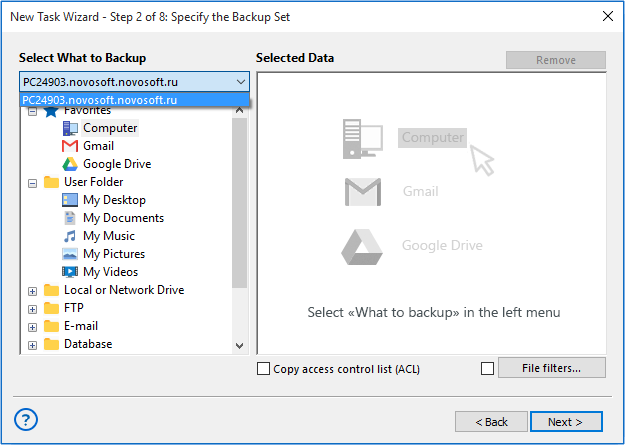
To backup network drive data with Handy Backup Server Network, create a backup task, select the remote machine on Step 2, and choose a local drive or partition on this machine.
For full drive imaging, use Disk Image or System Recovery. This method supports Windows 11, 10, 8, 7, and Windows Server 2025, 2022, 2019.
Centralized Network Management
With the Server Network edition, you can configure and manage the required number of Network Agents from the centralized management console.
It provides tools for agent setup, administration, and remote installation, including centralized management of agents on supported Windows systems and Linux distributions*.
* Currently, Handy Backup offers Linux distributions for RedOS, Ubuntu 22.04, and Debian 12/11. For backup scenarios involving other Linux distributions, please contact us at [email protected] for details.
Key Features of Remote Data Backup Software
Unlike single-machine editions, Handy Backup Server Network lets you choose a source machine, such as a PC, workstation, or server, from the drop-down list in the upper-left corner. Each machine has its own backup, restore, and synchronization tasks.
Network Backup Agent Types
Handy Backup Server Network supports two types of Network Agents:
- Workstation Agents handle user data such as files, folders, libraries, disk images, local databases, and FTP content.
- Server Agents support the same sources, plus SQL databases, virtual machines, VM arrays, and private clouds.
Video Tutorial: How to Install Management Panel and Deploy Network Backup Agents
Network backup can be a tedious and daunting task if done manually by hand, even though backup software. Luckily, Handy Backup’s Management Panel provides network backup solution that removes the "boring" part from the process.
Attention: The Management Panel unites, synchronizes and regularly performs network backups on every machine that has Network Agent installed. More, you can deploy Agents remotely through the Panel in just a few minutes, and after installation, you can control Agent network backups by the Panel alone, no matter how many Agents you have.
Download for Free
Version 8.7.0 , built on May 7, 2026. 152 MB
When You Need to Use Network Backup Software?

Using Physical Online Storage
This reason is about protecting your trusted, confidential or highly sensitive data from physical perils, such as fire or theft. With network backup, you will always have an actual copy of your crucial information stored by network somewhere apart with an original dataset which can be ruined by catastrophe.

Keeping Remote Network Mirrors for Data
Network backup software can just form some environment, shared by network, for using data in collaboration. Some of these tasks successfully utilize private and commercial clouds, but for more private information, automatic network backup to a trusted, shared server is much more preferable method of sharing.
Frequently Asked Questions about Network Backup
Can I back up multiple workstations over the network to a single server?
Yes, Handy Backup Server Network allows you to create backup tasks for different workstations and store the data on a central server.
Please note: a separate task is created for each workstation. Handy Backup does not support creating a single shared task that includes several workstations at once. All tasks are managed through a unified administrator interface.
Can I make a backup task for more than one workstation?
No. Any task will copy data from one workstation at once. Since the version 8.0.4, you will receive a caution every time when you will try to backup multiple workstations.
How I can back up data by somehow identical way (i.e. content of My Desktop folder) from several workstations at once?
Yes. If you need to back up similar data, for example the contents of the Desktop folder, from several workstations, create a separate task for each workstation. To save time, you can create one task as a template and then copy it for other machines.
- Create and save the first backup task.
- In the main window, right click the task and copy it.
- Open the properties of the newly created task.
- On the "Name" tab, change the task name so that it can be easily distinguished from the original task.
Tip. You can include the remote workstation name in the task name for easier sorting and searching among multiple tasks.
- On the "Backup Set" tab, delete the old content.
- Select another workstation from the drop-down list of machines.
- Select the required data from the new workstation as usual and continue.
- Change any other task properties if needed.
- Repeat these steps until you have created tasks for all workstations in your backup list.
This method gives you better control and stability when backing up data from multiple network workstations.
My network backups are running very slowly. What can I do?
If your network backups are running very slowly, try to do the following:
- Close all unused network connections. Such connections, for example VMware virtual connections, are the most common reason of slowing network backup.
- During the task creation or in the task configurations after the creation on the 5th Step enable compressing data into a single ZIP.
Download for Free
Version 8.7.0 , built on May 7, 2026. 152 MB
The product line of Handy Backup provides effective remote backup solutions for all purposes and needs of users.
Try it by downloading and installing a 30-day free trial version of Handy Backup with a full set of data, control and online-oriented features!
See also: