Offsite Backup Software Solution for Remote Data Backup
Offsite backup software streamlines the process of transferring vital data duplicates to remote storage solutions, such as network drives, NAS devices, FTP servers, or renowned cloud services like OneDrive and Dropbox. Handy Backup emerges as a top-tier offsite backup solution, boasting a plethora of plugins tailored to accommodate diverse online data storage requirements.
Looking to safeguard your critical data with ease and efficiency? Experience the power of Handy Backup's remote server backup feature today! Download our free 30-day trial version and discover how effortless it can be to protect your valuable information remotely.
 Download for Free
Version 8.7.0 , built on May 7, 2026. 152 MB
30-day full-featured trial period

Key Functions of Offsite Backup Software
Physical Data Distribution
Offsite backup solutions store separate copies of the same dataset in physically distinct locations. This ensures that you can always restore your data from a backup copy in case of physical damage or technical issues, ranging from electrical outages to full-scale fires or natural disasters, affecting the original dataset location.

Accessing Offsite Data Backup Remotely
Granting offsite storage access to your backup software also grants you (or any other trusted individual) access to data copies, limited only by network capabilities and your discretion (since you control information security and access rights). Restore your remote backups from anywhere in the world!

No Maintenance Required with Offsite Server Backup Software
Utilizing offsite backup server software with external storage removes the need for maintenance, offering cost-effectiveness for enterprises. Storage owners handle maintenance, alleviating the burden on remote backup users compared to on-premises solutions.
Drawbacks of Remote Backup
Alongside the previously mentioned advantages, offsite backup presents its own set of drawbacks. Below, we delineate the most notable and prevalent challenges linked to online data storage.
- Backup and recovery performance depend on the available bandwidth and the quality of network services.
- The cost per storage unit (e.g., per GB) is often significantly higher compared to local backup solutions.
- There is a continual risk of potential interception of your backup data through network traffic monitoring.
- Some offsite backup storage services may engage in unethical practices, posing a risk of data theft.

Robust offsite backup software, such as Handy Backup, can mitigate or even eliminate several of these risks. For deeper insights into how Handy Backup accomplishes this, please consult the following sections.
Handy Backup Offsite Software Storage Options
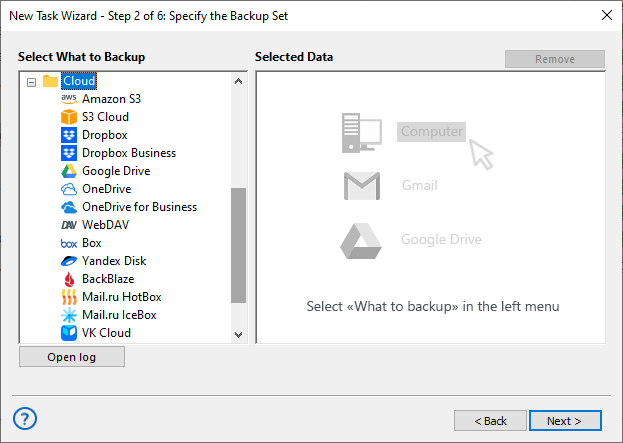
Handy Backup supports a wide range of remote backup solutions. Please refer to the screenshot above for a brief overview of the list of storage plug-ins, or consult the table below to assess its storage capabilities.
| Local Network | Internet | |
|---|---|---|
| Drives and Data Servers | Mapped Drives Network Shared Folders NAS Units | Offsite Data Backup Servers |
| FTP Storage | FTP SFTP FTPS (including SSL) | FTP SFTP FTPS (including SSL) |
| Cloud Solutions | Private Clouds supporting WebDAV | Private Clouds Microsoft OneDrive Google Drive Amazon S3 Dropbox Any Cloud supporting WebDAV |
Remote Backup Software Plug-ins
When it comes to remote backup, you have the flexibility to utilize nearly any storage plug-in, including the Computer plug-in in the Server Network solution. The previous table outlines the types of storage that can serve as remote backup solutions. Simply utilize a Handy Backup plug-in to establish a connection to offsite backup storage and create a backup task!
Recommended Solution
Lifetime license

Handy Backup Professional
The Professional edition allows for offsite data backup via FTP, SFTP, and FTPS connections, and also provides direct integration with leading cloud services like S3-based storage, OneDrive, Dropbox, and Google Drive.
Further Advantages of Handy Backup as Off Site Backup Software
As a comprehensive offsite data backup software solution, Handy Backup offers several crucial advantages, fulfilling the capabilities described above and providing even more for users in need of an offsite backup software solution!
- Storing data offsite in native formats, enabling direct use of this data from storage;
- Scheduling tasks to run at specific times or intervals ranging from minutes to months;
- Selecting from various backup methods (full, incremental, differential, and mixed backups);
- Preserving offsite backup data as different versions of the same dataset;
- Automatically resuming tasks missed due to issues such as network problems, if needed;
- Executing other (external) software before or after a backup task;
- Access to technical support for assistance in setting up and maintaining any remote backup tasks.

These advantages, combined with numerous standard features such as data compression, encryption, and the ability to run all offsite backup software operations in a "stealthy" mode (as a Windows service), make Handy Backup an exceptionally capable solution for managing offsite backup data.
Best Practices for Offsite Backup Implementation
When deploying offsite backup strategies, following best practices can optimize data security and accessibility. Here are essential considerations for effective offsite data backup:

Adhere to the 3-2-1 Rule
Ensure redundancy by maintaining a minimum of three copies of your data, stored on two different types of media, with one copy stored offsite. The 3-2-1 backup strategy ensures data availability and protection against unforeseen disasters.

Encrypt Your Data
Security is paramount. Encrypt your data during both transfer and storage to prevent unauthorized access. Encryption ensures the confidentiality and integrity of your data.

Regular Backups
Schedule regular backups to maintain the currency of your data. Regular backups minimize data loss in the event of unexpected incidents.
Use Cases for Remote Backup
Why is offsite backup important to you? There are various scenarios for implementing offsite backup solutions. Here is a brief list of the most common types of tasks of such nature.
- Shared Data: Offsite backup enables access to these data by any individual from any location.
- Vital Information: Utilizing off-site backup techniques safeguards it from local hazards.
- Distributing Datasets: Sometimes, "backup" simply entails sending data online to other users.
- Large Databases: It's common practice to store backups for mirrored databases offsite.
Distinguishing Onsite and Offsite Data Backup

As demonstrated above, the primary feature of offsite data backup is the ability to store data physically away from the mainframe or computer location. Consequently, the data backup will be protected from physical and hardware-related risks that local backup cannot provide.
As noted above, local backup offers several advantages, such as relatively inexpensive storage, fast data transfer rates, and high storage availability. We recommend combining on-site backup software with offsite data backup in a scheme such as the 3-2-1 backup strategy, Grandfather-Father-Son, or others.
Download for Free
Version 8.7.0 , built on May 7, 2026. 152 MB
30-day full-featured trial period
Try Handy Backup as all-purpose offsite backup software! Download now the latest version with a full set of plug-ins and functions for a 30-day free trial period!
Customer Feedback on Handy Backup Offsite Backup Software
"I use offsite backup to my local WebDAV cloud, as well as to Dropbox. Handy Backup organizes all my data copying actions, and I have no problems with it. If I need, I can always tune up the task parameters to meet my changing requirements. It is easy and clean; all task still work through several months and years. Very good job! "
Dietrich Zersky, a photo blogger