SQL Server Backup Software
Handy Backup is SQL Server backup software designed to automate database backups without complex scripts or manual operations. Using Windows VSS, it creates consistent copies of active databases and provides flexible scheduling, versioning, and multi-storage options, including local drives, NAS, and cloud services.
 Download Trial





Why Choose Handy Backup SQL Backup Software?
Handy Backup is a SQL database backup software solution for businesses and IT administrators who need automated backups without complex scripts or manual database exports. As a dedicated SQL backup tool, it combines MSSQL database backup, flexible scheduling, multiple storage destinations, and guided recovery in one application.
Unlike utilities focused exclusively on SQL Server databases, Handy Backup can also back up business files, applications, and other databases, making it practical for organizations managing several types of data.

Automatic Backup
Schedule MSSQL database backups daily, weekly, monthly, or at custom intervals. Tasks run automatically without repeatedly launching SQL Server Management Studio or executing scripts manually.

Hot Database Backup
Back up active SQL Server databases using Microsoft VSS and SQL Writer. Database snapshots are created without shutting down the SQL Server instance or interrupting normal database operations.

Flexible Storage
Save SQL Server backups to local drives, external disks, NAS, FTP/SFTP servers, Amazon S3, or cloud storage. Keep copies outside the production database environment for independent recovery.

Database Recovery
Restore SQL Server databases through a guided recovery task. Choose an existing backup, review the destination, and recover database files without constructing separate restore scripts.

Encryption and Versions
Configure backup encryption, compression, and retention of multiple backup versions. These options help control storage requirements and manage access to copies of business databases.

Logs and Notifications
Review task execution logs and receive email notifications about completed operations or errors. Administrators can identify unsuccessful SQL Server backup jobs without checking every task manually.
Comparing SQL Server Backup Tools
Choosing between built-in SQL Server backup tools and third-party backup software depends on your recovery requirements, available storage, and administrative workflow. Microsoft SQL Server provides native backup operations through T-SQL, SQL Server Management Studio (SSMS), and SQL Server Agent where available.
Third-party backup tools for SQL Server, such as Handy Backup, can simplify recurring database operations by combining scheduling, storage management, task monitoring, and restoration. The table below compares the capabilities of native SQL Server utilities with Handy Backup's dedicated MSSQL backup functionality.
| Feature | Native SQL Server Tools | Handy Backup |
|---|---|---|
| Database backup | Yes | Full database snapshotsComplete copy of each selected database |
| Backup of active databases | Yes | YesVSS and SQL Writer |
| Automatic scheduling | Configuration requiredSQL Server Agent or external scheduler | Built-inTask scheduler and triggers |
| Graphical task configuration | SSMS | Task Wizard |
| NAS and network storage | YesAccessible disk paths and network shares | YesBuilt-in storage selection |
| Cloud backup destinations | Selected destinationsAzure and S3-compatible options depend on SQL Server version | Multiple servicesS3, OneDrive, Dropbox, Google Drive, and more |
| Transaction log backup | YesNative SQL Server backup operation | Different methodVSS database snapshots; not a dedicated log-backup workflow |
| Point-in-time database recovery | YesWith the required recovery model and log-backup chain | Backup versionsRecovery from available database backup copies |
| Backup encryption | YesAvailability depends on edition and version | YesConfigurable backup encryption |
| Email notifications | Configuration requiredDatabase Mail and job notifications | Built-inTask result notifications |
| Database restore | YesNative SQL restore operations | YesGuided restore tasks |
Which approach should you choose? Native SQL Server tools are appropriate when you need detailed control over transaction logs, recovery models, and point-in-time restoration. Handy Backup is a practical alternative when the priority is automated database snapshots, multiple storage destinations, scheduled tasks, and straightforward recovery management. The two approaches can also complement each other.
Automatic Backup Tool for Business
Handy Backup provides an MSSQL database backup tool for organizations that regularly update customer records, accounting information, business applications, and internal databases. This SQL backup utility can execute recurring backup jobs at predefined intervals, reducing dependence on manual exports and individual administrator routines.
Administrators can create separate tasks for different databases, assign individual schedules and storage destinations, and maintain multiple versions of data. Built-in notifications and task logs also simplify routine monitoring. Learn more about automatic backup software.
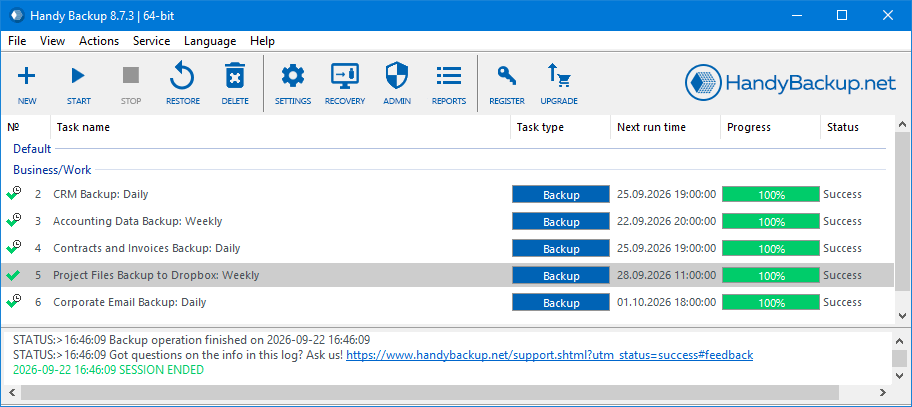
Customer Review of Handy Backup MSSQL Software
In Handy Backup 8, the MSSQL backup plug-in allows me not only copy and recover my database but also make clones in automated mode! This is a truly precious gift, as I can make a distributed net of MSSQL clones between our customers without any additional effort!
Charles Brooks, a system administrator for "Nortrope Chems, Inc.", WA
How to Back Up a SQL Server Database with Handy Backup
To create a SQL Server backup task, use the dedicated MSSQL plug-in in Handy Backup. Follow these steps to select databases, configure a backup destination, and automate recurring copies.
-
Launch Handy Backup and open the New Task Wizard.
-
On Step 1, select Backup. Choose Advanced mode if you need additional task settings.
-
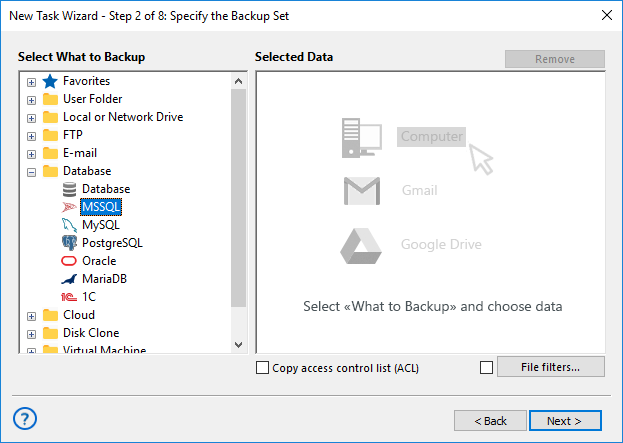
On Step 2, open the Database group and select the MSSQL plug-in.
-
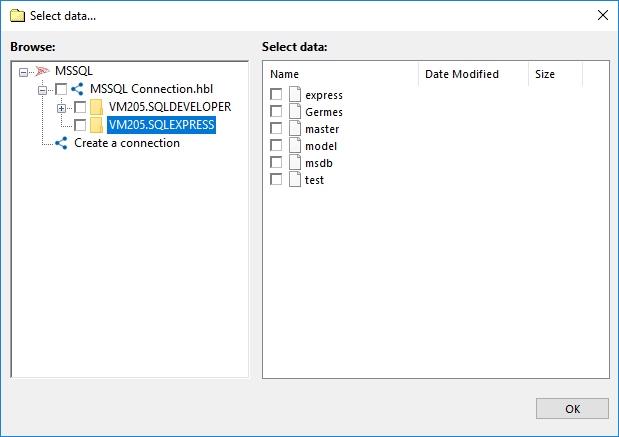
Select an existing SQL Server connection or click Create a connection. Enter the required connection parameters and credentials.
-
Expand the SQL Server connection and choose the databases you want to back up. Click OK to add them to the backup set.
-
On Step 3, select the destination, such as a local disk, NAS, Amazon S3, or another cloud service.
-
Configure encryption, compression, and versioning as needed. The MSSQL plug-in always copies the entire database; selecting incremental or differential mode does not reduce the amount of data copied.
-
Set a schedule for automatic SQL Server backups, configure notifications if required, and name the task.
-
Finish the wizard and run the first backup. Check the task log to confirm that the operation completed successfully.
Important: The dedicated MSSQL plug-in uses SQL Writer and Windows Volume Shadow Copy Service (VSS) to create database snapshots. The Handy Backup Workstation service must have sufficient permissions to access these services. The MSSQL plug-in operates with a locally installed SQL Server instance; remote servers require an appropriate Handy Backup deployment.
For additional configuration details, consult the Handy Backup User Manual, particularly the MSSQL Plug-in section.
For an extended plug-in overview, see MSSQL backup and restore.
Where to Store SQL Server Backups
A dependable SQL Server backup solution should allow database copies to be stored separately from the production database files. Handy Backup provides local, network, and cloud destinations that can be combined in a broader business backup strategy.


Local, Network, and Cloud Backup Strategies
For frequently accessed recovery copies, a local drive or NAS device may provide convenient access. For recovery after hardware failure or a site-level incident, an additional offsite copy can be stored using S3 backup software or another remote destination.
A common approach is the 3-2-1 backup strategy: retain three copies of important data, use two different types of storage, and keep at least one copy offsite. Administrators should also control storage credentials, retention periods, and restore access.
SQL Server Backup Types and Versioning
Microsoft SQL Server offers several native backup methods, including full, differential, and transaction log backups. Handy Backup uses its dedicated MSSQL plug-in to create database snapshots through VSS. These operations should not be confused with every native SQL Server backup command.

Full Database Backup
A full backup creates a complete recovery copy of the selected database. With Handy Backup, the MSSQL plug-in collects the database files through its VSS-based workflow. The resulting backup can be retained for restoration when needed.

Backups and Versioning
The MSSQL plug-in creates a complete copy of each selected database for every backup. Incremental and differential modes do not reduce the amount of database data copied.
Use scheduling and version retention to maintain recoverable database copies from different backup runs.
Transaction Log Backup and Recovery Models
SQL Server administrators may also require native transaction log backups for recovery to a specific point in time. This functionality depends on the database recovery model and the availability of a valid log-backup chain.
Handy Backup's MSSQL plug-in uses VSS database snapshots and should not be presented as a replacement for SQL Server's native transaction log backup and point-in-time recovery procedures.
Technical distinction: The full, differential, and transaction log operations described in SQL Server documentation are not necessarily equivalent to similarly named options in a general-purpose backup application. Choose the backup method based on your recovery requirements, and test the resulting restoration procedure.
How to Restore a SQL Server Database
Handy Backup provides a guided procedure for restoring databases previously saved with its MSSQL plug-in. A restoration task can return database files to their original location or use a different destination when configured appropriately.
- Open Handy Backup and create a new Restore task.
- Select the backup destination and locate the backup.hbi index file.
- Choose the required backup set and provide the decryption password if the copy is encrypted.
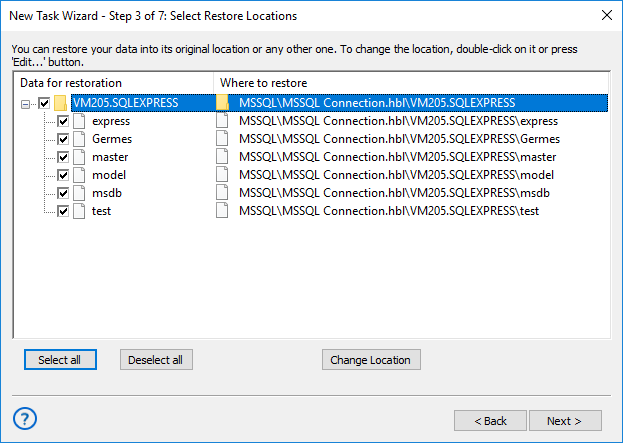
- In the restore locations dialog, review the databases and destination paths.
- Use Change Location if the database must be restored to another appropriate location.
- Complete the wizard, review the recovery settings, and start the task.
Important: Restoring a database through the MSSQL plug-in may require stopping the relevant SQL Server instance and its dependent Windows services. Plan production restores during an appropriate maintenance window, and create a current backup before overwriting database files.
Restore SQL Server Databases to Another Location
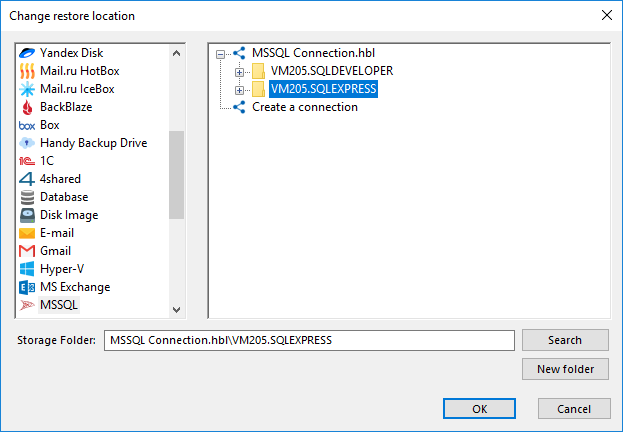
Handy Backup can restore an existing database backup to a different configured location. This is useful when creating a separate working copy, testing recovery procedures, or preparing data for migration.
In Advanced mode, open the restore locations dialog and select Change Location. Choose the appropriate destination, confirm the selection, and complete the restore task.
When restoring to another SQL Server environment, verify the software version, file paths, database names, permissions, and destination configuration before running the task.
Restoring a database copy through backup and recovery is not the same as real-time SQL Server replication or an Always On availability group. However, scheduled backup and restore tasks can be used to update separate database copies at defined intervals.
SQL Database Backup Software for Business
Handy Backup is designed for businesses that need to maintain recoverable copies of Microsoft SQL Server databases. Its dedicated database plug-in and automation features make it a practical SQL Server backup utility for business applications, recovery testing, multi-server environments, and offsite backup workflows.
Business Applications
Maintain recurring copies of SQL Server databases used by business applications, customer management systems, reporting tools, and other internal software.
Testing and Recovery
Create database backup copies for recovery tests and controlled restoration workflows. A separate test environment helps administrators confirm recovery procedures before a production incident.

Multiple Servers
With Handy Backup Server Network, organizations can centrally manage backup operations across network computers with the appropriate agents and database plug-ins.

Offsite Backups
Store database copies away from the production server using NAS, SFTP, or cloud storage. Separate destinations provide additional recovery options after local storage failures.
Choose Your SQL Server Backup Solution
Handy Backup offers SQL Server backup solutions for individual database servers and larger network environments. Choose the appropriate edition based on the number of computers, centralized management requirements, and the applications included in your backup plan.
Handy Backup Small Business
The Small Business edition includes the dedicated MSSQL plug-in for backing up and restoring Microsoft SQL Server databases. It is a practical choice when you need automatic database backup on an individual computer or server.
Handy Backup Server Network
Server Network is designed for organizations that need centralized task management across multiple computers. Network Agents allow the software to perform backup operations on remote machines as part of a managed backup environment.
Both editions can be considered as SQL Server backup solutions for business environments. Choose the deployment according to the number of computers, required plug-ins, and administration workflow.
Recommended Solution
Lifetime license

Handy Backup Small Business
Handy Backup Small Business provides automated SQL Server database backup and recovery with flexible scheduling and storage options. From a single interface, you can also back up other critical business data, including files, email, applications, and virtual machines, without managing separate backup tools.
SQL Server Backup Best Practices
Define Backup Frequency
Schedule backups according to the rate of database changes and the amount of data your organization can afford to lose. Frequently updated databases may require additional native SQL Server backup operations between full database snapshots.
Separate Backup Storage
Keep copies on independent storage, such as a NAS device or remote cloud account. Avoid retaining the only backup on the same physical disk as the production SQL Server database.
Verify Backups and Test Restores
A completed backup task does not guarantee that every recovery scenario has been tested. Periodically restore databases in a suitable test environment and verify that applications can access the recovered data.
Review Logs and Retention
Monitor failed or incomplete jobs, check available storage capacity, and retain backup versions for the period required by your organization. Use email notifications to identify tasks that need administrator attention.
For broader planning, see our guide to database backup tools and methods.
FAQ About SQL Server Backup Software
What is the best way to automate SQL Server database backups?
SQL Server backups can be automated using native SQL Server Agent jobs, external scheduling tools, or dedicated backup software. Handy Backup provides a graphical task scheduler and MSSQL plug-in that let administrators configure recurring database backups without maintaining separate scripts. The most appropriate method depends on recovery requirements, storage locations, and administrative resources.
Can Handy Backup back up a SQL Server database while it is running?
Yes. Handy Backup uses Microsoft Volume Shadow Copy Service and SQL Writer to create database snapshots while SQL Server remains operational. The Workstation service must have sufficient permissions to communicate with these Windows services. Unlike backup operations, database restoration can require stopping the SQL Server instance.
Can I back up SQL Server directly to NAS or cloud storage?
Yes. Handy Backup allows administrators to select NAS devices, network folders, Amazon S3, S3-compatible services, OneDrive, Dropbox, and other destinations when configuring MSSQL backup tasks. The software manages database copying and storage transfer within the task workflow, without requiring administrators to manually export databases and upload the resulting files.
Does Handy Backup provide incremental and differential MSSQL backups?
No. The MSSQL plug-in creates full database backups only. Incremental and differential settings do not reduce the amount of database data copied because the plug-in cannot identify changes within the database. To retain earlier database states, use scheduled full backups and versioning.
Can Handy Backup restore a database to another SQL Server location?
Yes. The MSSQL restore workflow includes a Change Location option for selecting a different database restoration path. The destination environment must be configured appropriately, and administrators should check database compatibility, file locations, and permissions before recovery. This is a backup-and-restore operation rather than real-time SQL Server replication.
What are the advantages of third-party backup tools for SQL Server?
Third-party backup tools for SQL Server can simplify recurring operations by combining scheduling, storage management, notifications, and restoration in one application. Handy Backup also provides backup capabilities for files, applications, and other databases. Native SQL Server tools remain important for specialized recovery operations, including transaction log management and point-in-time restoration.
Is there a SQL Server backup free trial?
Handy Backup provides a 30-day trial period with access to its backup features and plug-ins, including MSSQL. You can evaluate automated database backup, storage destinations, and recovery procedures before purchasing a license. For ongoing use, select a commercial edition that includes the MSSQL plug-in, such as Handy Backup Small Business or Server Network.
Can I use the generic Database plug-in instead of the MSSQL plug-in?
Handy Backup also includes a generic Database plug-in that works through ODBC connections. It may be suitable for certain database operations when the appropriate driver is installed. However, the dedicated MSSQL plug-in uses SQL Writer and VSS for SQL Server database snapshots and is the recommended option for this specific backup workflow.
What should I look for in a SQL database backup tool?
When choosing a SQL database backup tool, consider automatic scheduling, database consistency, storage flexibility, backup monitoring, and recovery options. Handy Backup combines these features in a graphical application with a dedicated MSSQL plug-in, making it suitable for recurring database backup tasks without custom scripts. For transaction log management and point-in-time recovery, SQL Server's native tools remain important.
Which Handy Backup edition includes the MSSQL backup tool?
The dedicated MSSQL plug-in is included in Handy Backup Small Business and higher editions, including Server Network. Small Business is suitable for local SQL Server backup tasks, while Server Network provides centralized management for backup operations across multiple network computers.
Related to SQL Backup:
Capterra′s Rating:
"Great product, very simple and effective backup program"