Windows Registry Backup Tool
Windows registry backup, which Handy Backup can perform automatically, is a necessary tool for keeping different settings, software parameters and user keys intact from unwanted changes and situational perils. To effectively backup Windows registry, Handy Backup contains a dedicated tool.
 Download for Free
Version 8.7.2 , built on June 23, 2026. 152 MB
30-day full-featured trial period

Registry Backup Benefits

With a copy of a registry, you can restore registry backup data any time and to any place, including a newly installed system or a repaired system image. By this set of options, Handy Backup can serve as a perfect tool for registry backup and restore.
Advantages of Registry Backup and Restore with Handy Backup

Automating Selection
By using the dedicated "Registry" plug-in, you have a direct access to Windows registry content, avoiding using file system or external software for selecting necessary keys and sections for backup.

Scheduling Operations
You can schedule backup task to run at particular time and repeat with a particular interval, from minutes to months, or even trigger a task to some system event in advanced task wizard mode.

Backup Uniformity
Handy Backup uses the same method for answering how to backup registry Windows 7,8,10, Vista or any modern Windows server edition. It is just the same plug-in and interface for all OS types.
How to Back up Windows Registry
Handy Backup has a special registry backup tool, which allows you to back up all Registry components including user keys, machine keys and current configuration keys. Just create a new backup task, and then select Registry on Step 2. The application will automatically locate all necessary registry data.
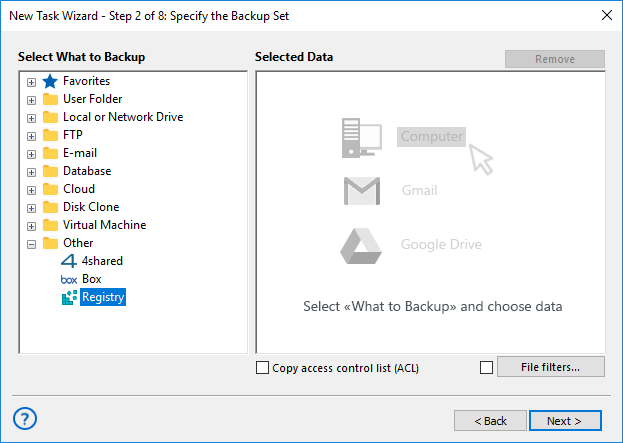
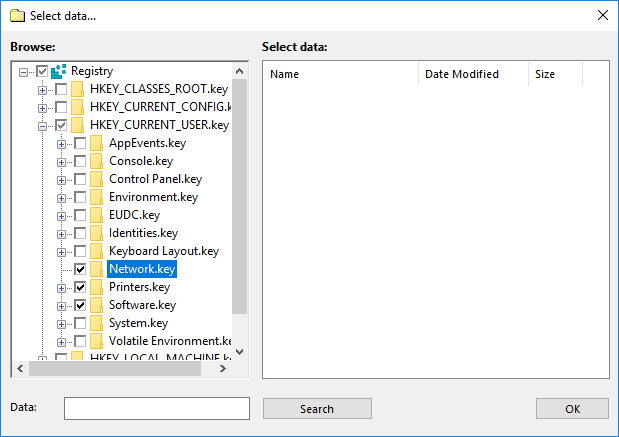
To backup Windows registry with Handy Backup more efficiently, you can specify which data should be included or excluded from the backup set, using the Registry Plug-in and the graphical interface.
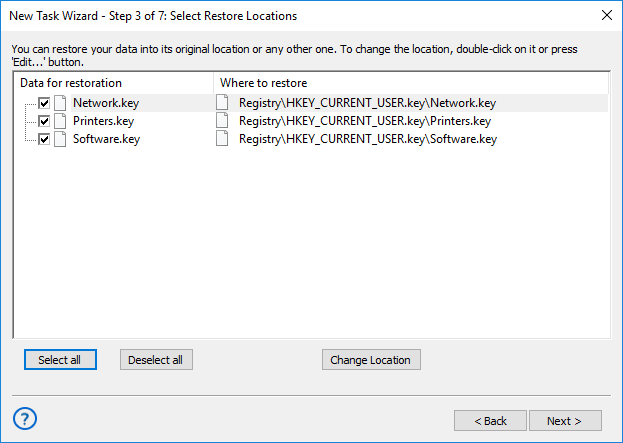
To restore registry backup, you can use the same preset in a restoration task. Please make sure that your version of Windows for which you are restoring your Windows backup registry data is the same as for original registry.
Review About Registry Backup by Handy Backup
Recommended Solution
Lifetime license

Handy Backup Professional
The Professional edition allows advanced Windows registry backup for experts and IT pros. Try our software and perform registry backup quickly and automatically. Full-featured free 30-days trial!
Registry Backup Restore
Although Handy Backup makes unencrypted backups in native formats, allowing accessing registry copies freely and moving these copies when you need, we recommend to make Windows registry backup and restore in automatic mode, via the plug-in, to avoid human errors and copy mishaps.
Caveat! Different versions of Windows use different registry file sets. Handy Backup can access all these data via the same plug-in. Still, when you will have a need to change or restore some of registry files manually, then please check about how to backup registry Windows 10 or other particular version!
Benefits of Registry Backup with Handy Backup
Handy Backup allows performing full backup of any Registry components with the following options:
- Transfer data to any media - store registry backups to USB, FTP, SFTP, network storage and other backup media!
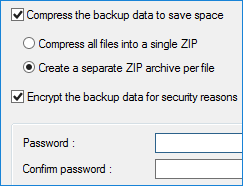
- Compression, encryption, etc. - provide the most flexible task configuration!
- Backup with timestamps - be able to restore system to any desired state!
- Backup as Windows service - ack up data as a Windows service and make all processes run invisibly and automatically!
Being a great Windows registry backup and restore software, Handy Backup has also many other useful data options, such as Outlook backup, Database backup and other. For a full list of data source options, please refer to Handy Backup features.
Download for Free
Version 8.7.2 , built on June 23, 2026. 152 MB
30-day full-featured trial period
Perform registry backup with Handy Backup and always feel safe about your Windows settings!
See also:
Capterra′s Rating:

"Great product, very simple and effective backup program"
"It is very simple to use but very handy function, to save a Regisrty before making manual changes and file-tuning a system. Looks great, and works with no question, allowing making no trouble when configuring complex registry-based tune-ups!"
Steve Larch, a system administrator