Hard Disk Mirroring Software Tools for non-RAID Drive
Hard disk mirroring means creating a copy of a hard drive on another disk (which will be a “mirror”). This action is a part of functioning of such popular hard drive mirroring arrays as RAID1 and RAID10. However, you can also mirror any drive using hard disk mirroring tools such as Handy Backup.
 Download Trial
The Principle of Automatic Hard Drive Mirroring
Hard drive mirroring software goes beyond creating a simple copy of data from one disk to another. Instead, it operates at a physical level, copying the disk mirror sector by sector. This process involves reading and replicating the internal hard disk structure, encompassing file allocation tables, boot records, and all the information stored on the drive. This method aligns with the principles of continuous backup, ensuring a comprehensive and up-to-date replication of the entire disk.
Best Hard Drive Mirroring Software Features
These are some necessary functions for any hard disk mirroring tool, providing efficiency and stability. Handy Backup meets all these requirements, allowing scheduled, automated hard disk mirroring on a physical level, without stopping using a copied hard drive for other purposes during saving a mirror.

Image-Based Hard Disk Mirroring
Automatic hard drive mirroring must copy the disk content information on a sector level, thus creating a complete and perfect physical HDD copy. You can move these clones to another drive, including “bare metal”, just formatted hard disks. Please learn more about hard drive cloning.

Scheduling Hard Drive Mirroring
Disk mirroring software must allow automatic schedule for running tasks on a regular basis, by both a starting time and a repeating interval or by an event occurred in the system. You can also make running for missed tasks or start a hard disk mirroring by some system event such as user logon.

Hot Hard Disk Mirroring
To create a copy of a disk in use without compromising efficiency, hard disk mirroring tools must copy the drive content in a “hot” mode, e.g. without stopping using a disk by other applications. It can be especially useful when working with databases, virtual machine arrays or other server drives.
Advantages of Handy Backup
- Hot hard disk mirroring using the VSS (Windows Volume Shadow Copy Service);
- Job by schedule allowing making a hard drive mirror by a period or by an event;
- Making bootable images in a readable VHD format for mapping as virtual or VM drives;
- Effective drive loading, protecting hardware and saving time during hard disk mirroring.

Recommended Solution
Lifetime license

Handy Backup Small Business
Best disk mirroring software for a single machine, the Small Business edition also allows creating backups for any other server-level or user data existed! Free 30-days trial version!
How to Use Handy Backup for Hard Disk Mirroring
To create a drive-mirroring task with Handy Backup, please follow the next instruction.
- Run Handy Backup and create a new task, calling a Wizard by a button on the panel.
- Select a backup task on Step 1, and also turn on the advanced wizard mode if you need.
Note: Advanced task wizard contains much more task settings and options, but a bit more steps as well. If you need to just mirror a hard disk, do not use advanced mode for convenience. But if you want to take some extra option such as running external software before hard disk mirroring, go advanced!
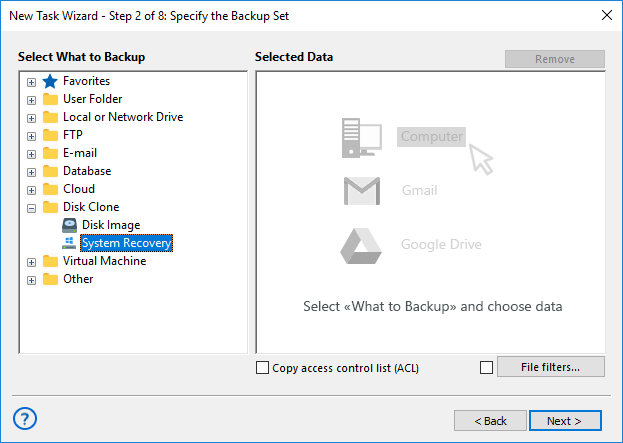
- On Step 2, select the “Disk Clone” option on the Step 2 by clicking on a “+” on it.
- Select the “System Recovery” plug-in by clicking on it.
- Mark the drive(s) that you plan to mirror by a checkbox besides a drive name.
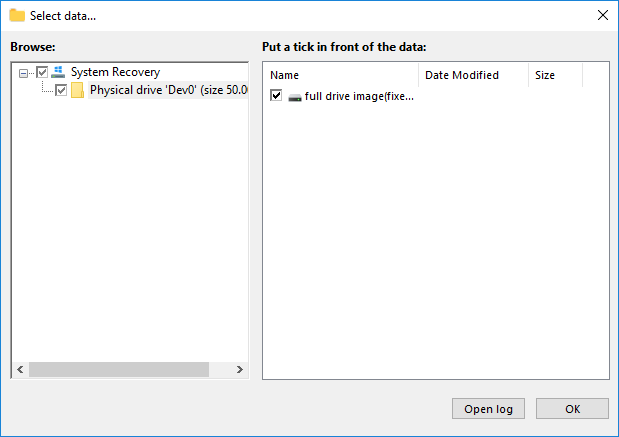
- Click OK and return to the Task Creation Wizard. Make all other task parameters step by step.
- When finishing, run a task or wait for a scheduled running.
- Now create a new restoration task.
- On Step 2, enter into your storage of disk mirroring files.
- Find a file called backup.hbi and select it.
- In the appearing dialog, click the “Change location” button.
- Select a new local drive to write a disk image mirror on it. Click OK and continue creating a task.
After you finish, all done! Your tasks will run as a pair, one creating a hard disk mirroring image and the next restoring this image into a different hard drive than an original. We will strongly advise to keep a big amount of space on the intermediate file storage containing your mirrors before restoration!
The Disaster Recovery Utility

The Disaster Recovery utility provides another way for software hard disk mirroring. You can copy an entire drive to an external device containing the Disaster Recovery boot loader, and then move this drive clone to any other disk (including “bare metal” copying to a new or scratch PC).
For details about Disaster Recovery utility, please refer to the User Manual. It is freely available for customers of Handy Backup Professional, Small Bussines and Server Backup editions.
Hard Disk Mirroring for RAID
Some RAID array configurations, for example, RAID1 and RAID10, mirror hard disks automatically; this is a principal function of these arrays. Despite that fact, you may need for “software hard drive mirroring” of your RAID to another location. Use Handy Backup for this operation, exactly as for a single drive!
Download Trial
Even without a RAID array, you can always create a mirror of your hard disk to protect or clone your data on a physical level.
Try Handy Backup freely during a 30-day trial period, making use for all its functions, plug-ins and advantages!
See also: