Backup Related Features
Handy Backup has a pack of features allowing users fully controlling what, where, when and how to take copies of any data on their PCs or even networks. Some editions allow purchasing feature when a user feel a need for it; other, like a Small Business solution, already contain all features out-of-the-box.
 Download for Free
Version 8.7.0 , built on May 7, 2026. 152 MB
30-day full-featured trial period
What Is Backup Data?

Backup is saving copies of information to some secured place, physically or logically separated among an original data storage. This allows always keeping a good, consistent copy of crucial data and restoring these data at any time when a need will emerge. Therefore, backup can protect from any peril!
What Is Backup File Utility Can Do?

Any backup software, including Handy Backup, has some set of principal features working with backup tasks. To compare feature set from different editions of Handy Backup, please refer to the Backup Software Comparison Chart. For convenience of browsing, we divide all features into several categories.

Thanks to a well-developed plug-in architecture, the list of supported data source options can impress or even enjoy. With Handy Backup, you can work with different file systems, databases, applications, and much more.
- File Backup - you can back up any data as individual files and folders, or using of advanced plug-ins for specific data types.
- User Folder Backup - saves a content from typical folders like Documents, Favorites, Desktop, and other Windows user folders.
- Windows Libraries Backup - takes a snapshot from any Windows common library, like Documents, Images or Video.
- Image Backup - hard disk imaging allows you to copy PC data completely, with all documents, operating system and applications.

- Full computer backup - software allow taking an entire copy of all computer data, either on a file level or, preferably, in a logical level (i.e. as a couple of packed drive or partition images).
- Backup email services - provides a function of saving and recovering emails from any Web mail servers supporting IMAP protocol.
- Outlook Backup - backs up your Outlook local data, including emails, contacts, events and so on.
- Backup Music - save your collection of music and audio files in every format you have: MP3, Virbis OGG, WMV etc.
- Backup Videos - take a snapshot of your movie collection, video or homemade films stored in any video format available!
- Photo Backup - back up your JPEG photo collection, professional-level TIFFS or Photoshop files with just a few clicks.
- Database Backup - a common plug-in for backing up database tables using a dedicated ODBC driver for each database. It can save data from any SQL or non-SQL database type.
- MS SQL Server Backup - back up MSSQL database with all views, indexes, stored procedures, and other data.
- MySQL Backup - backup and easy recovery of MySQL, one of the leading database management systems of the world.
- DB2 Backup - protect IBM DB2 data servers. The “Ready for IBM DB2” logo verifies compatibility with the technology.
- Lotus Backup - advanced plug-in for Lotus Domino/Notes databases of version 6.5 and higher. Compatibility with the technology is verified with the “Ready for IBM Lotus” logo.
- Oracle Backup - hot backup and restoration of Oracle databases.
- Exchange Server Backup - back up the most powerful messaging and collaboration system.

- FTP Backup - allows linking a program and saving data from an FTP server located somewhere in the local network or via the Internet.
- SFTP backup and FTPS backup - protected variants of an FTP connections, these features can save data from such protected file storages or from a majority of website hosting servers.
- S3 Cloud - allows connecting to any cloud besides Amazon S3 that provides the same S3 interface, e.g., taking Wasabi backup.
- OneDrive and OneDrive for Business - backup to “native” Windows clouds using featured APIs for connection and transferring of what is backup data used.
- Google Drive - allows saving data to the most popular Google cloud service.
- Box, BackBlaze, Xref AutoCAD for Cloud - other options for commercial clouds backup.
- WebDAV Cloud is an additional feature that enables connectivity with various cloud services, providing a WebDAV-enabled interface.
- System Recovery - takes a bootable image of a system drive in a VHD format for restoring, mapping as a virtual drive or even starting a system image on a virtual machine like VirtualBox.
- Registry Backup - saves a copy of your current Windows registry. This option can save a lot of time when you attempt a recovery or restore your system after some malicious attack.
Centralized Backup by Network
What is backup data by network? In this mode, you can use all features described in this article to backup files from a single management panel in a local network. Save data remotely, making an efficient online backup without physically moving between different machines!
Server backup – allows saving server-level data, such as databases, virtual machines, websites and FTP content, to any local storage connected to network machines, or to remote data vaults including local and Internet-based FTP servers, clouds etc.

Workstation backup - provides backup functions for remote user PCs and workstations running under any type of OS, to save projects, workfiles, emails and other user-level data wherever you want, including local, network and Web-connected storage of almost any type in exist.
Attention! Only the Server Network solution provides the centralized network backup function. In addition, you must purchase a Network Agent of appropriate type (i.e. a Server Agent or a Workstation Agent) to each machine connected to your network, if you plan to back up to and from this machine.
Recommended Solution
Lifetime license

Handy Backup Standard
The Standard edition lets you backup files, folders, and e-mails to local and USB drives, FTP servers or Online. Supported options include compression, encryption and scheduling.

You can back up your data wherever you want! Are you a home user? Use home NAS or USB drives. Are you an IT expert? Take advantage of secured SFTP or FTPS connections and cloud replication.
Storage Destination Features
- Back up to FTP - you can transfer important data to remote computers using the File Transfer Protocol (FTP), or its secure variations (FTPS, SFTP).
- Backup to Network - saves all what is backup file selection to shared storage locations such as NAS units or remote mapped drives.
- Backup to Amazon S3 - you can back up data to Amazon S3 cloud storage.
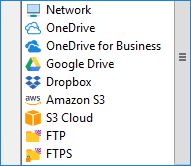
- Backup to HDD - the software lets you copy data to any local drive attached to your machine. If you are using an external unit, you can also trigger your task for plugging this unit into your PC!
- Backup to Google Drive - perform effective Google Drive auto backup.
- Backup to Box, BackBlaze, 4shared or Wasabi S3 Cloud Backup - as for Amazon S3, these storage features allow you using your account on some popular cloud as your backup destination.
For any users and any needs, Handy Backup allows selecting the most appropriate storage feature for keeping backup data.
The software comes with a wide range of options, including data compression, encryption, scheduling and much more.

Filtering, Selecting and Verifying Options
- Backup Filtering - you apply filters based on file attributes, or specify include/exclude file masks to back up only files you need.
- Backup in native formats - preserving original formats of any uncompressed, unencrypted files in copies, which allows browsing, replacing and modifying files from these copies without complete recovery.
- Open File Backup – you can select locked files for “hot” backup, as the utility uses a Volume Shadow Copying Service to snapshot files used by other applications.
- Backup Verification* - sometimes it is useful to verify that all backups were made error free, e.g. after transferring the files via an FTP or to some cloud.
- Selective Restoration - recover, copy or clone your data to a different place than the source by using the “Change restore location” dialog when create a task for restoring the information.

Backup Controlling Features
- Backup as Service - for maximum security of PC data, you can set up Windows service and have all jobs always started in time, even with no user logged in.
- Easy-to-use interface - an intuitive graphical environment (GUI) for creating and controlling backup tasks.
- Two-mode task wizard - allows creating new tasks of any type in simple or advanced mode, with a latter option adding some extra steps to task creation but exploring all features and functions of Handy Backup.
- Event logs/reports backups - by viewing the log file, your stay informed about all executed tasks and task statuses, as well as errors.
- Email notifications - sending operation results to you regularly providing you with up-to-date information about the progress of task execution and errors.
- Other program to run before/after running backup tasks - you can schedule any task to run before or after a selected program.
*Note: Backup verification is temporarily unavailable in the latest version, 8.7.0.

Compression and Encryption
- Backup with ZIP - built-in ZIP compression engine lets you minimize backups (and if you are backing up online, time and storage space used).
- Backup Encryption - allows encrypting any file with a 128-bit BlowFish algorithm, to reduce possible risks during the transfer and storage.

Scheduling Options
- Backup Scheduling - you can define a backup plan and run backup and recovery tasks automatically with a period of repeating set from months to minutes.
- Triggering Backups by USB Plugging or by Other Event - you can also launch your task on logon/logoff, force to run a missed task, or even start a task when connecting a USB unit linked with this task to your PC!
Recommended Solution
Lifetime license

Handy Backup Small Business
Small Business Backup Solution has multiple server-specific functions including backing up of Microsoft Exchange Server, MSSQL, MySQL databases, IBM Lotus Domino, and much more.
Handy Backup provides some methods of backing up data, as well as some storage techniques allowing saving time, space and efforts on backup operations.
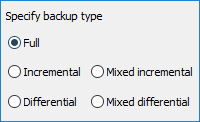
- Full Backup - all files of the selected backup set are copied upon each backup session.
- Incremental Backup - back up only new and last modified files are backed up.
- Differential Backup - only slighted changes of data, compared to the previous full backup.
- Mixed Backup - a cycle of a full backup and some differential backups, repeatedly running until it reach a preset quantity of differential backups and start all the cycle again.
- Versioned Backup - keeping some versions of one dataset (taken from a full or a differential backup), possibly duplicating each other, for a time or a quantity you are need.
- Mirror Backup - provides identity of content of the two selected folders.
- Time-stamped Backup – you can mark any backup folder with a clearly readable date and time of creating that particular backup, allowing manual or automated time-depending operations.
System Requirements
Handy Backup is a solution designed to backup Windows computers and back up small business servers running under Windows:
- Windows 11 Backup
- Windows 10 Backup
- Windows 8, 8.1 Backup
- Windows 7 Backup
- Windows Server 2022 Backup
- Windows Server 2019 Backup
- Windows Server 2016 Backup
- Windows Server 2012, 2012R2 Backup
- Windows Server 2008 Backup
Note: You can back up Windows Servers and workstations working under both 32- and 64-bit platforms. Handy Backup will automatically select an appropriate type of software, according to the configuration of machine and OS.
Backup Linux - you can run Handy Backup from some Linux distros under Wine, or as a part of a network architecture (for network-oriented editions).
Download for Free
Version 8.7.0 , built on May 7, 2026. 152 MB
30-day full-featured trial period