Registration, Re-registration, Registration Number Loss
Updated on June 11, 2026
Applies to: Handy Backup
I have lost my registration number
If you have lost your registration number, do not worry too much. You can restore your registration without a problem!
Manual Restoration (Quick and Straight Method)
To restore your registration number, please go to the registration management page and select “Forgot the registration number” option.
Then enter your E-mail address you were using when you were purchasing your copy of Handy Backup. Within 24 hours, you will receive the reply with detailed instructions.
Calling for Technical Support
If you did not receive the reply by E-mail within 24 hours, or if you forget your E-mail used for registering Handy Backup, you can call to tech support to solve your problems.
Please send us a message to [email protected] with all the information you have used when you ordered Handy Backup:
- Your Order ID
- Your name
- Your email (in case you remember it)
- Your company name
The more details you provide, the faster we can find your registration number in our database. Then you will receive E-mail reply with detailed instructions, too.
I have received a message saying that my registration number is invalid
If the server does not accept your registration number, please check whether you have entered it correctly upon registration.
If you have typed it correctly, then check if you are registering the same version as you are using. Currently the four different major versions of Handy Backup are supported:
- Handy Backup Free for Clouds
- The old Handy Backup 6 and Handy Backup 7
- The most actual Handy Backup 8
It is impossible to register your version with a registration number that belongs to different versions of Handy Backup.
- Firstly check the version of your software. The version number appears in the window title of Handy Backup utility. Also you can check it through the program menu: click Help and then About Handy Backup.
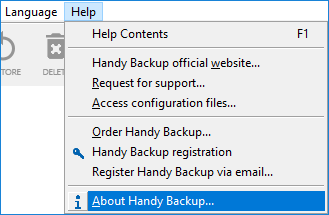
You will see the following window.
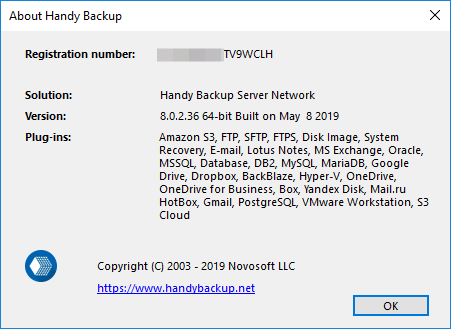
- Then check if your number is appropriate for your chosen version of Handy Backup. The version number suited for your registration number contained in your purchasing information.
- If you have any other problems with a registration number to version 7 or 8, please contact our support center at [email protected] and explain your problem. Be sure you can provide your name, company name and order ID as the required information to solve your problem!
If you have bought the program on the web-site handybackup.com, please go to the page dedicated to this problem and follow the provided instructions.
New key registration for version 6 is no longer supported (previously registered versions will continue to operate). For optimal performance, we recommend using the latest version of the program.
If you have received a message "Registration limit exceed", please send E-mail to our support team [email protected] about this problem, and we will help you solve this situation.
How do I register the program on a computer without Internet access?
To register the program without Internet access, open the Handy Backup menu and generate the registration data to send by email. Just follow a few simple steps:
- Open the Help menu item and find the Register Handy Backup via email... option.
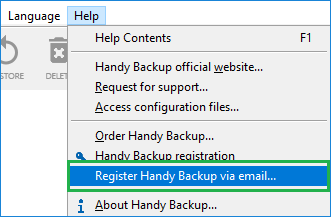
The Registration window opens.
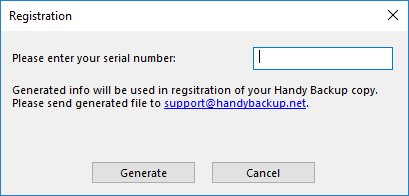
- Enter your registration number and click Generate.
- Please send the generated information to [email protected]. Upon receipt, we will send you a registration file that you will need to import into the program. The message from the support team will have all the necessary instructions.
You can find more information in the Registration section of User Manual.
Can I use a single license on more than one computer?
You can use a registration key on one computer only!
- If you need to install Handy Backup on multiple computers, you must purchase the appropriate number of licenses.
- If you want to move Handy Backup from one computer to another, please reset your registration using our license management form. You can also refer to Migrating to New Computer for detailed instructions.
Important: Once you transfer your copy of Handy Backup to another computer, the previous installation will no longer work.
To back up LAN data, including servers and workstations over a local network, you only need a single registration key. This key is entered on the central management panel of Handy Backup Server Network — no activation is required on remote machines.
If your organization’s IT policies do not allow file sharing, you may be interested in our enterprise backup solution.
How can I move my copy of the program from one computer to another?
Note: Transferring Handy Backup from one computer to another is supported only in version Handy Backup 8.
Transferring your copy of the program from one computer to another. It is a simple task.
First, remove the registration number from your current machine. You can do it by one of three ways. Choose the fastest and most convenient way for you to delete your registration:
- From the program. Click the Register button on the program′s toolbar.

- Then click the Recover registration button, which will open the registration management section of our website.
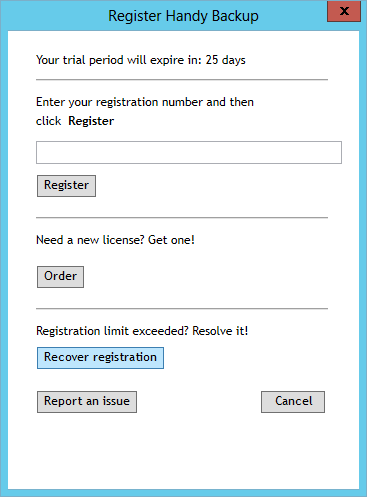
- Select the “Moving registration to another computer” option and follow the instruction provided on the opened page.
- Manual. Go to the registration management section of our website, and select an option for moving your license (“Registering on another computer”). Then follow the instruction provided for you on the requested page.
- Calling for tech support. Please send the e-mail including your name, date of purchasing and your current registering number to the technical support team, using the address [email protected] for the letter.
Note: In a latter case, you must wait for E-mail confirmation of resetting your registering number to proceed.
Then set up a new copy of Handy Backup on your current machine. Register it as usual, using the same number you were using on a previous computer. The new copy will work under exactly the same license as previous instance of Handy Backup.
How do I find my registration number of Handy Backup?
You can find out the registration number of Handy Backup in different ways.
You have Handy Backup 7 or earlier versions and you want to update it to version 8 but do not remember your registration number. You can find it via the following methods:
From the program
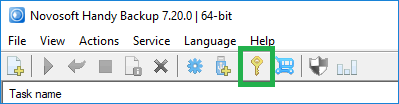
- Launch Handy Backup. On the toolbar click the key button or enter the Help menu and click the "Enter your serial number..." option.
- Open a new dialogue window, where you will see your registration number.
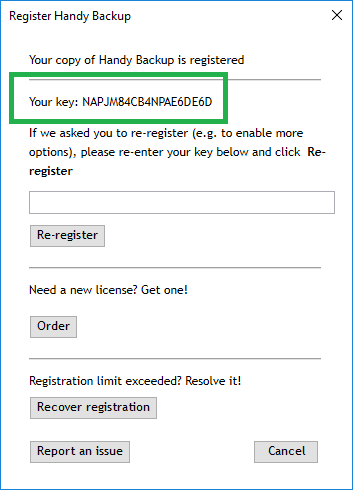
Through the registration management form
- On the form web-page choose the forgot the registration number option.
- Enter the email address you registered Handy Backup with.
- An email will be sent with all the registration numbers you have purchased.
Purchase letter
- When purchasing the program you will receive a letter with your order confirmation and the registration number. In that letter you can also check which version of Handy Backup you have purchased.
If you have any further questions please email us at [email protected].
What to do if I have bought the program on handybackup.com?

The version you have bought on handybackup.com is old and it works only on Windows 95/98/Me or Windows NT 4.0/2000/XP.
If you want to actualize your version so that it would work on MS Windows 11/10/8/7, Windows Server 2025/2022/2019/2016/2012(R2) and Linux, we can give you a license for our product with a good discount:
- Firstly you should download the latest version of Handy Backup
- Then order the upgrade to the newest version of the program for $14.
If you have any problems, send us a letter to [email protected] explaining your problem.
What to do if there are problems with the registration number for free version of the program?
To use Handy Backup Free for Clouds you have to register.
If you have problems with your number for free version of the program, you can go to the free registration section of our web-site and follow the instruction provided for you on the requested page.
If you experience any troubles during the free registration, please contact us at [email protected]. We will try to solve all your registering problems as quickly as possible.
