VM Backup Software Solution
Virtual machine backup software - Handy Backup is a specialized tool designed to protect virtual environments by creating regular, automated backups of virtual machines, including all data, configurations, and system states. It helps ensure business continuity and minimizes downtime caused by system failures or data loss.
Start protecting your virtual infrastructure today with reliable, flexible, and easy-to-use VM backup software built for home users, businesses, and IT professionals.
 Download Trial




Why VM Backup is Essential
Backing up VM's is crucial in today’s IT environments where downtime or data loss can lead to serious operational and financial consequences. Let’s explore why reliable virtual machine backup solutions are indispensable for your infrastructure.

Critical Business Data
Virtual machines often host essential business applications and databases. Losing this data without a backup can halt your operations and damage your company’s reputation.
Fast Disaster Recovery
With efficient virtual machine recovery tool, you can quickly restore entire VM's after failures, minimizing downtime and preventing revenue loss.
Virtualization Flexibility
Backups allow safe migration and cloning of virtual machines across different hosts or cloud environments, supporting IT agility and scalability.
Advantages of Handy Backup for Virtual Machine Backup
Handy Backup offers a reliable and efficient virtual server backup software tailored to the unique demands of VM backup, helping businesses protect their virtual environments with ease and confidence.

Automated Backup Scheduling
Handy Backup lets you create flexible backup schedules, whether daily, weekly, or customized intervals, so your virtual machines are consistently protected without any manual effort.

Incremental and Differential Backups
By backing up only the changes made since the last backup, Handy Backup saves storage space and significantly reduces the time required to complete each backup cycle.

Multi-platform Compatibility
Handy Backup seamlessly supports popular virtualization platforms such as VMware, Hyper-V, and VirtualBox, providing a unified VM backup software across different environments.

Flexible Storage Options
You can securely save virtual machine backups to various destinations, including local drives, network-attached storage (NAS), FTP servers, and popular cloud storage services for Google Drive and Amazon S3 backup.

Fast and Reliable Recovery
Our virtual machine recovery tool enables quick restoration of entire VM's or specific files, minimizing downtime and allowing rapid recovery from any data loss or system failure.

Secure Data Encryption
Your backup data is protected with advanced AES-256 encryption, certified to meet industry standards, ensuring maximum confidentiality, data integrity, and compliance with security regulations and corporate policies.

Pre- and Post-Backup Actions
Handy Backup allows you to automatically run scripts or applications before or after any backup task. This feature is useful for preparing environments, notifying systems, or performing cleanup operations.

Email Notifications and Detailed Logs
Handy Backup provides comprehensive email notifications and detailed logs for every VM backup task, allowing you to monitor the status and quickly identify any issues or failures.
Recommended Solution
Lifetime license

Handy Backup Small Business
Handy Backup Small Business is a powerful and versatile virtual machine backup software designed specifically for small teams and IT departments that need to protect virtual machines along with physical workstations and servers. Download the 30-day free trial today and experience effortless VM backup with enterprise-grade features tailored for small businesses.
Hyper-V Backup
- Schedule regular backups of running virtual machines without interrupting ongoing services
- Easily restore individual files directly from virtual disk images whenever needed
- Store your VM backups securely on local storage, network drives, or popular cloud platforms

VMware Backup
- Move virtual machines between hosts or environments without service downtime
- Automate snapshot creation and preserve full system states for reliable recovery
- Protect live instances with hot backup support — no need to shut down virtual machines
How to Backup a Virtual Machine with Handy Backup?
- To back up a virtual machine, open Handy Backup and create a new backup task using the “Create” button or Ctrl+N.
- On Step 2, select the appropriate plugin from the “Virtual Machine” group, depending on the type of VM you want to back up.
- Click “Create a connection…” and choose the desired backup mode — either hot backup without stopping the VM or suspend mode for a more consistent snapshot.
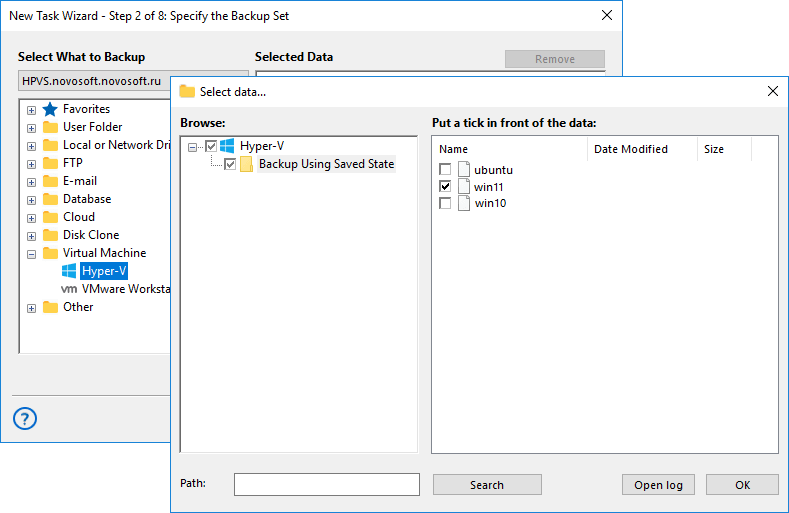
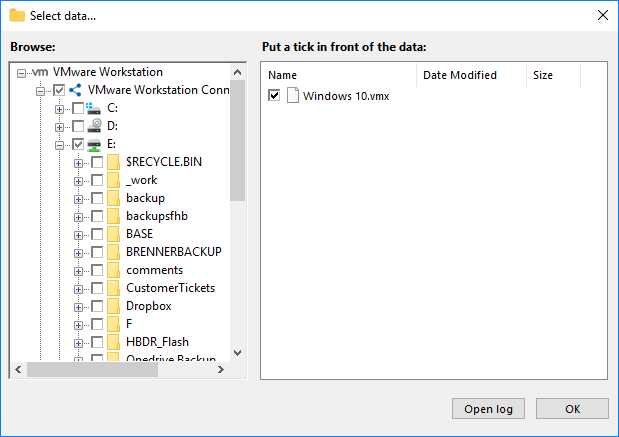
- Select the files or data within the virtual machine that you want to include in the backup. You can choose the entire VM container or specific virtual disk files.
- Choose the storage location for your backup, such as a local drive, NAS, FTP server, or a cloud service like Amazon S3 or Google Drive.
- Set additional options like backup schedule, incremental or differential mode, and encryption. Finally, give your task a name — and your virtual machine backup is ready to run!
Additional Benefits of our Virtual Backup Solution

Use Handy Backup in 21 languages to manage tasks comfortably in your native language or work seamlessly in international teams — ensure smooth collaboration.
Try a free trial version with full functionality for 30 days. Explore all backup features before committing to a license and see how it fits your needs.
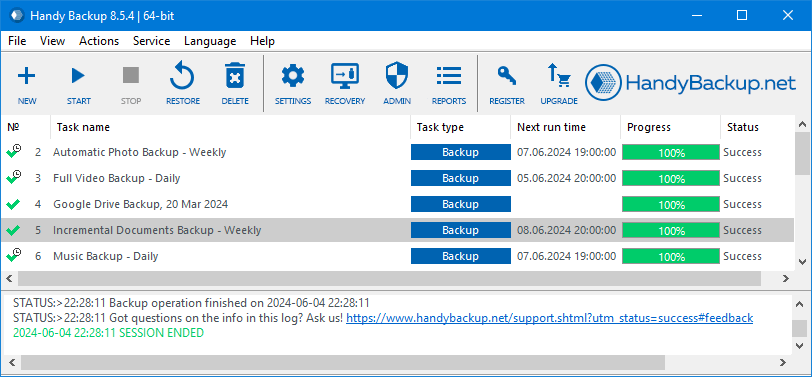
Work in a user-friendly interface designed for both beginners and professionals. Easily create and manage backup tasks with intuitive menus and visual controls.
Manage backups via a web application from any browser and device. Control your tasks remotely without installing the software on every workstation.
Buy a lifetime license and avoid subscription renewals or recurring payments. Pay once and keep using the software forever with all key features unlocked.
Select optimized pricing plans tailored to your infrastructure and backup strategy. Pay only for the features you need without extra overhead.
Set up your backups easily with a fast and guided installation process. Get started in just minutes and configure tasks without deep technical knowledge.
Contact our technical support for help with any issue. Get assistance with setup, troubleshooting, and best practices from a responsive support team.
Frequently Asked Questions About Virtual Machine Backup Solutions
- What is Virtual Machine Backup Software
Virtual machine backup software is a specialized tool designed to create secure copies of entire virtual environments, including operating systems, configurations, and stored data. Unlike basic snapshots that only capture a moment in time, a dedicated backup solution creates full or incremental copies externally and allows complete restoration in case of failure. Handy Backup is a powerful tool for protecting virtual machines of various platforms. It supports scheduled full, differential, and incremental backups, ensuring your entire virtual infrastructure remains safe and recoverable when needed.
- Is Handy Backup only a virtual machine backup software, or does it also work as a physical server backup software?
Handy Backup is both a virtual machine backup software and a physical server backup software. It allows you to back up and restore data from VMware, Hyper-V, and other VMs, as well as from physical servers and workstations, providing a single solution for all environments.
- Can I run backups without affecting VM performance?
Yes, modern VM backup tools often supports “hot backup” functionality, allowing you to create copies of virtual machines while they continue running. This reduces service interruptions and helps maintain business continuity. The overall system impact will depend on your infrastructure and the backup method used. Handy Backup supports background execution of backup tasks, intelligently managing system resources to ensure your virtual machines remain responsive and uninterrupted during the backup process.
Download Trial
Try the 30-day free trial of Handy Backup, the reliable VM backup software.
Experience seamless virtual machine protection, flexible automation, and total peace of mind.