Hybrid Cloud Backup – Handy Backup
Hybrid cloud backup is a comprehensive data protection strategy that combines local and cloud-based storage solutions. With a hybrid cloud backup solution, your data is simultaneously backed up to both on-site devices and off-site cloud storage, offering enhanced security and flexibility.
Discover why Handy Backup stands out among other hybrid cloud backup solutions. Download our free trial today and experience firsthand the exceptional performance and reliability of our software.
 Download Trial
Hybrid Cloud Backup Advantages
Hybrid cloud backup solutions provide a robust combination of local and cloud storage to deliver superior data protection. By integrating on-site and off-site backup methods, these solutions enhance security, ensure data integrity, and improve accessibility. Experience how this dual approach creates a more resilient and adaptable system for safeguarding your critical information against a range of risks and challenges.

Disaster Recovery
Hybrid backup solutions enable efficient disaster recovery by maintaining up-to-date copies of data both locally and in the cloud.

Data Integrity
Ensures that data remains accurate and unaltered through regular synchronization between local and cloud backups.

Scalability
Hybrid backup systems are scalable, allowing you to easily adjust to growing data needs and additional backup sources.

Simplified Management
Combines multiple backup processes into one easy-to-use interface, simplifying management of handling separate backup systems.
Handy Backup distinguishes itself in the realm of hybrid cloud backup solutions through its exceptional blend of performance and ease of use. It integrates local and cloud storage effortlessly, ensuring that your data is consistently protected and readily accessible. The solution’s robust framework offers comprehensive safeguards against various risks, providing peace of mind and reliability for all your data protection needs. Handy Backup is a top choice for those seeking a dependable and effective approach to safeguarding their valuable information.
Why Choose Handy Backup for Hybrid Backup?
Handy Backup offers a suite of benefits tailored to enhance your hybrid cloud backup strategy. By seamlessly integrating local and cloud storage, Handy Backup ensures your data remains secure, accessible, and efficiently managed.

User-Friendly Interface: Combine multiple backup processes into a single, easy-to-use interface, simplifying task management and monitoring.

Support for Multiple Sources: Sync data between local storage and cloud services, with customizable sync directions for flexible and comprehensive backup options.

Task Automation: Schedule tasks for automatic execution, streamlining the backup process and reducing the need for manual intervention.

Network Solution Support: Support remote machine synchronization, making it ideal for hybrid cloud backup for enterprises and complex network setups.

Advanced Encryption Standards: Utilize AES-256 and Blowfish encryption to secure your data both locally and in the cloud, ensuring robust protection against unauthorized access.
Recommended Solution
Lifetime license
Handy Backup Server Network
Handy Backup Server Network is an excellent solution for hybrid cloud backup, ideal for those who want to integrate local and cloud storage. This software makes it easy to synchronize data between local servers and cloud services, ensuring reliable backup and data recovery. Try Handy Backup Server Network today! Download the free 30-day trial version and experience the simplicity and effectiveness of our solution.
Hybrid Backup vs. Cloud Backup vs. On-Premise Backup
Choosing the right backup solution is crucial for ensuring data safety and operational continuity. In this comparison, we'll explore the strengths and limitations of hybrid, cloud, and on-premise backup solutions. By understanding the unique benefits and challenges of each, you can make an informed decision that best suits your organization’s needs.

Hybrid Backup
- Balanced Flexibility and Security:
Such backup combines local storage with cloud services for a balanced approach. It allows you to keep frequently accessed data on-premise for quick recovery, while securely storing additional copies in the cloud for disaster recovery and long-term retention. - Ideal For Organizations with Diverse Needs:
Such backup is perfect for businesses that require fast local recovery options combined with the reliability and scalability of cloud storage. It’s especially beneficial for companies that need to comply with strict data regulations or optimize their network bandwidth usage.

Cloud Backup
- Scalable and Accessible:
Cloud backup allows for easy scaling of storage capacity and provides remote access to your data from anywhere in the world. It’s an excellent choice for businesses looking to minimize on-site hardware and focus on geographic data distribution. - Best for Remote Teams:
Cloud backup suits distributed teams and disaster recovery across regions. However, compared to hybrid backup, cloud solutions may involve longer data recovery times and higher dependency on internet connectivity, which can impact operations during outages.

On-Premise Backup
- Complete Control and Immediate Access:
On-premise backup keeps all your data within your local infrastructure, offering maximum control over hardware and security. It ensures the fastest possible data recovery times, without depending on external factors like internet speed or cloud provider availability. - Optimal for High-Security Environments:
This approach is ideal for organizations with stringent security requirements, such as government agencies or industries handling highly sensitive information. It’s also a strong choice for businesses in areas with unreliable internet connectivity.
Each backup solution has its strengths and is best suited for different scenarios. Hybrid online backup offers a balanced approach, combining the speed of local recovery with the resilience of cloud storage. Cloud backup excels in scalability and geographic distribution but can be slower and more dependent on internet connectivity. On-premise backup provides maximum control and the fastest access, ideal for high-security and high-availability environments. Understanding these differences will help you choose the solution that aligns best with your operational needs and strategic goals.
Hybrid Cloud Backup Setup Guide
This guide will help you configure a hybrid cloud backup, syncing your data between local storage and cloud services.
- Start the New Task Wizard from the main panel or by pressing Ctrl+N.
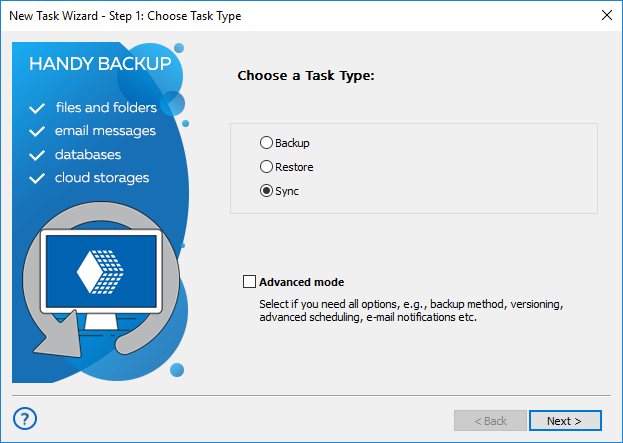
- Select Sync and click Next. Leave "Advanced Mode" unchecked to use simple mode.
- (For network solutions) Choose a remote machine for syncing the first folder.
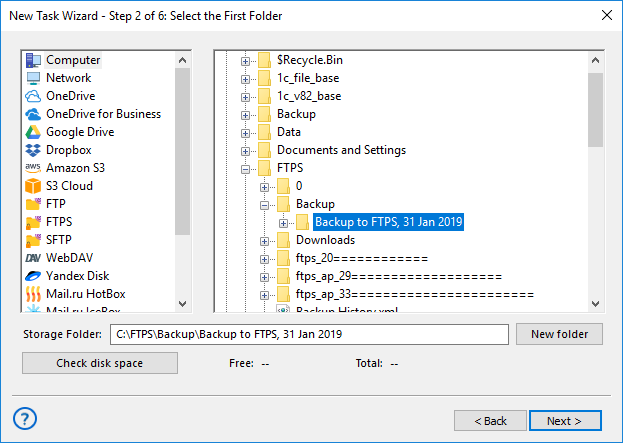
- Select the first folder in the left panel (e.g., click Computer for local folders).
- In the right panel, select a cloud folder for synchronization, then click Next.
- Repeat steps 3-5 to select a second folder from available storage options.
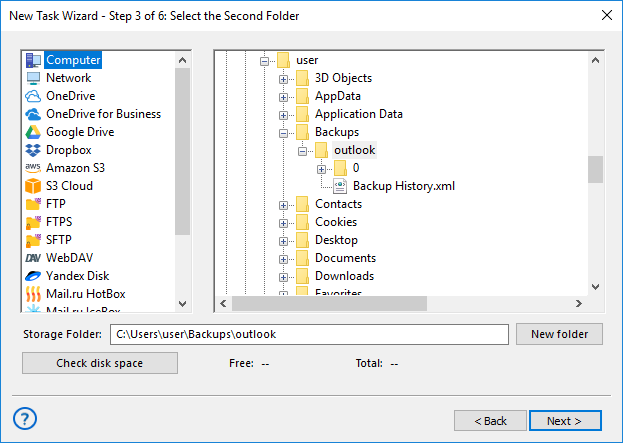
- Choose the sync direction: copy from the first folder to the second, from the second to the first, or merge both.
- Decide how to handle files with the same name: copy or skip. Click Next once settings are configured.
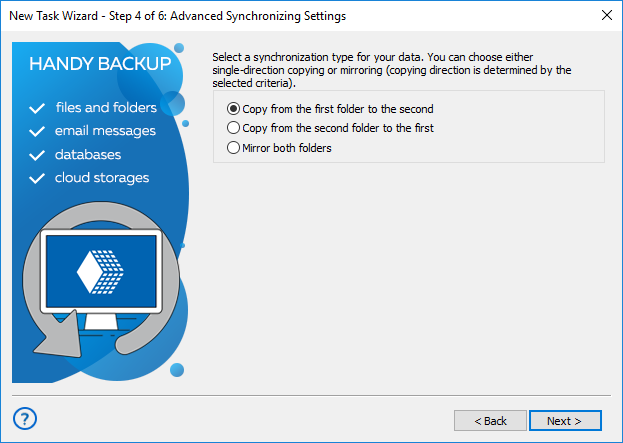
- Schedule your task: enable "Enable scheduler", set start time and frequency, then click Next.
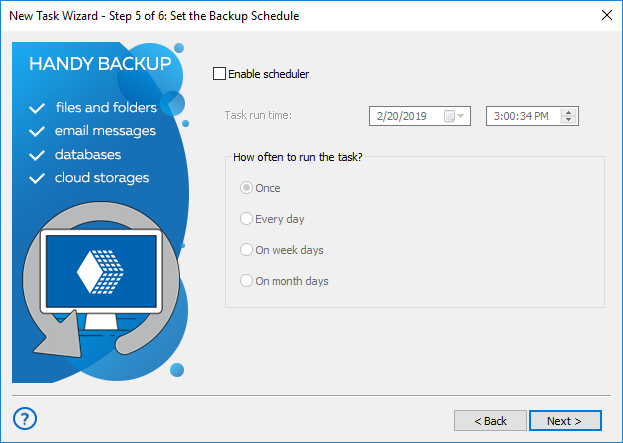
- Name your task and choose to run it immediately or later.
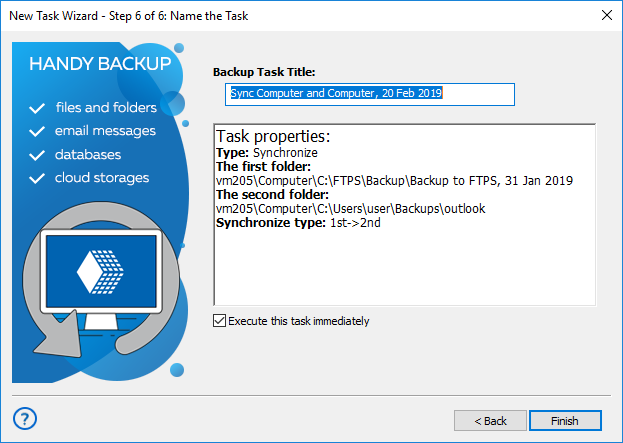
- Review all settings and adjust if needed.
In addition, you can also learn how to create a Selectel backup seamlessly, ensuring fast and reliable protection for your business data.
FAQ on Hybrid Cloud Backup
- What are the two main types of hybrid backup?
The two main types of such backup are combining local storage with a public cloud, which offers a cost-effective and scalable solution for backup and disaster recovery, and integrating local storage with a private cloud, which provides enhanced security and control, suitable for organizations with strict compliance needs. Handy Backup supports both types, offering the flexibility and security you need for effective data management.
- How can I monitor and manage my hybrid cloud backup effectively?
Effective monitoring and management involves regularly checking the status of backups, ensuring successful completion of tasks, and reviewing any alerts or errors. Handy Backup offers an intuitive Backup Reports feature to monitor your hybrid cloud backup. You can review detailed task reports, receive automated email notifications on task status, and track any issues. This ensures you stay informed about backup operations and can address any problems promptly. For real-time updates and efficient management, explore Handy Backup’s reporting and notification options.
- What types of data and systems are best suited for hybrid cloud backup?
Such backup is ideal for various types of data and systems. It works well for critical business data that requires both fast local access and secure offsite storage, such as databases, application files, and large volumes of unstructured data. Systems that benefit from hybrid backup include file servers, email servers, and virtual machines. Handy Backup excels in these scenarios by providing seamless integration between local and cloud storage, ensuring that your important data is both readily accessible and securely backed up.
See for yourself how our hybrid backup solution combines ease of use with robust security, ensuring your data is always safe and accessible.
Experience the ultimate in data protection with our 30-day trial.
Download Trial