Selectel Backup Software
Selectel backup solution helps you reliably back up data stored in your Object Storage and manage backups from a single interface. Handy Backup supports Selectel via S3-compatible and FTPS connections, allowing you to automate backup tasks, control storage access, and keep recoverable copies of your data. Download the 30-day free trial to test Selectel backups in real-world scenarios with no limitations.




Why Backup Selectel Object Storage
Efficient Selectel backup tool is essential for ensuring business continuity and keeping your data safe in any situation.

Accidental Deletion
Even well-managed projects are at risk of human error and operational mistakes. Files or buckets can be deleted unintentionally, causing unexpected downtime or loss of critical information.
Hardware Failure
Unexpected failures of servers, storage devices, or network infrastructure can make data temporarily or permanently unavailable. Backups provide a reliable safety net in such cases.
Cybersecurity Risks
Data stored online can be affected by malware, ransomware, or unauthorized access. Regular backups help mitigate these risks and allow you to restore your data quickly if an incident occurs.
What You Can Back Up from Selectel
Handy Backup Selectel backup software allows you to securely store a wide range of data, keeping it organized, accessible, and ready for your workflow.

Files & Folders: back up files or entire folders, including documents, images, and project files.
Buckets: create backups of entire buckets to preserve the structure and contents of your Selectel storage.
Media Files: securely back up videos, audio, and other media files to ensure your content remains safe.
Choose Your Preferred Connection Method
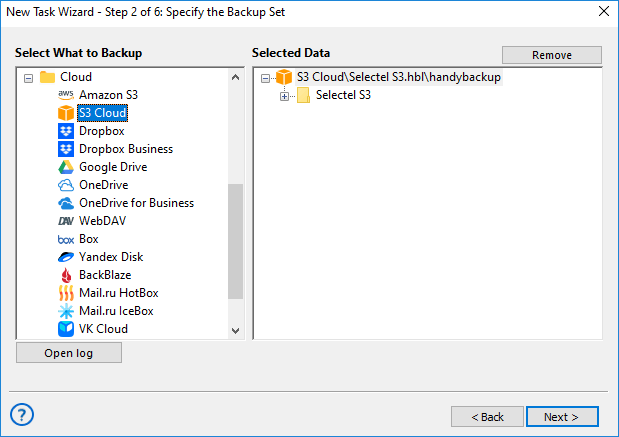
With Handy Backup, you can select the connection type that best fits your workflow. Whether you prefer S3-compatible storage or FTPS, you can configure secure backups quickly and manage your data efficiently.
S3 Cloud
Use S3-compatible connections for direct access to Selectel Object Storage. This method is ideal for handling large volumes of files and folders, automating backup tasks, and maintaining structured bucket storage. Benefits include high-speed transfers, seamless integration with cloud workflows, and reliable support for object-based storage.
FTPS
FTPS Backup allows you to back up data using a secure FTP connection. This option is perfect if you prefer standard file transfer protocols, need compatibility with existing FTP workflows, or want encrypted transfers over FTP servers. Advantages include broad compatibility, ease of setup for existing FTP users, and secure encrypted connections.

High-speed data transfer
Easy integration into cloud infrastructure
Reliable support for object storage
Wide compatibility
Easy setup for FTP users
Secure connection
Key Advantages of Handy Backup

Automation: schedule automatic backups to your Object Storage and run tasks without manual intervention.
Partial Backup: back up only changed or selected data, reducing storage usage, network load, and backup time.
Encryption: secure your backups with strong AES-256 encryption, protecting sensitive data during transfer and at rest.
ZIP Archiving: compress backup data into ZIP archives before uploading, saving storage space and simplifying management.
Multiple Data Types: back up files, databases, system data, emails, and virtual machines to Selectel using one unified solution.
Multiple Destinations: store backup copies in Selectel alongside local or other cloud storage for extra redundancy and flexibility.
User-Friendly Interface: configure and manage Selectel backups through a clear interface without complex setup or advanced skills.
Lifetime License: protect your data with a one-time purchase, avoiding subscriptions and reducing long-term backup costs.
Recommended Solution
Lifetime license

Handy Backup Professional
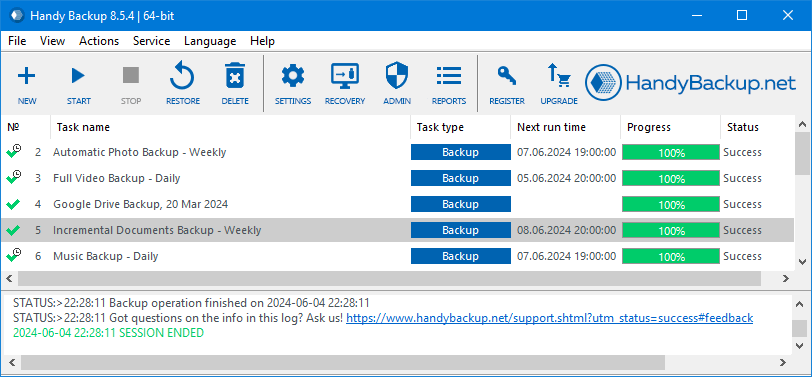
Handy Backup Professional is a powerful Selectel backup software, letting you automate tasks, secure your data, and manage all backups from a single interface. Download the 30-day free trial today and experience hassle-free Selectel backups in real-world scenarios.
What You Can Back Up to Selectel

Files, Folders & Applications:
Back up documents, spreadsheets, presentations, project folders, and important application settings or system files. Keep all your essential data safe, organized, and easily recoverable across devices.

Disk & Drive Images
Create full disk or drive images, including system states, configurations, and virtual machine snapshots. Ensure fast disaster recovery, smooth migrations, and minimal downtime for critical systems.

Emails & Databases
Securely backup IMAP mailboxes, messages, attachments, and SQL, MySQL, PostgreSQL, or other database data. Protect communication and business-critical information from accidental loss or corruption.

Websites & Virtual Machines
Back up website files, databases, assets, and VM snapshots quickly and securely. Safeguard your online presence and virtual environments from accidental deletion, hacks, or unexpected server failures.

System & App Backups
Maintain consistent recovery points for system configurations, critical application data, and essential settings. Ensure that all software and configurations can be restored quickly and reliably after failure or migration.

Cloud-to-Cloud & Media
Transfer and back up data from other cloud services, including videos, audio, and image files. Consolidate digital assets, preserve bucket structures, and add redundancy for better C2C backup management.
How to Backup Selectel Bucket
Selectel Object Storage supports S3-compatible access and FTPS, so you can easily use it as a backup destination.
A detailed step-by-step guide on how to create a project, generate keys, set up a bucket, and get connection endpoints is available in the Selectel setup manual.
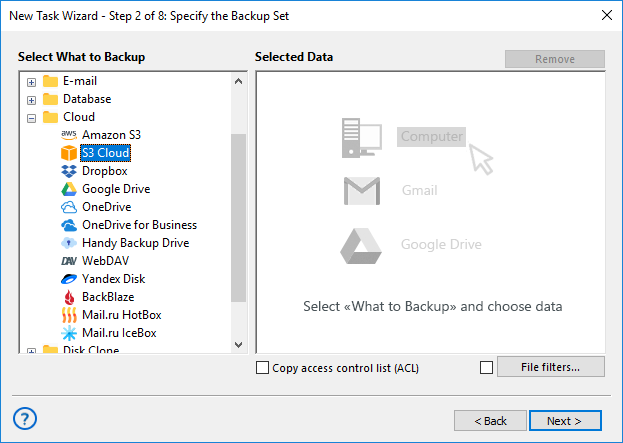
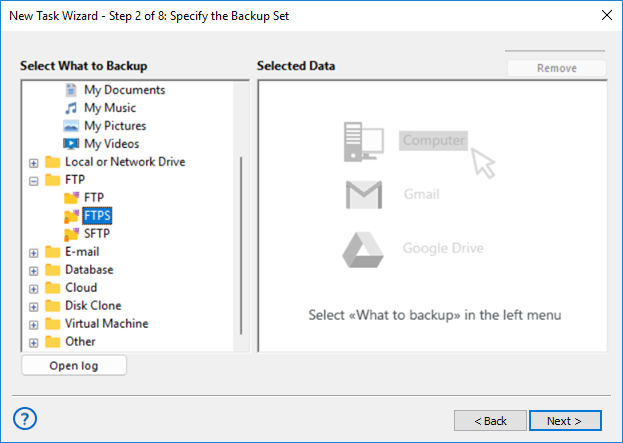
Once your storage is ready, Handy Backup lets you back up data using either the S3 Cloud or FTPS plugin. Both options are fully supported and can be configured in just a few steps.
In addition, Handy Backup also works as Amazon S3 Backup Software, providing reliable cloud backups.
Create a new backup task in Handy Backup. For advanced options, you can enable Advanced Mode. Then, choose your preferred connection type below to continue configuring the backup.
S3 Connection
Using the S3 Cloud plugin, Handy Backup treats Selectel as a fully integrated cloud destination rather than a simple remote folder. It efficiently handles large backup chains and long-term retention scenarios.
FTPS Connection
Using the FTPS plugin allows seamless integration into environments where S3 access is restricted or workflows rely on FTP automation. Transfers are encrypted, ensuring secure and reliable backup.
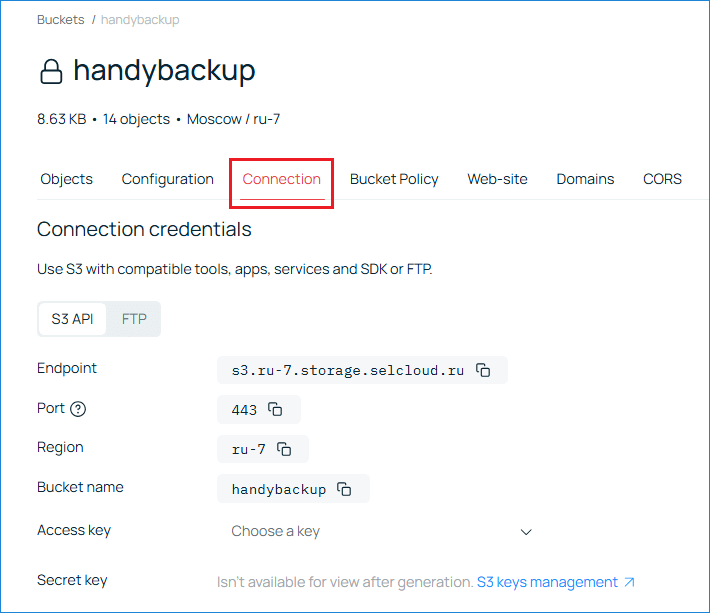
To connect Handy Backup via S3, you need to specify the basic access parameters provided by your cloud storage.
- S3 Endpoint — copy this value from the storage’s Connection tab. It defines the exact address of your object storage.
- Access Key — a public identifier used to authenticate the connection.
- Secret Key — a private key paired with the Access Key. It is shown only once when created.
- Region — optional; can be left unchanged for S3-compatible storage.
Handy Backup also supports connecting via a secure file-transfer protocol using FTPS credentials.
- FTP Server — copy the server address from the Connection settings.
- Port — use the port specified for FTPS.
- Explicit FTPS — must be enabled to ensure encrypted data transfer.
- Access Key and Secret Key — the same credentials used for S3 access.
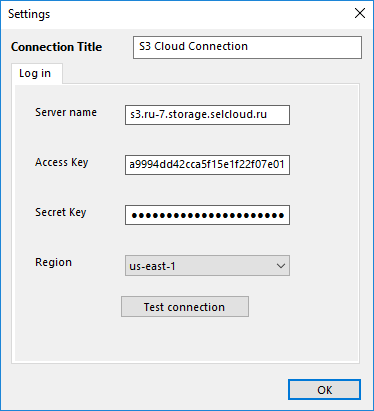
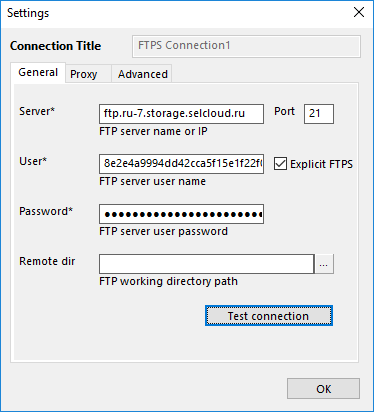
Click OK. The configured Selectel connection will then be displayed in the list of available connections.
S3 connection successfully added
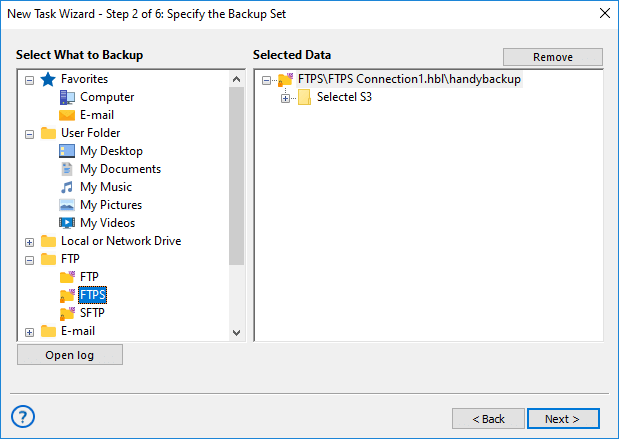
FTPS connection successfully added
After that, you can proceed with backup configuration using the standard Handy Backup workflow.
- For S3 storage, refer to the S3 Cloud Plugin manual.
- For FTPS access, refer to the FTP/FTPS/SFTP Plugin manual.

Have questions? Contact our support team and get help!
Common Questions About Selectel Backup Solution
Which Selectel Object Storage regions are supported for backup?
Object Storage services typically operate across multiple geographic regions to improve performance, fault tolerance, and data availability. When backing up data, selecting the correct region ensures lower latency and more stable data transfer by routing traffic to the nearest or most appropriate data center.
Handy Backup allows you to choose the required storage region when connecting to your Object Storage via the S3-compatible interface. This helps optimize backup speed and reliability by ensuring that data is transferred to the correct regional endpoint.
Can I back up data from multiple Selectel buckets within a single task?
In general, S3-compatible object storage organizes data into separate buckets, each with its own structure, permissions, and lifecycle rules. Backup software must be able to address multiple buckets independently to maintain proper data integrity and access control.
With Handy Backup, you can include multiple Selectel buckets in a single backup task by selecting them as separate data sources. This allows centralized backup management while preserving the original bucket structure during both backup and restoration.
Can I restore individual files or objects without restoring the entire bucket?
Modern object storage backups should support granular recovery to avoid unnecessary data transfer and downtime. Being able to restore individual objects is especially important when only specific files are deleted or corrupted.
Handy Backup supports selective restore for Selectel Object Storage, allowing you to recover individual files or objects without restoring the entire bucket. This makes the restore process faster, more efficient, and more cost-effective.
 Download Trial
Download the 30-day free trial of Handy Backup to test Selectel Object Storage backup in your own environment.
See how easily it fits into your existing backup workflow.