Database Issues
Updated on June 24, 2026
Applies to: Handy Backup
The program creates null tables after PostgreSQL/MySQL backup or restore
If Handy Backup creates null tables after PostgreSQL or MySQL backup or restore, perhaps it is because the utilities "pg_dump.exe" r "mysqldump.exe" are used. They come with Handy Backup, but in this case they do not match the version of the installed version of PostgreSQL or MySQL.
So you need to remove the utility "psql.exe" and "pg_dump.exe" or "mysql.exe" and "mysqldump.exe" from the directory of andy Backup 8 in Program Files.
Then do the following:
- Go to the System section of the Control Panel;
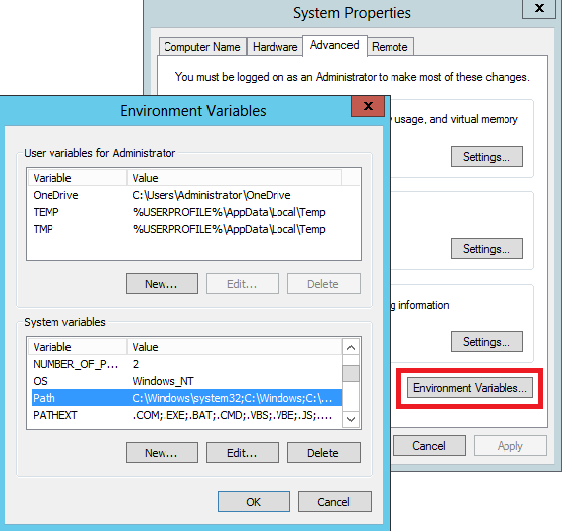
- Click Advanced system settings on the left panel of the appeared window;
- Click the Environment Variables... button;
- Check if the path to these utilities, installed as a part of PostgreSQL or MySQL, is registered in the Path line. If you do not see it there, then add the path.
If it does not help, send us a letter containing the content of the Novosoft folder with detailed logs and tasks to [email protected].
Novosoft folder can be found at the following path:
- C:\ProgramData\Novosoft
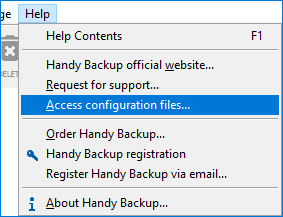
Also you can access Novosoft folder through the interface of the program by clicking the “Access configuration files...” option in the “Help” section of the tool bar.
Related Pages: