MySQL Auto Backup Software
MySQL backup solution by Handy Backup is a powerful tool that creates hot snapshots of your tables without interrupting ongoing SQL transactions. With flexible scheduling, point-in-time recovery, and a rich set of additional features, Handy Backup is widely regarded as one of the best MySQL database backup tools for Windows.




Backup and Recovery of MySQL Databases
There are two main ways to back up a database:
- Cold Backup requires stopping the server, ensuring all cached data is saved, and then copying the binary files. This method is generally not recommended, as server downtime can lead to lost productivity and revenue.
- Hot Backup allows you to create live (online) snapshots of the database while it is being queried or updated. Hot backups are performed at the logical level using database interfaces rather than directly accessing disk files.

Handy Backup uses hot backup technology similar to that in MySQL Enterprise Backup (Oracle's proprietary solution for enterprise). It performs backups quickly and allows automated backup for specific tables, tablespaces, or entire databases.
Restoring MySQL Backups
The main goal of database recovery is to restore information after a data loss event or server failure. It is also useful for cloning and mirroring databases. Key scenarios for recovering database backups include:
- Restoring a database after data loss or a server failure.
- Migrating data to other database systems (see the MySQL Backup plug-in section below).
- Configuring replication servers in master-to-master or master-to-slave setups.
- Creating database copies for testing or development environments.
Recovery operations are fully supported on the Windows version of Handy Backup.
For more information, please refer to MySQL recovery.

Top Features of MySQL Backup Tool

Hot Backup and Recovery: Perform live backups without interrupting database operations or affecting web applications and services. Ensure data consistency while your server continues running.
Full Backup: Create a complete copy of your database, including all data and configuration settings, to maintain a full replica for disaster recovery or migration purposes.
Partial Backup: Target specific tables or tablespaces during backup to save time, storage space, and network resources. Focus only on the most critical data without creating a full database copy.
Excluding/Including Tables: Fine-tune backups by excluding unnecessary tables or including only essential ones. This optimizes storage use and reduces backup duration.
Incremental MySQL Backup: Back up only the data that has changed since the last backup. Reduce backup time and storage requirements, making regular automatic MySQL backups feasible.
Log Backup: Capture transaction logs to enable point-in-time recovery. Combined with full or incremental backups, this ensures minimal data loss in case of server failures.
Secure Encryption: Protect your backups using AES-256, AES-128, or Blowfish encryption. This ensures that your data remains safe from unauthorized access during storage and transfer.
Secure SSL Backup: Encrypt data during backup and restoration using SSL, ensuring safe transmission between the MySQL server and Handy Backup while protecting against unauthorized access.
Backup of Local and Networked Databases: Backup databases stored locally or on remote servers without complex scripts, using a simple and user-friendly GUI solution.
Selective Table Restore: Restore individual tables or objects without reinstalling Handy Backup on another machine. Access database contents directly, preserving flexibility and control over your data.
Replicate Databases: Use backup files to quickly initialize master-to-slave replication. Create clean dumps and sync new nodes with minimal configuration.
Mirror Servers: Prepare consistent backups to set up stable master-to-master mirroring, ensuring high availability, fast failover, and uninterrupted service performance.
Customers about Handy Backup

MySQL backup speed is great. For MySQL is Excellent, Super Fast, Super Easy! For now we are planning to recommend Handy Backup to our customers.
Johnny Cosme Lewis, www.HostSeven.com
Recommended Solution
Lifetime license
Handy Backup Professional + MySQL/MariaDB
Handy Backup Professional + MySQL is a powerful and flexible solution for backing up MySQL databases. It automates secure backups to local drives, network shares, NAS devices, FTP/SFTP, and major cloud storage services such as Amazon S3, Google Drive, OneDrive, and others. Experience the full functionality with a free 30-day trial and discover how easy professional data protection can be.
Backup Rotation and Retention
Handy Backup MySQL backup software provides advanced rotation and retention options, allowing you to manage backup lifecycles efficiently and keep your data organized.

Flexible Scheduling
Configure daily, weekly, or monthly rotations to align with your workflow and ensure regular backup cycles.
Version Control
Maintain multiple versions of each backup while automatically removing outdated copies to save storage.
Professional Rotation
Implement Grandfather-Father-Son schemes for long-term backup management and reliable recovery.
How to Automate MySQL Backup with Handy Backup
Handy Backup uses the MySQL plug-in to connect directly to the server and create consistent SQL dump files. The plug-in displays database objects in a simple tree structure, allowing you to select exactly what you want to include in the backup.
- Click the New Task icon on the toolbar, choose Backup task, and click Next.
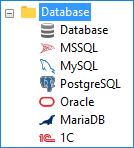
- In Step 2, select MySQL from the Database group.
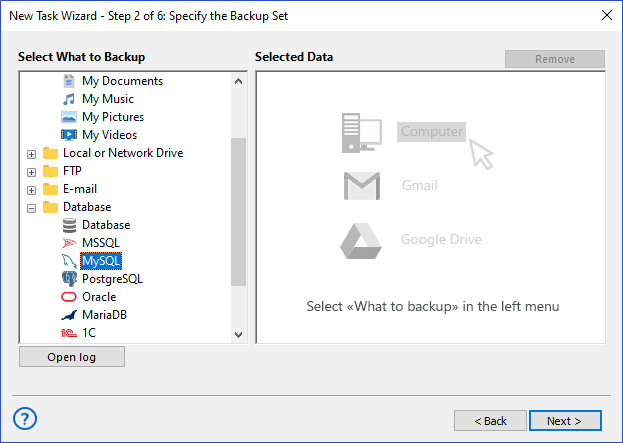
Select the MySQL plugin
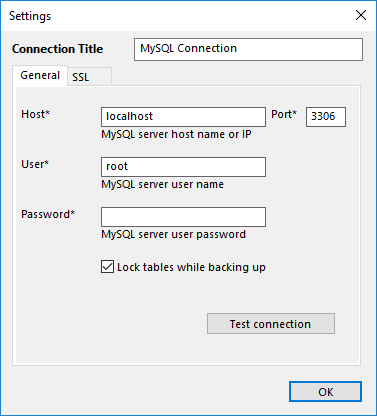
Create and configure a new MySQL connection
- If you do not have a MySQL configuration yet, click New configuration to create one:
- Enter a configuration name — helps identify the connection when working with multiple servers.
- Specify the Host (IP address or hostname) and Port used by your database server. Default port is 3306.
- Enter the User and Password. These credentials must have permission to view databases and read their contents.
- (Optional) Open the SSL tab to configure certificate paths and enable encrypted communication with the server.
- Click Test connection to verify settings, then click OK to save and return to the data selection screen.
- After connecting, navigate through the tree and check the databases or individual tables to back up. Folders represent databases; files represent tables.
Required MySQL privileges:
- To browse databases: SHOW DATABASES, SHOW TABLES
- To perform backups: SELECT on all databases/tables being backed up
- To perform restores: permissions to drop and create databases/tables, and execute all required SQL statements
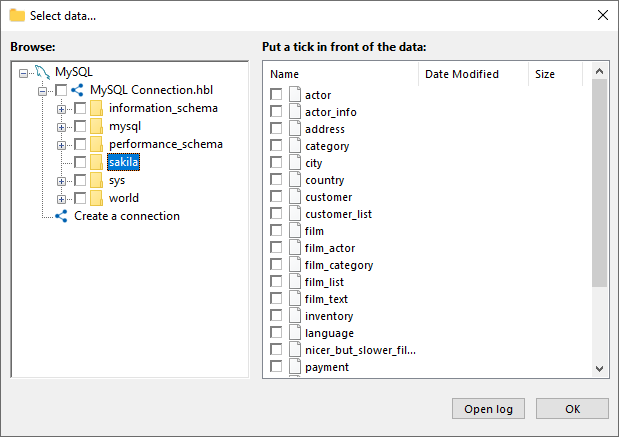
Tree view of MySQL objects: folders represent databases, files represent tables
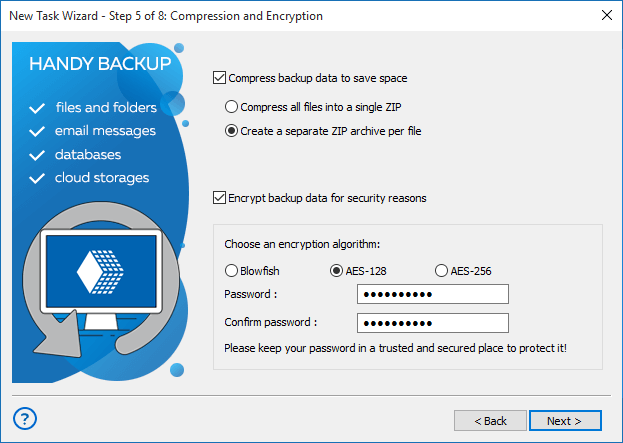
Configure advanced settings
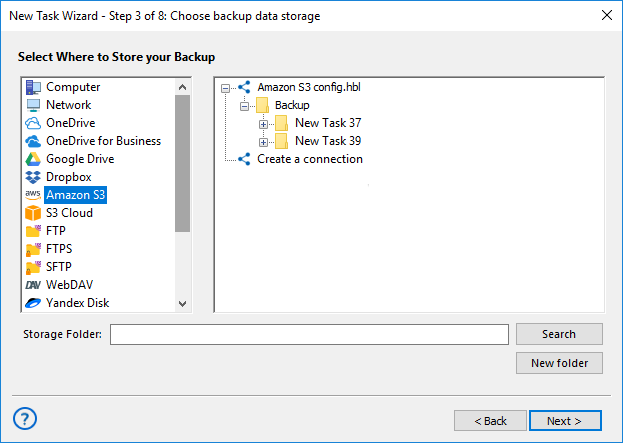
- Click Next to select the backup destination. You can choose a local folder, network share, NAS, or cloud storage. Amazon S3 is fully supported for secure storage of SQL dump files.
- Continue through the wizard to configure compression, scheduling, and other advanced backup options.
- Enter a descriptive task name, e.g., “Daily MySQL Backup to Amazon S3” and click Finish to save the automated MySQL backup task.
Auto MySQL Backup to S3 and Other Clouds
Automating MySQL backups to Amazon S3 gives you a professional, scalable, and cloud-oriented way to protect your databases, with the same workflow applicable to other major clouds.

Region selection for your S3 storage to ensure stable connections and optimal transfer speed.
Built-in checksum verification to ensure backup integrity after upload to S3-compatible storage.
Seamless Cloud Backup with S3-compatible storages and other popular providers such as Google Drive, Dropbox, OneDrive, and more.
Handy Backup MySQL Plug-in for Windows
Handy Backup includes a powerful database backup plug-in that functions like a client, allowing you to retrieve data without interrupting server operations. MySQL backup with Handy Backup requires no additional software. Simply locate and select the MySQL plug-in from the database list.
The plug-in connects to the server and saves database contents into a dump file. The resulting backup contains all SQL queries needed to fully reproduce the original database, including tables, tablespaces, stored procedures, functions, and other data.

Note: You can connect to remote servers from the Windows version of Handy Backup by providing the server IP or name. This allows full access to the database data for backup purposes.
Backup MySQL Database with a Generic Database Plug-in
In addition to the dedicated plug-in, Handy Backup also offers a general Database Backup plug-in, which can export tables via ODBC connectivity. This plug-in does not support certain objects, such as stored routines, and requires the installation of the MySQL ODBC Driver, which can be downloaded from the official website.
For more details, refer to our ODBC backup tool page. Note that this plug-in is primarily intended for Windows database backups.

Note: To ensure compatibility with newer versions, please use the 64-bit edition of Handy Backup.
Licensing Information
The MySQL backup plug-in is included in two editions of Handy Backup: Small Business and Server Network. Both editions provide the full set of plug-ins, with the main difference being that the Small Business edition supports a single computer, while the Server Network edition allows backing up multiple servers and workstations across a complex network.
- If you need a solution solely for MySQL backup, Handy Backup Small Business is the ideal choice.
- If you want to back up multiple servers or workstations, Handy Backup Server Network is the recommended edition.
MySQL Backup Software: Video Tutorial
The next video will teach you how to create backup tasks in Handy Backup. This example illustrates the complete process of creating and even proofing backup procedures, and also shows how to recover a table from a previous backup using Handy Backup as your MySQL automated backup software.
Handy Backup for Hosting Providers
We are open for cooperation with business partners from all fields of IT industry, including OEM, technological integrators, service providers, and other. Partnership details are discussed individually, in respect of each partner’s resources and expertise.
As regards MySQL backup, Handy Backup solutions are already employed by a number of web hosting providers who use it to back up client websites and databases. If you would like to join our partner network or learn more about how we can help your business, please visit the Partners section.
 Download Trial
Download the 30-day trial of Handy Backup and enjoy easy, reliable, and fully automated MySQL and file backups — secure, fast, and stress-free!
FAQ on MySQL Backup Solution
How to backup MySQL database in Windows?
You can back up MySQL on Windows by using a reliable tool like Handy Backup. It simplifies the process with a user-friendly interface, supporting full or selective backups, hot backups without downtime, and incremental updates. Just download Handy Backup, select your database, choose the backup destination (local, network, or cloud), and use it as your automatic MySQL backup tool.
How to choose a tool for business if you need both MySQL and file backup in one solution?
When selecting a business backup solution, look for software that supports multiple data types. Handy Backup is not only for MySQL, it can also back up files, folders, and other databases. This unified approach saves time, reduces complexity, and ensures all critical data is protected with the same interface and scheduling options.
Can Handy Backup create a MySQL backup and store it both locally and in the cloud simultaneously?
Yes. Handy Backup allows you to back up MySQL databases and save copies locally while simultaneously uploading them to cloud storage. This dual approach ensures fast local recovery and offsite protection, with full support for S3-compatible clouds, Google Drive, Dropbox, OneDrive, and more.