Hosting Backup Solution - Handy Backup
Web Hosting Backup Software - Handy Backup helps hosting companies automate data protection across servers, customer environments, databases, and hosted services without deploying a complex enterprise backup platform. Centralized management, browser-based control, encryption, scheduling, retention, detailed logs, and workflow automation help administrators protect customer data while reducing routine backup administration.
 Download Trial





Simplify Backup Operations Across Your Hosting Infrastructure
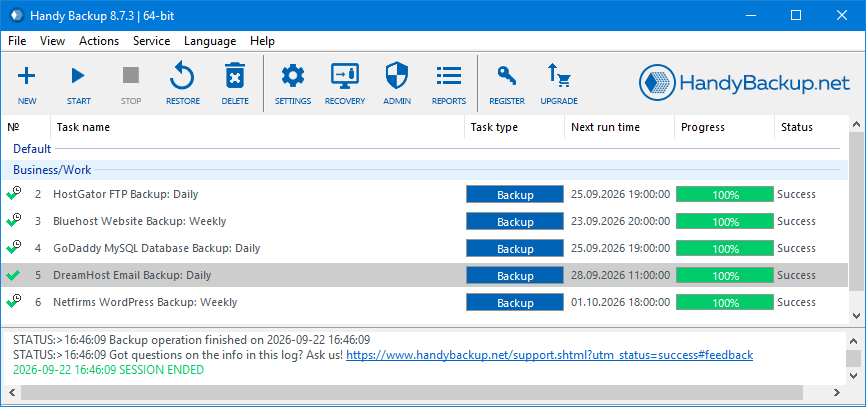
For a hosting provider, backup is not just about copying files. The challenge is keeping many backup jobs predictable, visible, and easy to manage.
Handy Backup lets administrators create separate policies for different servers and workloads while controlling backup and recovery tasks from a central environment.
As infrastructure grows, additional machines and workloads can be added without rebuilding the entire backup process.
Key Backup Capabilities for Hosting Providers

Reduce Manual Backup Administration
Backup tasks can run on schedules instead of requiring manual actions. Different servers can use schedules based on how often data changes. Incremental and differential backup methods reduce copying of unchanged data. Tasks can also be grouped, making larger backup environments easier to navigate and monitor.

Run Scripts with Backup Tasks
Web Hosting backup solution - Handy Backup can run programs, commands, or batch files before or after a task, integrating backups with scripts and maintenance procedures. Scripts can prepare data, create database dumps, stop or restart services, verify or move data, and trigger other processes.

Protect Customer Backups with Encryption
Hosting companies may store backups containing data from many customers. Handy Backup supports AES-256 encryption to protect backup content from unauthorized access. SFTP and FTPS can also protect data in transit between servers or external storage locations.

Keep Recovery Data Separate from Production
Backups stored with live services can share the same infrastructure risks. Handy Backup lets providers keep copies outside production systems with separate retention policies. Administrators control where backups are stored and how long versions remain available.

Centralize Server and Database Protection
Hosting infrastructure includes more than website files. Handy Backup Server Network uses centrally managed Network Agents and supports MySQL, MariaDB, PostgreSQL, Microsoft SQL Server, Oracle, Hyper-V, and other server data. This lets providers manage different backup scenarios in one environment instead of using separate utilities.

Deploy and Manage Remote Agents Centrally
As protected machines increase, manual setup becomes inefficient. Handy Backup Server Network centrally configures and deploys Network Agents on supported Windows and Linux systems. Agents handle remote backups while administrators manage tasks centrally, making it easier to add or replace servers without repeating the setup.

Keep More Than the Latest Backup
For hosting providers, the newest backup is not always the right recovery point. Problems may appear days after a change or CMS update. Multiple versions let administrators restore an earlier state when needed, while retention settings balance recovery history with storage usage for different workloads.

Get Files Back Without Restoring Everything
Backup is valuable when specific data can be restored quickly. Handy Backup lets hosting providers recover individual files and folders from existing backup sets through Windows Explorer, without restoring the entire backup. This helps recover deleted or damaged site content while saving time and avoiding unnecessary full recovery.
Manage Backups from a Web Browser

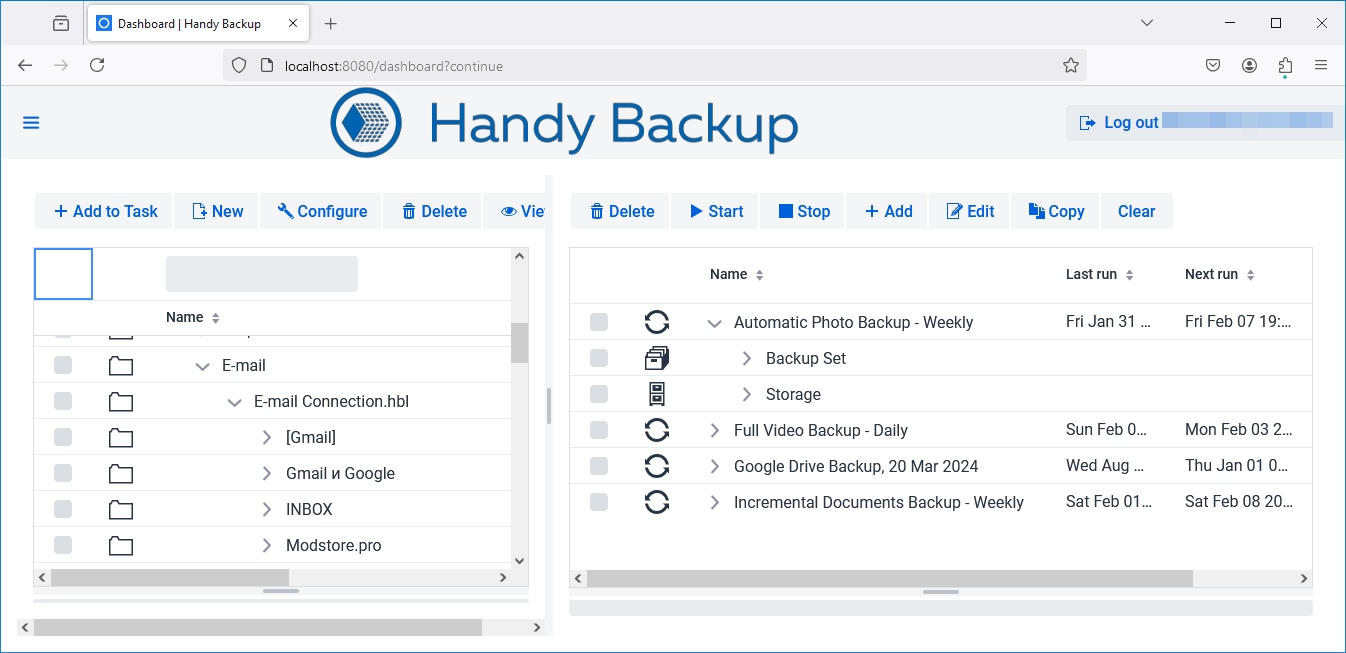
Handy Backup includes a web-based backup interface that allows administrators to work with backup and recovery tasks without direct access to the machine where Handy Backup is running. From a browser, you can create, edit, and launch tasks, monitor current and completed jobs, track task status, and receive notifications about failures and other issues.

The web interface is useful for managing backup infrastructure in server rooms, remote offices, or hosting environments. It also enables centralized task management and monitoring across multiple computers or servers. The Handy Backup web application is currently available as a Beta feature and continues to be developed.
Key Benefits for Hosting Providers

Centralized management: control backup and restore jobs across multiple machines.
Browser-based administration: create, edit, launch, and monitor tasks remotely.
Workflow automation: run scripts and external programs before or after backup operations.
Encryption: protect stored backups and use encrypted transfer protocols where required.
Flexible scheduling and retention: apply different protection policies to different workloads.
Server and database support: manage common hosting workloads within one backup environment.
Centralized agent deployment: reduce repetitive setup when adding protected machines.
Independent recovery copies: separate backup storage from production infrastructure.
Reviews about Handy Backup
Recommended Solution
Lifetime license

Handy Backup Small Business
Handy Backup Small Business protects a single server with automated backups of website files, databases, and other critical data. It provides flexible scheduling, storage options, and easy recovery for small hosting environments.
Who Is This Hosting Backup Solution For?
Handy Backup is best suited to small and midsize hosting companies that need centralized automation, remote control, database protection, encryption, and flexible recovery without adopting a large enterprise backup platform. It is also useful for managed hosting companies that operate multiple servers and want the backup infrastructure to remain under their own control. Handy Backup is better positioned as a provider-operated backup system. For providers that need deeper integration, Handy Backup also supports OEM and customization scenarios.
FAQ About Backup Software for Hosting Providers
What is hosting backup software?
Hosting backup software helps a hosting company automate protection and recovery across servers and customer environments. It may include centralized management, scheduling, database backup, encryption, retention, monitoring, and workflow automation.
Can Handy Backup manage backups across multiple hosting servers?
Yes. Handy Backup Server Network provides centralized management for backup and recovery tasks across multiple machines using Network Agents.
Can I manage Handy Backup through a web browser?
Yes. The Handy Backup web application allows you to create, edit, run, and monitor backup and restore tasks through a browser. It can display task status and notifications and can be used to manage tasks across multiple Handy Backup installations. The web interface is currently in Beta.
Can Handy Backup run scripts before or after a backup?
Yes. Handy Backup can automatically execute external programs or batch files before or after a task. This allows backup to be integrated with database exports, service control, validation, and other hosting workflows.
Can hosting backups be encrypted?
Yes. Handy Backup supports backup encryption, including AES-256 and AES-128. Encrypted connection methods such as SFTP and FTPS are also available for supported scenarios.
Can a hosting provider use different schedules for different servers?
Yes. Backup tasks are configured independently, so each server or workload can use its own schedule and retention policy.
Does Handy Backup support hosting databases?
Yes. Server-level functionality supports several common database systems, including MySQL, MariaDB, PostgreSQL, Microsoft SQL Server, and Oracle. Availability depends on the Handy Backup edition and configuration.
Can Handy Backup be used to provide backup services to customers?
Yes. A hosting company can operate Handy Backup as part of a provider-managed backup and recovery service. OEM and customization options are also available for deeper integration.