Bluehost Web Hosting Backup Solution
Handy Backup provides an independent Bluehost backup solution for automatically protecting website files, MySQL databases, and hosted email. Create scheduled backup tasks and store copies outside your Bluehost account on a local drive, NAS, FTP/SFTP server, or supported cloud storage.
Bluehost includes its own website backup options, but external Bluehost backup software gives you additional control over backup schedules, storage locations, version history, and recovery. It is useful when you want to maintain a separate copy of important website data independently from the hosting environment.
 Download Trial





Does Bluehost Back Up Your Website?
Yes. Bluehost provides built-in backup options for website files and databases, although the available features depend on the hosting plan and backup service. Current Bluehost tools include automatic weekly backup as well as additional website backup options for customers who need more frequent recovery points or WordPress-specific protection.

Automatic Backup
Bluehost Basic Weekly Backup automatically protects website files and databases. It is designed mainly for convenient hosting recovery and allows available backup copies to be restored or downloaded.

File and Database Recovery
Website files and databases can be handled separately when supported by the selected Bluehost backup service. This makes it possible to recover site files or database content without always restoring everything together.

Additional Backup Options
Depending on the account and hosting plan, Bluehost may provide additional website backup services or WordPress-specific backup functionality. Features and retention can therefore differ between Bluehost customers.
Important: Bluehost's Basic Weekly Backup currently stores one automatic restore point at a time, with a newer restore point replacing the previous one. It protects website files and databases but does not include email data. For important websites, keeping another independent backup copy can provide additional recovery options.
Why Keep an Independent Bluehost Backup?
A hosting backup and an independently managed backup solve different parts of the recovery problem. Keeping another copy outside Bluehost gives you greater control over where backups are stored, when they run, and how many versions remain available.

Separate Storage
Keep website data outside the production hosting account. If the hosting environment or an available restore point does not contain the copy you need, your separate backup remains available in storage you control.

Your Own Retention
Maintain several backup versions instead of depending only on the latest hosting restore point. Your retention policy can reflect how often the website changes and how far back you may need to recover data.
Recovery Under Control
Restore data from copies that you manage yourself. You can keep website files, database backups, and other protected data available independently from the recovery workflow inside the Bluehost account.
What Can You Back Up from Bluehost?
A complete Bluehost website backup may contain several types of data. Handy Backup can protect website directories, MySQL databases, and compatible hosted mailboxes using the connection method appropriate for each source.
Website Files
Back up HTML files, scripts, WordPress files, images, themes, plugins, uploads, configuration files, and other website content available through the hosting account. Handy Backup can retrieve selected directories through SFTP or another supported file-transfer protocol.

MySQL Databases
Protect posts, settings, customer records, application data, and other dynamic website information stored in MySQL. When remote database access is available, Handy Backup can connect directly and create scheduled database backup copies.

Bluehost Email
Bluehost Basic Weekly Backup does not include email data. Where the mailbox supports IMAP access, Handy Backup can protect selected email folders separately and save messages in their original EML format for independent storage and recovery.
Exported Backup Data
If direct access to a particular source is unavailable, files exported through the Bluehost control panel can be included in another regular backup task. This is useful for SQL dumps, downloaded archives, and other manually generated recovery data.
Tip: For a dynamic website, protect both the website files and the associated database. File-only backup may not contain posts, account information, orders, settings, or other data stored inside MySQL.
Bluehost Built-in Backup vs Handy Backup Software
Bluehost's own backup functionality is useful for hosting recovery. Handy Backup is designed to complement it by maintaining additional copies independently from the hosting account and giving you control over schedules, storage, and retention.
| Backup Feature | Bluehost Built-in Options | Handy Backup |
|---|---|---|
| Website file backup | Yes available with supported backup services | Yes independent backup through SFTP and supported protocols |
| MySQL database backup | Yes database backup and download are available | Yes direct backup when remote access is enabled |
| Hosted email backup | Separate not included in Basic Weekly Backup | Yes IMAP mailbox backup where supported |
| User-defined schedule | Depends varies by backup plan or service | Yes |
| Multiple backup versions | Depends retention varies by selected service | Yes controlled by task and storage settings |
| Automatic copy outside Bluehost | Manual available copies can be downloaded | Yes automatically to the selected destination |
| Local drive or NAS storage | Manual requires downloading backup data | Yes |
Note: Bluehost backup availability, frequency, retention, and download options depend on the hosting package and backup service. The comparison above describes the general role of each approach rather than replacing the current terms of a specific Bluehost plan.
Recommended Solution
Lifetime license

Handy Backup Small Business
Handy Backup Small Business automates Bluehost website and database backups, helping small businesses keep independent recovery copies on local, NAS, remote, or cloud storage.
Bluehost FTP Backup: Protect Website Files via SFTP
A Bluehost FTP backup can be automated by connecting Handy Backup to the hosting account and selecting the website directories that should be protected. For supported Bluehost hosting accounts, SFTP is the preferred connection method because transferred data is encrypted.
Once the connection is configured, Handy Backup can retrieve website files directly from the hosting server and save them to another destination. The task can protect an entire website directory or only selected folders depending on your recovery requirements.
This workflow is suitable for static websites as well as the file portion of WordPress and other CMS-based websites. For complete recovery of a dynamic website, include the corresponding database in the backup strategy.
Security note: Bluehost currently recommends SFTP instead of standard FTP where SFTP is available. On shared hosting, SSH access may need to be enabled before using SFTP. Connection availability can depend on the type of Bluehost account.
Bluehost MySQL Backup for Dynamic Websites
A Bluehost MySQL backup protects information that is not stored in ordinary website files. WordPress and other dynamic applications may keep posts, settings, customer records, comments, account information, and other changing data in a database.
Direct Database Backup
When remote MySQL access is enabled and the database server can be reached from the computer running Handy Backup, use the MySQL plug-in to select the required database content and include it in an automatic backup routine.

Back Up an Exported SQL File
If direct remote database access is unavailable, export the required MySQL database using the hosting tools available in your Bluehost account. The resulting SQL or archive file can then be included in a scheduled file backup task.
For WordPress: keep the database backup together with the matching version of the website files whenever possible. Restoring files from one point in time and a database from another may result in inconsistent site content or configuration.
Choose Where to Store Bluehost Backup Copies
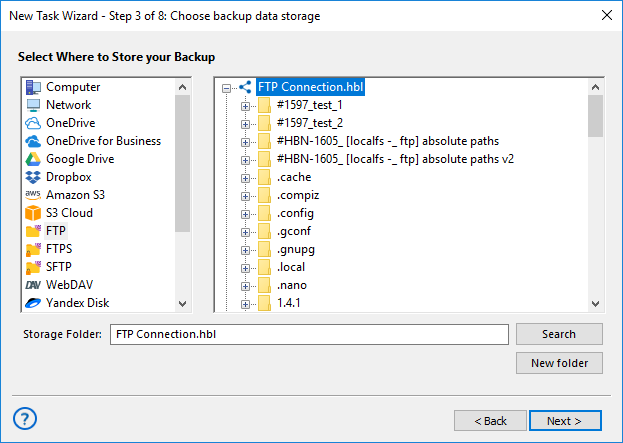
Independent backup is most useful when the recovery copy is stored separately from the live Bluehost website. Handy Backup lets you select local, network, remote, or cloud destinations according to your storage and recovery requirements.

Local and External Drives: save backup copies to a PC drive, external HDD, SSD, USB storage, or another directly connected device.
NAS and Network Storage: keep website copies on shared folders, network drives, or NAS devices managed separately from the hosting account.
Cloud and Remote Storage: use supported cloud services, Amazon S3 and compatible storage, FTP/SFTP/FTPS servers, or other available remote destinations.
Automate Bluehost Website Backup Tasks
Flexible Scheduling
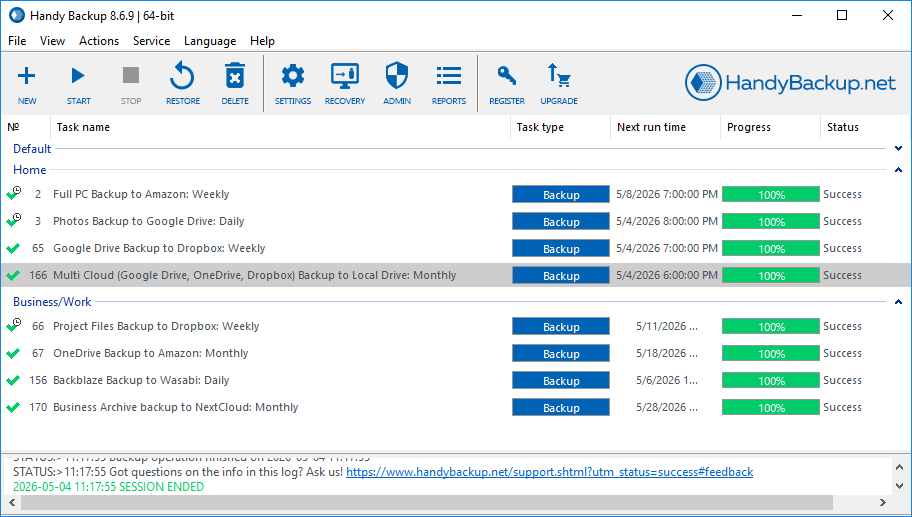
Run Bluehost backup tasks automatically instead of downloading data manually. Configure daily, weekly, monthly, or other schedules according to how frequently your website files, database, or mailbox changes.

Backup Versions
Use full, incremental, or differential methods where appropriate and retain several backup versions. Multiple recovery points can help after accidental edits, damaged files, unwanted updates, or other changes.

Secure Backup Copies
Protect backup archives with AES encryption when required and use secure transfer methods such as SFTP or FTPS. This is useful when website copies are transferred across public networks or stored remotely.
How to Backup a Bluehost Website with Handy Backup
The following workflow shows how to backup a Bluehost website automatically. Exact connection details depend on the hosting account and protocols enabled for it.
- Create a backup task. Launch Handy Backup and select a new Backup task.
- Select the hosting connection. At the data selection step, choose SFTP or another supported FTP-based plug-in according to your Bluehost configuration.
- Enter the Bluehost server settings. Create the connection using the hostname, username, password or authentication method, port, and other settings available for your hosting account.
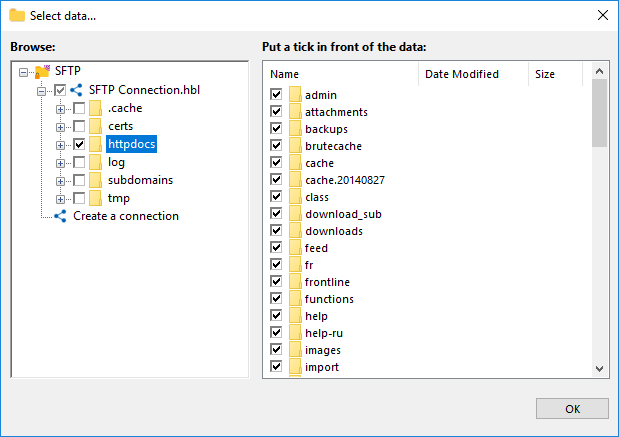
- Select website files. Choose the website directories and files that should be included in the backup.
Tip: Preserve the directories required by the website, including uploaded files, themes, plugins, scripts, and configuration data. Keeping the original directory structure simplifies later recovery.
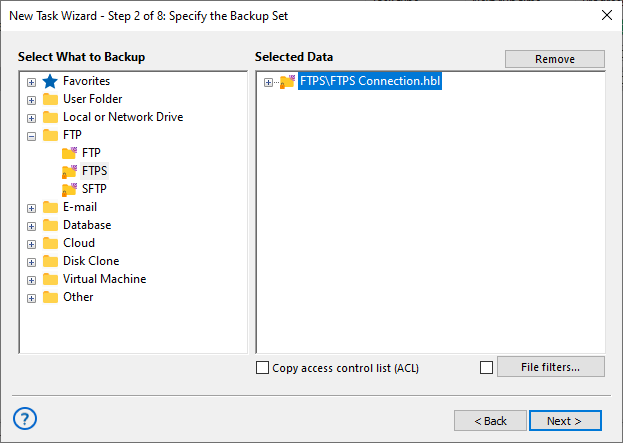
- Add database data. For a dynamic website, configure the MySQL plug-in when direct database access is available, or include a previously exported database file.
- Choose backup storage. Select a local disk, external drive, NAS, network folder, remote server, supported cloud service, or another available destination.
- Configure backup options. Set the schedule, backup method, versioning, compression, encryption, and other required parameters.
- Run and verify the task. Start the first backup and confirm that the required website files and database data are available in the destination.
Recovery best practice: test your backup before you need it. Confirm that important files can be retrieved and that the database copy required for the website is available. A backup strategy is much more useful when the restore procedure has already been checked.
Restore a Bluehost Website from Your Backup
An independent backup can be used for more than disaster recovery. It can also help recover accidentally deleted files, roll back unwanted changes, retrieve an earlier database copy, or prepare website data for migration to another compatible environment.
Recover Website Files
Restore the required folders and files from your independent backup. Individual file recovery is useful when only one image, script, configuration file, theme component, or uploaded document has been deleted or changed.
Recover Database Data
Restore the database required by the website using the recovery method appropriate for the backup. For a complete dynamic website restore, make sure the recovered database corresponds to the selected version of the website files.
Include Bluehost Email in Your Backup Strategy
Website protection may extend beyond website files and databases. Bluehost's Basic Weekly Backup does not include email data, so mailboxes may need a separate backup routine if email is part of the information you need to preserve.
For a bluehost email backup, Handy Backup can connect to Bluehost mailboxes that support IMAP access, copy selected mailbox folders, and save messages in EML format. The resulting files can be stored separately from the live mailbox along with other business backup data.
Keeping website and email backup tasks separate also lets you use different schedules. A frequently changing mailbox, for example, may need to run more often than a relatively static website.
One Backup Application for Bluehost and Other Data
Bluehost backup software does not have to be limited to one hosting account. Handy Backup can manage separate tasks for multiple websites, local folders, databases, NAS devices, cloud accounts, and other sources from the same application.
This is useful when a Bluehost website is only one part of the data that needs protection. Each task can use its own connection, destination, schedule, backup method, encryption settings, and version policy.
FAQ About Bluehost Backup Software
Does Bluehost automatically back up my website?
Yes. Bluehost currently provides automatic backup functionality for supported hosting accounts. Basic Weekly Backup protects website files and databases automatically, while additional backup options may be available depending on the hosting plan and website type.
How often does Bluehost back up a website?
Bluehost Basic Weekly Backup runs automatically on a weekly basis. Bluehost states that only one automatic restore point is stored at a time for this service, so a new restore point replaces the previous one. Other Bluehost backup services can have different schedules and retention policies.
Can I download a Bluehost backup to my computer?
Yes. Bluehost's current Basic Weekly Backup allows available website file and database backup copies to be downloaded. Keeping downloaded copies outside the hosting account can provide an additional recovery option, although generating and saving them through the Bluehost interface is separate from creating an automatic external backup with Handy Backup.
How can I automatically backup a Bluehost website?
Handy Backup can connect to website files through SFTP or another supported protocol, copy selected directories to independent storage, and run the task according to your schedule. For a complete dynamic website backup, protect the corresponding MySQL database as well as the website files.
Can I create a Bluehost FTP backup with Handy Backup?
Yes. Handy Backup can protect website directories available through supported FTP-based connections. For Bluehost accounts where SFTP is available, SFTP is preferable because the transferred data is encrypted. On some shared hosting configurations, SSH access must first be enabled before SFTP can be used.
Can I create a Bluehost MySQL backup separately from website files?
Yes. When remote database access is available, Handy Backup can use the MySQL plug-in to protect database content independently from website files. If direct access is unavailable, you can export the database through the hosting tools and include the resulting SQL file in a regular backup task.
Does Bluehost website backup include email?
Bluehost states that Basic Weekly Backup does not include email data. If your Bluehost mailbox supports IMAP access, Handy Backup can create a separate mailbox backup and store selected messages as EML files independently from the website backup.
Why use external Bluehost backup software if Bluehost already provides backups?
External Bluehost backup software adds an independently managed copy rather than replacing the hosting provider's recovery tools. It lets you choose your own schedule, storage destination, backup versions, retention settings, and protection for additional data such as compatible hosted email.
See also: