Back Up an Existing JustHost Account After the Bluehost Transition
JustHost and Bluehost are now one. Existing JustHost customers now access their accounts through Bluehost, but Bluehost states that the hosting server and existing content do not move as part of the transition. For website owners, this means the data already stored in an old JustHost account still needs the same backup and recovery planning as before.
Handy Backup provides an independent way to back up an old JustHost website after the Bluehost transition. Depending on the access available for the account, it can copy website files through FTP, SFTP, or FTPS, protect supported databases or exported database dumps, and back up compatible email accounts through IMAP. Backup copies can be stored separately from the hosting environment on local, network, remote or cloud storage.
 Download Trial




Protect Existing JustHost Data After the Bluehost Transition
The JustHost-to-Bluehost transition changes how existing customers access and manage their accounts, but it does not remove the need to protect the data already hosted there. A complete backup strategy may include website files, database content and hosted email.

Website Files
Copy pages, scripts, images, uploads, themes, plugins, configuration files and other website content available on the hosting server. Handy Backup can use FTP, SFTP, or FTPS as the source connection.

Website Databases
Protect dynamic website data when remote database access is available. If the hosting configuration does not allow direct access, create a database dump and include the exported file in the regular website backup.

Hosted Email
Compatible mailboxes can be backed up separately through IMAP. Handy Backup can copy mailbox folders and messages to independent storage instead of leaving the only copy on the active hosting mail server.
Note: Website files, databases and email are separate data sources. The exact backup method depends on the FTP, SFTP, FTPS, database or IMAP access enabled for the existing account.
Keep an Independent Copy of Your Old JustHost Website

Separate Storage
Keep a recovery copy outside the production hosting account. If live website data becomes unavailable or damaged, the backup remains on storage selected and controlled separately.

Regular Automation
Replace repeated manual downloads with scheduled backup tasks. Run them daily, weekly, monthly or at another interval based on how frequently website content changes.

Recovery History
Maintain multiple backup versions and return to an earlier copy after accidental deletion, unwanted edits or corrupted files instead of depending on a single recovery point.
cPanel Backup and Handy Backup for Existing JustHost Accounts
Bluehost currently identifies JustHost as a cPanel-based hosting platform that supports a full account backup. That option can be useful for account-level preservation or migration. Handy Backup serves a different purpose by creating scheduled, independently stored copies of selected website data.
| Backup Requirement | cPanel Full Backup | Handy Backup |
|---|---|---|
| Full hosting account archive | Yes available for JustHost cPanel accounts according to Bluehost | Different purpose protects selected data through supported connections |
| Website file backup | Yes as part of the account backup | Yes through FTP, SFTP, or FTPS |
| Database protection | Yes within a full cPanel account backup | Yes directly where supported or from exported dumps |
| Automatic recurring tasks | Not the main purpose | Yes |
| Local, NAS or cloud destination | Manual workflow after obtaining the backup archive | Yes selected as part of the backup task |
| Backup websites from different hosts | No specific to the hosting account | Yes |
Practical approach: a full cPanel backup can be useful for preserving or transferring the hosting account, while a scheduled JustHost backup solution can maintain additional copies of frequently changing website data on independent storage. The two approaches can complement each other.
Choose Where to Keep Your JustHost Backup
Backing up an old JustHost account after the Bluehost transition does not mean that the new copy has to remain with the same hosting provider. Handy Backup lets you choose an independent destination for recovery data.

Local and External Drives: keep website copies on a PC, external HDD, SSD or other directly attached storage.
NAS and Network Storage: save backup data to shared folders, network drives or supported NAS devices.
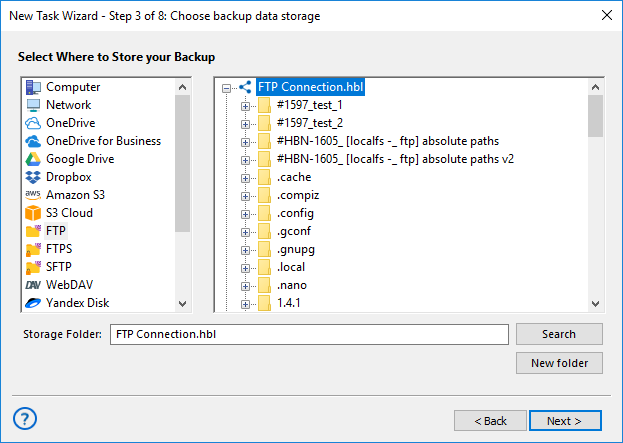
Cloud and Remote Storage: use supported cloud services, Amazon S3 and S3-compatible storage, FTP, SFTP, FTPS or other remote destinations.
Back Up JustHost Email Along with Website Data
An older JustHost account may contain not only a website but also mailboxes connected with the domain. If those mailboxes remain accessible through IMAP, their messages can be protected separately from website files and databases.
Copy Mail Directly from the Server
Handy Backup uses its E-mail plug-in to connect to compatible IMAP servers. Mailbox folders and messages can be copied without first exporting them through a desktop email client.
Keep a Separate Mail Archive
Store email copies on local, network or supported remote storage. This provides an additional archive if messages are deleted, an old mailbox is closed or email hosting changes later.
Note: IMAP backup requires valid server access. Mailbox connection settings should be taken from the current email configuration available for the account after the JustHost-to-Bluehost transition.
How to Back Up an Old JustHost Website with Handy Backup
-
Check your current hosting access. Sign in through the current Bluehost account interface and identify the connection information available for your existing website.
-
Create a backup task. Launch Handy Backup and start a new Backup task.
-
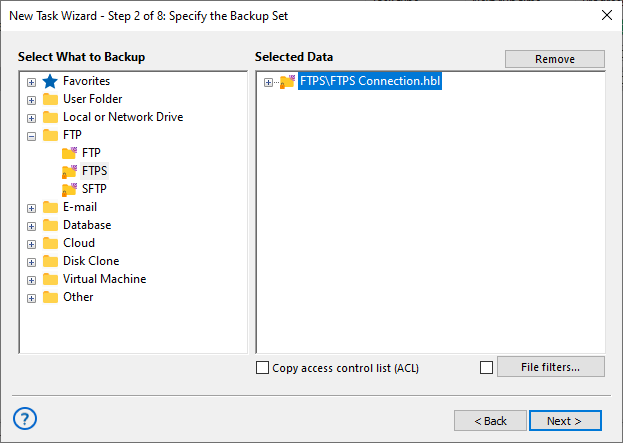
Configure website access. Select FTP, SFTP, or FTPS according to the protocol enabled for the account and enter the server connection settings.
-
Select the website files. Include the directories and files required to restore the site, including configuration and uploaded-content folders where applicable.
-
Include the database. Use direct database access where available, or add an exported database dump to the website backup.
- Choose independent storage. Select a local drive, NAS, network folder, remote server or supported cloud destination.
-
Configure backup settings. Select the required schedule, backup method, versioning, compression and encryption options.
-
Run the backup. Start the task immediately or allow Handy Backup to perform future backups automatically according to the schedule.
Recommended Solution for Complete JustHost Data Backup
Handy Backup Small Business is suitable when the backup needs to include both website files and database content. It combines the file and email capabilities of the lower editions with database backup and the complete set of Handy Backup plug-ins.
This makes it possible to protect the main components of an existing hosting account in one application and send backup copies to independent local, network, remote or cloud storage.
Recommended Solution
Lifetime license

Handy Backup Small Business
Handy Backup helps you create an independent backup of your JustHost account after the move to Bluehost. You can automatically protect website files and other accessible data, then store backup copies on local drives, NAS, remote servers, or supported cloud storage.
Continue Protecting Websites Beyond JustHost
Not Tied to the Old Hosting Brand
Handy Backup does not depend on a dedicated JustHost integration. The same backup approach can be used after a website is moved to another hosting provider, provided the new server offers a supported connection.
Keep Separate Tasks for Each Site
Create individual backup tasks for old JustHost websites, current Bluehost sites or websites hosted elsewhere. Each task can have its own connection, storage destination, schedule and recovery history.
FAQ about JustHost and Bluehost Backup
Has JustHost moved to Bluehost?
Just Host and Bluehost are now one, and existing JustHost customers are directed to Bluehost for account access. Bluehost states that the existing hosting server and content do not move as part of this transition, so the change should not be confused with an automatic migration of every website to a different server.
Can I still back up an old JustHost website?
Yes. An old JustHost website can still be backed up when you have access to its hosted data. Handy Backup can copy website files through FTP, SFTP, or FTPS and can protect database content separately through a supported database connection or an exported database dump.
Can I back up my JustHost account after the Bluehost transition?
Yes. The transition does not prevent you from making your own backup copies. Bluehost also currently identifies JustHost as a cPanel hosting platform capable of producing a full backup. Handy Backup can be used alongside this capability to create scheduled copies of selected website, database and email data on independent storage.
Do I need to migrate my JustHost website to Bluehost before backing it up?
No. Bluehost states that existing JustHost hosting servers and content do not move as part of the account transition. You can back up the data at its current location as long as the required file, database or email access remains available.
Can I back up JustHost email after moving to the Bluehost account interface?
Yes, if the mailbox remains accessible through IMAP. Handy Backup can connect directly to a compatible IMAP server, copy mailbox folders and messages, and store them separately from the active mail account.
Does a full cPanel backup replace an independent website backup?
They serve different purposes. A full cPanel backup is useful for preserving or transferring an account, while an independent backup task can run regularly and keep selected website data on storage outside the hosting environment. Using both can provide additional recovery options.
Where should I store a backup of an old JustHost account?
For greater separation, keep at least one backup copy outside the production hosting account. Handy Backup supports local and external drives, NAS and network storage, FTP/SFTP/FTPS servers, Amazon S3 and S3-compatible services, and other supported cloud destinations.
Does this page refer to JustHost.ru?
No. This page refers to the former JustHost.com hosting brand whose existing customers are now directed to Bluehost. JustHost.ru is a separate hosting provider and is not the subject of this guide.