Backup Solutions for Educational Institutions
Handy Backup provides flexible data backup for education, from individual school computers to databases, servers, research data, email, and multi-computer university networks. Whether you need education data backup for a school office, a college department, or a university network, Handy Backup lets you build separate backup and recovery workflows for different data sources and infrastructure.




What Education Data Should Be Backed Up?
Schools, colleges, and universities work with very different types of information, from student records and administrative documents to research databases and shared network files. A reliable data backup for education strategy should cover each important workload separately and assign an appropriate schedule, storage destination, and retention policy.

Student and Administrative Records
Back up documents, spreadsheets, enrollment records, academic files, financial information, policies, reports, and other data used by school or university administration.

Databases and Information Systems
Create scheduled copies of supported MySQL, MariaDB, PostgreSQL, Microsoft SQL Server, Oracle, and other databases used for student information, finance, research, websites, and internal applications.

Research and Academic Data
Include research datasets, departmental files, teaching materials, project documents, laboratory exports, multimedia resources, and other academic information available through supported file or data sources.

Workstations, Servers, and Email
Protect staff computers, shared folders, Windows systems, servers, and supported email data. Different backup tasks can be created for individual departments, users, or infrastructure components.
Data Backup for Schools, Colleges, and Universities
Educational environments range from a few administrative computers to campus networks with databases, servers, shared storage, research workstations, and multiple departments. Handy Backup allows an institution to build its backup configuration around the infrastructure it actually uses rather than applying one workflow to every system.
For a small school backup tasks can run directly on a Windows computer. Larger educational organizations can use centralized network backup to manage tasks across multiple endpoints.

Schools and Small Offices
Back up files, folders, email, and other supported data on administrative or staff computers with automatic schedules and separate storage destinations.

Colleges and Higher Education
Combine file backup with databases, servers, virtual machines, research data, and departmental storage when a more complex higher education backup environment is involved.

Universities, Campus Networks
Use centralized management for data backup for universities with multiple computers, servers, or departments connected across an institutional network.
Backup and Recovery Software for Education
Handy Backup provides the core functions needed to automate recurring education data backups and maintain several recovery points. Each task can have its own source, destination, schedule, backup method, and additional options.

Automatic Scheduling
Run backup tasks daily, weekly, monthly, at selected intervals, or according to other available scheduling conditions.

Version Retention
Keep several backup versions instead of replacing the previous copy, giving administrators additional recovery points for older data.

Encryption Options
Use AES-128 or AES-256 encryption for backup archives when the institution's policy requires encrypted copies of sensitive information.

Logs and Notifications
Review task logs and use email notifications to identify failed or incomplete backup jobs without checking every task manually.
How an Education Backup Task Is Created
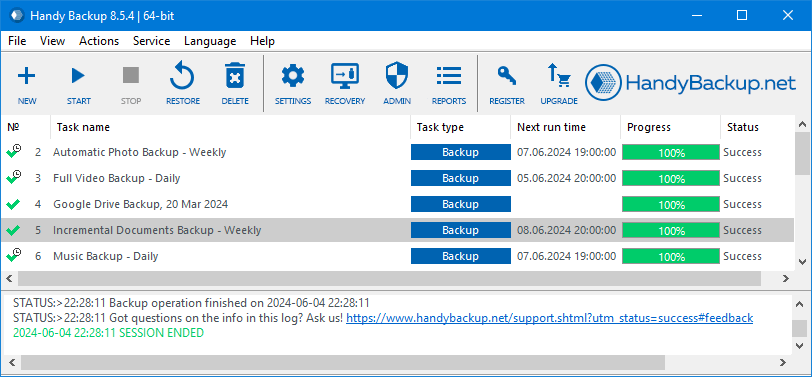
Handy Backup uses a step-by-step task wizard. Administrators select what should be backed up, choose a destination, configure backup options, and define a schedule. Separate tasks can be created for student records, shared folders, research data, databases, email, and other workloads.
Backup Storage Options for Schools and Universities
Educational institutions often need more than one backup destination. Fast local recovery, a separate off-site copy, and longer-term retention solve different problems, so the same school or university may use several storage types within one backup strategy.

Fast Local Recovery
External drives, NAS devices, and network storage can provide quick access to recent backup copies when a workstation, file server, or departmental system needs to be restored.
Separate Off-Site Copies
FTP, SFTP, FTPS, WebDAV, remote network storage, or another managed location can keep a backup copy outside the source system or local department. This reduces dependence on a single device or site.

Cloud and Long-Term Storage
Amazon S3, S3-compatible storage, Google Drive, OneDrive, Dropbox, and other supported services can be used for off-site copies or longer retention when they fit the institution's storage and data-handling requirements.
Combine Destinations Instead of Choosing Only One
A university database, for example, can be copied to nearby network storage for faster recovery and also to a separate remote or cloud destination for off-site retention. Research files, administrative records, and staff computers can follow different storage policies.
This approach also makes it easier to implement a 3-2-1 backup strategy without forcing every workload into the same repository.
Data Backup for Higher Education and Research
Universities frequently have more diverse infrastructure than a single school office. Different departments may operate their own databases, file servers, research workstations, shared storage, and remote systems.
A backup solution for universities therefore needs enough flexibility to create independent tasks for different workloads rather than forcing all institutional data into one backup job.
- Research data: files, exports, datasets, project directories, and other accessible research materials.
- Departmental databases: supported SQL databases used for research, administration, websites, or internal systems.
- Shared storage: faculty and departmental network folders, NAS devices, and file servers.
- Administrative systems: finance, enrollment, personnel, reports, and other institutional records available through supported data sources.
- Workstations and servers: file-level backups or image-based copies where supported by the selected edition.
Education Backup Against Data Loss and Ransomware
Automate
Use recurring schedules so important copies do not depend on someone remembering to run a manual backup.

Separate
Keep backup copies on storage separate from the original system. A 3-2-1 backup strategy provides a practical model for maintaining multiple copies.

Test Recovery
Periodically restore representative files or systems and review task logs so that a completed backup is also a usable recovery source.
Backup is only one part of ransomware resilience. Endpoint security, access control, patching, network segmentation, user training, and storage-level isolation or immutability should be addressed separately where required.
Educational Backup Requirements and Standards
Schools and universities can be subject to different privacy, security, and continuity requirements depending on their country, funding, activities, and the data they process.
In the United States, relevant frameworks can include FERPA and, for certain higher education institutions, the GLBA Safeguards Rule. NIST provides technical backup and recovery controls that can also be used as a security benchmark.
In Europe, GDPR Article 32 addresses availability, timely restoration, and regular testing of security measures. UK Department for Education guidance provides more specific recommendations for schools and colleges, including the 3-2-1 approach and restore testing.
Read more about Backup Requirements and Standards for Educational Institutions
Choosing Handy Backup for an Educational Institution
Files on One Computer
If the main requirement is automatic backup of files, folders, and other Standard-supported data from one Windows computer, Handy Backup Standard may be sufficient.
Databases and Business Applications
For supported databases, virtual machines, and additional business workloads on an individual system, consider Handy Backup Office Expert.

System and Disk Image Backup
When an educational workstation requires disk imaging or Windows system backup in addition to ordinary files, Handy Backup Professional adds image-based backup functionality.
Multiple Computers and Servers
For school networks, campus infrastructure, or multiple administrative computers, Handy Backup Server Network provides centralized task management through Network Agents.
Handy Backup Reviews from Educational Institutions
5.0 out of 5 based on 1 rated review. 2 customer testimonials.

“Over the years, I have utilized Handy-Backup to transfer data from a remote air quality monitoring station to on-site external back-up drives, to our central database via FTP, and to local, state, and federal FTP servers on an hourly basis. This data provides real-time air quality information to the residents of our community, state, and nation to better protect their health and inform decision-makers about current conditions. I have promoted Handy Backup to many of my colleagues and across our industry. The USEPA has taken notice of your product because of my highlighting its utility to our programs. I have always been impressed with its unfailing devotion to getting data to the right place on time for years on end.”
Ohio University

“Handy Backup is an incredibly powerful and affordable way for me to make sure all my critical information is backed up. It allows me the flexibility to backup and restore my data where and when I want it without relying on our IT department.”
Wilkes Community College
Recommended Solution
Lifetime license
Handy Backup Small Business
The Small Business solution from Handy Backup is ideal for educational institutions looking to streamline their backup processes. With user-friendly interfaces and robust features, it ensures reliable backups, encryption protocols, and automated scheduling, allowing educational institutions to focus on their core missions without worrying about data security. Download a 30-day trial version today to experience its benefits firsthand.
Why Use Handy Backup for Education Data Backup?
A school or university does not always need a large enterprise backup platform. The appropriate solution depends on the number of computers, data types, infrastructure, and level of centralized administration required.
Handy Backup uses a perpetual license model and allows institutions to select an edition according to their current backup environment.
- Flexible deployment: from a single administrative PC to centralized backup across multiple computers.
- Different workloads: files, folders, supported databases, email, disk images, virtual machines, and network data depending on edition.
- Multiple destinations: local, external, network, remote, cloud, and S3-compatible storage.
- Automatic operation: scheduling, versioning, logs, notifications, and pre- or post-task actions.
- Direct control: institutions choose where backup data is stored and how individual tasks are configured.
- Native Backup Format: Handy Backup can store files in their original format, so administrators can browse backup data directly through Windows File Explorer and restore a single file without running a full restore operation. For email backups, individual messages can also be accessed separately when they are stored as standard EML files.
FAQ About Data Backup for Education
What is education data backup?
Education data backup is the process of creating recoverable copies of information used by schools, colleges, universities, and research institutions. This may include student and administrative records, databases, research data, shared files, email, workstations, and servers.
What data should schools and universities back up?
Important backup sources can include student records, administrative documents, databases, financial information, research datasets, teaching materials, shared folders, faculty files, email, websites, workstations, and servers. The exact scope should follow the institution's operational and retention requirements.
Can Handy Backup be used for data backup for universities?
Yes. Handy Backup can be used for files, supported databases, email, servers, disk images, virtual machines, and network computers depending on the selected edition. Server Network is intended for environments where multiple computers need centralized backup administration.
Can education backups be stored off-site or in the cloud?
Yes. Supported destinations include external drives, network folders, NAS, FTP, SFTP, FTPS, WebDAV, Amazon S3, S3-compatible storage, Google Drive, OneDrive, Dropbox, and other available services. Institutions can combine local and remote destinations in separate backup tasks.
How often should educational data be backed up?
There is no single schedule suitable for every educational system. Backup frequency should depend on how often the information changes and how much recent data the institution can afford to lose. Frequently updated databases may require shorter intervals than archived documents or teaching materials.
Does backup software make an educational institution FERPA or GDPR compliant?
No. Backup software can provide technical capabilities such as scheduling, encryption, storage, versioning, logging, and recovery, but compliance also depends on policies, access controls, retention rules, contracts, risk assessments, restore testing, and other organizational measures. See our backup requirements and standards for educational institutions for more information.
Which Handy Backup edition is suitable for a school or university?
For file backup on one Windows computer, Standard may be sufficient. Professional adds disk and system imaging. Office Expert supports additional business workloads such as databases and virtual machines. For multiple computers or servers that require centralized administration, Server Network is the appropriate network edition.
Ensure your educational institution's data is protected with our specialized backup solution.
Try it free for 30 days and experience seamless, reliable solution tailored for educational institution data backup.
 Download Trial