HIPAA Compliant Data Backup
HIPAA compliant backup software helps healthcare organizations create and maintain recoverable copies of electronic protected health information (ePHI) as part of a documented backup and contingency process. Handy Backup provides scheduled backup, encryption, versioning, task logging, multiple storage options, and data recovery tools for healthcare IT environments.
The software can be used to back up files, medical documents, databases, Windows systems, and other data containing ePHI. Organizations remain in control of where backup copies are stored, including local disks, NAS devices, remote servers, private infrastructure, and cloud storage.
 Download Trial
Important: HIPAA compliance is not established by installing backup software alone. It also depends on risk analysis, access policies, storage configuration, administrative and physical safeguards, recovery procedures, documentation, and how the organization uses and manages the software.





Why HIPAA Backup Requirements Matter
The HIPAA Security Rule requires covered entities and business associates to maintain the confidentiality, integrity, and availability of ePHI. Backup and recovery procedures are part of the contingency planning needed to keep important healthcare information retrievable after system failures, incidents, or other disruptions.

Confidentiality
Healthcare information should remain accessible only to authorized users and systems. Backup planning should account for storage access, archive encryption, credentials, and the systems used to handle ePHI.

Integrity
Organizations need procedures that reduce the risk of improper alteration or destruction of ePHI. Maintaining recoverable backup versions provides additional recovery points when source data is changed, damaged, or deleted.

Availability
Authorized personnel must be able to access required ePHI when needed. Scheduled backups, separate storage, and tested recovery procedures help organizations prepare for hardware failures, outages, and other disruptive events.
How Handy Backup Supports HIPAA Backup Requirements
A HIPAA Data Backup Plan is part of the broader Contingency Plan required under 45 CFR §164.308(a)(7). Handy Backup provides technical capabilities that can be incorporated into this process, from automatic backup creation to storage separation, logging, encryption, version management, and recovery.
| HIPAA Area | Backup Requirement | Handy Backup Capability |
|---|---|---|
| Data Backup Plan | Create and maintain retrievable copies of ePHI. | Scheduled backup tasks, full and partial backups, multiple versions, and configurable storage destinations. |
| Disaster Recovery Plan | Establish procedures for restoring data after loss or disruption. | Restore tasks, previous backup versions, file-level recovery, database restoration, and Windows disk image recovery where supported. |
| Emergency Mode Operations | Plan how critical operations and access to ePHI can continue during an emergency. | Backup copies can be stored separately from production systems on local, network, remote, or selected cloud storage. |
| Access Control | Limit access to information systems containing ePHI to authorized persons or software. | Backup storage can remain within an organization's controlled environment, while encrypted archives can require a user-defined password. |
| Audit Controls | Record and examine relevant activity in systems containing or using ePHI. | Task logs record backup activity and results, while email notifications can report completed operations and errors. |
| Transmission Security | Apply appropriate safeguards when ePHI is transmitted over electronic networks. | Supported remote destinations include secure transfer methods such as SFTP and FTPS, as well as cloud services using their supported secure connections. |
| Encryption | Evaluate encryption as an appropriate safeguard according to organizational risk analysis. | Backup archives can use AES-128, AES-256, or Blowfish encryption with a user-defined password. |
Note: The HIPAA Security Rule distinguishes between required and addressable implementation specifications. Encryption is currently an addressable specification, meaning organizations evaluate its use through risk analysis and document the safeguards they implement.
HIPAA Compliant Backup Solutions for Healthcare Data
Healthcare environments rarely contain only one type of information. HIPAA compliant backup solutions therefore need to account for the actual systems and files where ePHI is created, processed, and retained. Handy Backup can combine several supported data sources within one backup environment.

Files and Medical Documents
Back up PDFs, office documents, exported reports, scanned records, application files, and other file-based healthcare information stored on Windows systems.

Medical Databases
Use dedicated or generic database plug-ins for supported systems including MS SQL Server, PostgreSQL, MySQL/MariaDB, Oracle, and ODBC-compatible databases.

EHR and EMR Data
Back up accessible files and supported databases used by electronic health record and electronic medical record applications according to the architecture of the particular system.

PACS and DICOM Files
Include medical images and DICOM files stored in accessible folders, network resources, or other repositories supported by the backup environment.

Windows Systems
Create backups of Windows files, application data, or complete disk images when recovery planning needs to include the workstation or server environment itself.

Email Records
Back up supported IMAP mailboxes and Outlook data when email forms part of a healthcare workflow or contains records that must be retained according to organizational policy.
Learn more about medical data backup, including healthcare databases, files, and other clinical data sources.
Keep Healthcare Backups on Storage You Control
Handy Backup does not require healthcare organizations to keep backup copies in a proprietary Handy Backup cloud. Administrators select the destination that matches their infrastructure, recovery objectives, and compliance policies.
This makes it possible to keep sensitive healthcare backups on organization-controlled local or network storage, maintain an offsite copy, or use an approved third-party service where contractual and technical requirements are satisfied.

Local, NAS and Private Storage
Use internal disks, external HDD or SSD storage, network folders, NAS devices, and other infrastructure managed by your organization.

Remote and Cloud Storage
Use FTP, SFTP, FTPS, WebDAV, Amazon S3, S3-compatible storage, and other supported services when they meet your organization's technical and contractual requirements.
Third-party cloud storage and HIPAA: Support for a cloud service does not by itself make that service or configuration HIPAA compliant. When ePHI is stored with a third-party provider, the healthcare organization should verify the provider's HIPAA terms, applicable BAA, account configuration, access controls, encryption, and other required safeguards.
Build a Backup Process Around Your Healthcare Environment
Handy Backup can be used as part of a healthcare contingency process without forcing different types of data into a single storage service.

Automate backup: run tasks daily, weekly, monthly, at custom intervals, or according to supported system events.
Maintain recovery points: retain multiple backup versions instead of relying on only the latest copy.
Separate copies: combine local, network, remote, or approved cloud destinations according to your backup policy.
Encrypted Backup Archives
Configure AES-128, AES-256, or Blowfish archive encryption when backup data requires encryption at rest.

Logs and Reporting
Review backup task results and use email notifications to identify failed or completed operations as part of routine backup monitoring.

Recovery Procedures
Restore files, databases, or supported system data from existing copies and include periodic recovery testing in the organization's contingency procedures.
Manage and Monitor Healthcare Backup Tasks
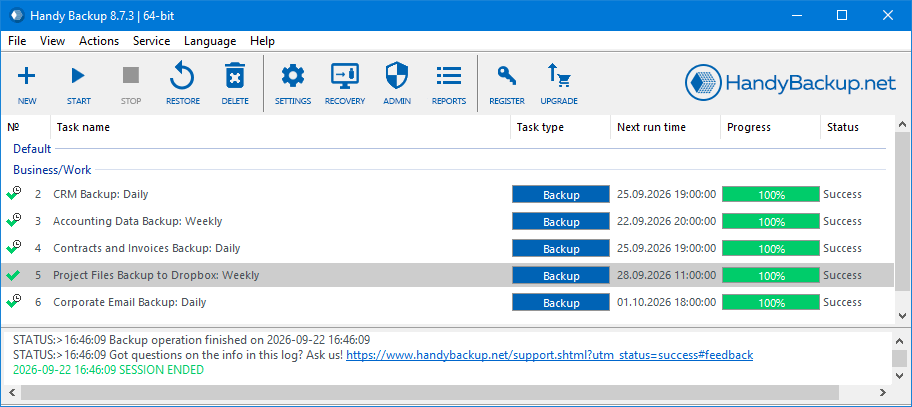
Healthcare backup policies need to work in daily operations, not only on paper. Handy Backup provides one interface for creating tasks, checking schedules, reviewing results, and organizing backups for different data sources and destinations.
Scheduled Backup Tasks
Create separate tasks for different healthcare systems and run them automatically according to the required recovery objectives. A database, document folder, workstation, or server can have its own schedule, destination, encryption settings, and retention configuration.

Backup Logs and Notifications
Use task logs to review backup execution and identify errors. Email notifications can provide additional operational visibility without requiring an administrator to keep the application open continuously.
Multiple Recovery Points
Versioning and incremental or differential backup methods make it possible to retain earlier copies instead of continuously replacing the previous backup with one current state.
What Is a HIPAA Data Backup Plan?
A HIPAA Data Backup Plan is a required implementation specification within the Contingency Plan standard at 45 CFR §164.308(a)(7). It establishes procedures for creating and maintaining retrievable copies of electronic protected health information. According to the U.S. Department of Health and Human Services (HHS), contingency planning includes procedures for backing up ePHI, restoring lost data, and continuing critical operations during an emergency.
Backup is only one component of contingency planning. Organizations also need disaster recovery and emergency mode operation procedures, while testing, revision, and analysis of application and data criticality should be addressed as required by the Security Rule.
A Practical Backup Plan Should Define
- which systems, files, databases, and other ePHI must be backed up;
- how frequently copies need to be created;
- which backup methods and retention periods are used;
- where primary and offsite copies are stored;
- who is authorized to access backup data;
- when encryption is applied and how credentials or keys are managed;
- how backup failures are reviewed and handled.
A Recovery Plan Should Define
- which systems and datasets have the highest recovery priority;
- how backup data is accessed during an incident;
- how files, databases, or systems are restored;
- who is responsible for initiating recovery;
- how restore procedures are tested;
- how recovery results are documented;
- how procedures are revised when infrastructure changes.
Backup Encryption, Logging and Recovery
AES Encryption
Encrypt backup archives with AES-128 or AES-256 when encryption is part of the organization's safeguards for stored ePHI.

Task Logging
Maintain operational records of backup task execution and review errors as part of regular monitoring and documented backup procedures.
Backup Versions
Retain previous states of backed-up data to provide additional recovery points when deletion, corruption, or an unwanted modification is discovered later.

Restore Testing
Periodically test restores to verify that healthcare data remains recoverable and recovery procedures work as expected, following HHS backup and recovery guidance.
Using the 3-2-1 Backup Rule for Healthcare Data
The 3-2-1 backup rule is not a specific HIPAA requirement, but it is a practical way to improve resilience and reduce dependence on a single copy or storage location.
A healthcare organization can use Handy Backup to maintain several copies of important data across different storage types, including an offsite destination, while defining schedules and retention according to its own risk analysis and recovery objectives.
3 Copies
Maintain production data together with additional backup copies needed by your recovery strategy.
2 Storage Types
Avoid depending on only one device or storage technology for every recoverable copy.
1 Offsite Copy
Keep at least one copy separated from the primary environment to improve recovery after a local incident.
HIPAA Compliance Is More Than Backup Software
No HIPAA compliant backup software can make an organization compliant by itself. The HIPAA Security Rule covers administrative, physical, and technical safeguards, and backup is only one part of that framework.
Organizations should combine backup technology with risk analysis, workforce procedures, access management, incident response, physical safeguards, documentation, business associate arrangements where applicable, and regularly reviewed contingency procedures.

Technical Safeguards
Backup technology can support areas such as recoverability, controlled storage, encryption, logging, and secure data transmission, but these capabilities must be configured according to the organization's environment and policies.

Policies and Procedures
The organization remains responsible for determining which ePHI is backed up, who can access it, how long copies are retained, where they are stored, and how recovery procedures are tested and documented.
Business Associate Agreements and Third-Party Services
Handy Backup Deployment
Handy Backup is installed in the customer's Windows environment and can save backup data to storage selected by the organization. This differs from a backup service that requires all healthcare data to be uploaded to a proprietary vendor-hosted repository.
For deployments where an organization determines that a Business Associate Agreement involving Handy Backup is required, contact [email protected] to discuss the applicable arrangement.
Cloud Storage Providers
If ePHI is sent to Amazon S3, an S3-compatible service, or another third-party cloud destination, that provider becomes part of the organization's backup architecture. Its HIPAA terms, BAA availability, selected service, account settings, encryption, and access policies should be evaluated separately.
Handy Backup's support for a storage destination describes technical compatibility and does not replace the organization's assessment of the third-party service.
How to Configure a HIPAA-Aligned Backup Task with Handy Backup
This example shows how Handy Backup can be configured as part of a HIPAA-aligned backup process. The exact schedule, storage, encryption, retention, access, and recovery requirements should follow the organization's documented policies and risk analysis.
-
Create a backup task. Open Handy Backup, start a new task, select Backup, and use Advanced Mode when additional backup settings are required.
-
Select the data. Choose the files, folders, database, disk image, email source, or other supported data that is included in your organization's backup plan.
-
Choose the destination. Select approved local, network, remote, or cloud storage. When ePHI is sent to a third-party provider, verify that the service and contractual arrangement meet your organization's requirements.
-
Configure recovery points. Select the required full, incremental, differential, or mixed backup method and configure version retention according to your recovery policy.
-
Configure encryption. Enable AES-128, AES-256, or another supported encryption option when encryption is required by your organization's safeguards, and manage the password according to internal access procedures.
-
Set the schedule. Configure automatic execution according to how frequently the source data changes and the organization's recovery objectives.
-
Run and monitor the task. Start the initial backup and review task logs or configured email notifications to confirm that scheduled operations complete as expected.
-
Test recovery. Periodically restore representative data according to your contingency procedures and document the result so the organization can confirm that required information is recoverable.
It is easy to configure and set up a new job. We use Handy Backup daily to backup critical equipment. We have not found any Cons with Handy Backup.
Todd, IT Network Administrator, Medical Devices, United States
Recommended Solution
Lifetime license

Handy Backup Small Business
Download Handy Backup Small Business Solution, a software designed to comply with HIPAA backup regulations. Protect your critical healthcare data with ease and confidence. Try it free for 30 days and experience the best in data protection and compliance.
Relevant HIPAA Security Rule Areas
Healthcare backup planning intersects with several areas of the HIPAA Security Rule. The following provisions are especially relevant when an organization defines how ePHI is copied, stored, monitored, transmitted, and recovered.
- 45 CFR §164.308(a)(7) — Contingency Plan
- §164.308(a)(7)(ii)(A) — Data Backup Plan
- §164.308(a)(7)(ii)(B) — Disaster Recovery Plan
- §164.308(a)(7)(ii)(C) — Emergency Mode Operation Plan
- 45 CFR §164.312(a) — Access Control
- 45 CFR §164.312(b) — Audit Controls
- 45 CFR §164.312(c) — Integrity
- 45 CFR §164.312(e) — Transmission Security
Current regulatory status: HHS has proposed updates to strengthen the HIPAA Security Rule, including broader encryption requirements and additional cybersecurity measures. Until a final rule changes the applicable requirements, organizations should distinguish the current Security Rule from proposed requirements when updating backup policies.